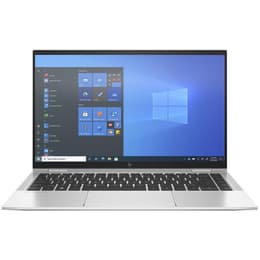


Dell Latitude 5400 14" Vs HP EliteBook X360 1040 G8 14"

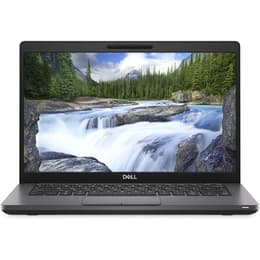
Dell Latitude 5400 14"
Starting at

Refurbished price:250.00

Versus €1,030.00 new

See options
HP EliteBook X360 1040 G8 14"
Starting at

Refurbished price:460.00

Versus €1,382.49 new

See options

Ratings

The Dell Latitude 5400 14 and the HP EliteBook x360 1040 G8 14 are both 14-inch business-oriented laptops designed for productivity and reliability. The Latitude 5400, released in 2019, offers a traditional clamshell experience with robust upgradeability, while the EliteBook x360 1040 G8, launched in 2021, distinguishes itself with a versatile 2-in-1 convertible design, a more advanced display, and enhanced audio-visual features. Both models operate on the Windows operating system, catering to professional and academic users. [24]

Scores

Durability

When considering the long-term usability of these devices, several factors contribute to their expected practical lifespan and software support.

  • Release Timeline and Age: The Dell Latitude 5400 was introduced in 2019, making it an older model compared to the HP EliteBook x360 1040 G8, which debuted in 2021. [16, 17, 24] This two-year difference impacts the duration of future software updates and hardware relevance.
  • OS Support Duration: Both laptops primarily run Windows. The Latitude 5400, being an older model, is compatible with Windows 11, extending its supported lifespan beyond the Windows 10 end-of-life in October 2025. [1, 17] The EliteBook x360 1040 G8, released later, comes with Windows 10 Pro and includes a license for Windows 11 Pro, ensuring a longer period of official operating system support. [2, 7, 9, 19, 24]
  • Repairability and Upgradeability: The Dell Latitude 5400 offers notable upgradeability with two accessible RAM slots and a removable M.2 SSD, alongside an optional 2.5-inch drive bay, allowing users to extend its life through component upgrades. [1, 14, 22, 24, 27] In contrast, the HP EliteBook x360 1040 G8 features soldered RAM, which limits future memory upgrades, though its M.2 SSD is typically user-replaceable. [18, 20, 25, 28]

Year of Release

2017

2020

Last Os Compatibility

Yes

Yes

OS

Windows 11

Windows 11

Performance

The performance capabilities of these laptops are influenced by their internal components, affecting how smoothly they handle demanding tasks and multitasking.

  • Processor Capabilities: The Dell Latitude 5400 is equipped with 8th or 9th Generation Intel Core processors, which provide reliable performance for everyday business applications and general productivity. [1, 16] The HP EliteBook x360 1040 G8 features more recent 11th Generation Intel Core processors, offering improved efficiency and responsiveness for demanding applications, complex data processing, and smoother multitasking. [2, 5, 7, 9, 19, 20]
  • System Responsiveness and Multitasking: The Latitude 5400, with its configurable RAM up to 32GB or 64GB, can handle multiple applications simultaneously, providing a consistent experience for most users. [1] The EliteBook x360 1040 G8, often configured with up to 32GB of LPDDR4X RAM, delivers a fluid user experience, particularly noticeable in scenarios involving numerous browser tabs, virtual meetings, and creative software. [5, 9, 18, 20]
  • Storage Options: Both devices utilize fast NVMe PCIe M.2 SSDs for quick boot times and application loading. The Latitude 5400 also offers an optional 2.5-inch SATA drive bay for additional storage flexibility. [1]

Memory (GB)

16 GB

32 GB

Processor

Core i5 - Gen 8 (U)

Core i7-1185G7

Graphic card

Integrated Graphics

Integrated Graphics

Screen quality

The display is a primary interface for user interaction, and both laptops offer different strengths in this area.

  • Display Technology and Resolution: The Dell Latitude 5400 typically comes with a 14-inch Full HD (1920 x 1080) IPS display, providing clear visuals and good viewing angles for standard office work. [1, 8, 14] The HP EliteBook x360 1040 G8 also features a 14-inch Full HD (1920 x 1080) IPS touch display, but it stands out with its convertible design, allowing it to be used in various modes, including tablet mode. [2, 5, 12, 19]
  • Brightness and Clarity: The Latitude 5400's display generally offers brightness levels around 220-400 nits, suitable for indoor environments. [1, 6] The EliteBook x360 1040 G8 often provides brighter panels, typically around 400 nits, with optional 4K UHD HDR displays reaching up to 550 nits, enhancing visibility in varied lighting conditions. [2, 5, 7, 9, 18, 38]
  • Special Features: The EliteBook x360 1040 G8's display is protected by Corning Gorilla Glass 5 and can include HP Sure View Reflect, an integrated privacy screen that limits viewing angles for enhanced security. [2, 18, 19, 25, 38]

Resolution

1920 x 1080

1920 x 1080

Screen type

IPS

IPS

Camera

Audiovisual

For communication and media consumption, the audio-visual components play a significant role in the user experience.

  • Camera System: The Dell Latitude 5400 includes a standard webcam, with an optional IR camera for facial recognition and a physical privacy shutter for security. [4, 8, 24] The HP EliteBook x360 1040 G8 features a hybrid 720p HD IR camera with an integrated electronic privacy shutter (HP Sure Shutter), offering clear video calls and secure login. [5, 24]
  • Microphone Quality: The Latitude 5400 provides standard microphone performance suitable for typical conference calls. [24] The EliteBook x360 1040 G8 generally offers enhanced microphone quality, often with noise-cancellation features, which can improve clarity in virtual meetings.
  • Speaker Output: The Dell Latitude 5400 has stereo speakers that are generally described as adequate for a business laptop. [24] The HP EliteBook x360 1040 G8 typically features more refined audio systems, often tuned by Bang & Olufsen, providing a richer sound experience for media consumption and video conferencing.

Miscellaneous

Beyond the core components, several practical elements contribute to the overall usability and convenience of these laptops.

  • Connectivity Options: The Dell Latitude 5400 offers a comprehensive port selection including multiple USB 3.1 Gen 1 Type-A ports, one USB 3.1 Gen 2 Type-C port with optional Thunderbolt 3, HDMI 1.4, and an RJ-45 Ethernet port. [1, 4, 6, 17] The HP EliteBook x360 1040 G8 features more modern connectivity with two Thunderbolt 4 ports (which also support USB4 Type-C), two USB Type-A ports, and HDMI 2.0. [5, 18, 29] Both support Wi-Fi 6 and Bluetooth. [5, 7, 18, 29]
  • Security Features: Both laptops include enterprise-grade security features. The Latitude 5400 offers optional fingerprint readers and IR cameras. [8] The EliteBook x360 1040 G8 emphasizes security with features like a fingerprint reader, IR camera for Windows Hello, and HP Sure View Reflect privacy screen options. [2, 5, 25, 29, 31]
  • Design and Handling: The Latitude 5400 features a durable chassis, often incorporating carbon fiber, and is MIL-STD 810G tested for ruggedness, weighing around 1.48 kg. [4, 8, 24, 26] The EliteBook x360 1040 G8, with its sleek aluminum chassis and convertible design, starts at a lighter 1.32 kg and incorporates recycled materials in its construction. [2, 5, 24, 26] Its 360-degree hinge allows for flexible usage modes. [12, 19]

Weight

1590 g

1310 g

Screen size

14

14

User feedback for the Dell Latitude 5400 often praises its robust build quality, long battery life (especially with the larger battery options), and its comprehensive port selection, including an Ethernet port, which is valued in business environments. [6, 8, 14, 21, 23] Some users have noted that the base display options can be dim, and some reports mention occasional overheating or boot issues, though these can often be mitigated with troubleshooting. [6, 15, 21, 40]

The HP EliteBook x360 1040 G8 receives positive remarks for its premium design, versatile 2-in-1 functionality, and strong performance from its newer processors. Its advanced display options, including privacy features, are also frequently highlighted. [5, 18, 25, 38] A common point of consideration is the soldered RAM, which limits future memory upgrades, and some users might find the standard battery capacity to be average. [18, 20, 25]

Users prioritizing a traditional, highly upgradeable laptop for consistent office work and who value a wide array of legacy ports may find the Dell Latitude 5400 14 well-suited to their needs. Conversely, users who require a more modern, flexible device with a convertible touchscreen, enhanced display features, and stronger performance for demanding tasks will likely lean towards the HP EliteBook x360 1040 G8 14. Both devices offer reliable performance for their respective target users, and choosing a quality-assured refurbished option can provide an eco-friendly alternative for either model. [24]
See all articles

Our recent comparisons