

Compare models

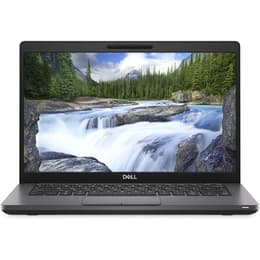
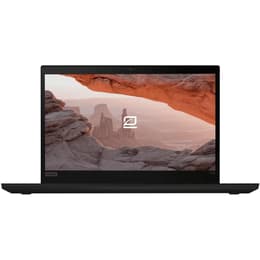
Dell Latitude 5400 14" Vs Lenovo ThinkPad T490 14"

  • 1-year minimum warranty
  • Free delivery on all orders
  • Free 30-day returns
Dell Latitude 5400 14"
Starting at

Refurbished price:€237.00

Versus €1,230.00 new

See options
Lenovo ThinkPad T490 14"
Starting at

Refurbished price:€300.00

Versus €700.00 new

See options

Differences at a glance

The Dell Latitude 5400 14" (2019) and the Lenovo ThinkPad T490 14" (2019) represent reliable business-class laptops designed for professionals, students, and everyday multitasking. Both machines offer a standard 14-inch form factor and run on Windows operating systems, providing stable software compatibility for productivity software and daily browsing. While they share similar commercial classifications, they differ in build philosophy, keyboard design, and port selection, giving each model a distinct character for daily work environments.

Available Models

Storage

Processor

Memory

Scores

Durability

When examining hardware longevity and physical resilience, both business laptops are built to withstand daily commuting and long-term office use. They offer different update paths and repair structures depending on their component layouts.

  • Software support timeline: Both models support current Windows operating systems, though overall longevity depends on the specific processor generation and driver availability provided by their respective manufacturers.
  • Repairability and maintenance: The Dell Latitude 5400 features a modular internal layout that simplifies component replacement, whereas the Lenovo ThinkPad T490 integrates some memory directly onto the system board alongside an available open slot.
  • Expected practical lifespan: Selecting a quality-assured refurbished option extends the usable lifecycle of these business laptops, offering a dependable computing solution for users needing stable daily performance.

Year of Release

2018

2019

Last Os Compatibility

Yes

Yes

OS

Windows 11

Windows 11

Performance

Under everyday workloads, both devices handle document editing, web research, and multitasking efficiently through their processing architecture and memory configurations.

  • Storage and multitasking capacity: Both laptops support solid-state drive upgrades and configurable random-access memory amounts, allowing users to switch between multiple browser tabs and office applications smoothly.
  • Battery behavior during daily use: Battery longevity varies based on component age and usage intensity, with both machines generally providing enough charge for standard mobile productivity tasks away from an outlet.
  • System responsiveness: Everyday applications open quickly and run reliably without noticeable lag, making both models well-suited for academic work and professional writing tasks.

Graphic card

Integrated Graphics

Integrated Graphics

Screen quality

The visual experience on both 14-inch laptops prioritizes functional clarity and reduced glare for prolonged document reading and spreadsheet management.

  • Display technology and resolution: Both models typically utilize standard high-definition or full high-definition panels with matte surface coatings to minimize reflections under bright indoor lighting.
  • Brightness and outdoor visibility: Panel brightness levels are adequate for indoor office environments and classrooms, though direct sunlight usage may require shaded positioning.
  • Viewing experience: Panel color accuracy and contrast ratios are optimized for text clarity and productivity applications rather than color-critical media production.

Resolution

1920 x 1080

1366 x 768

Screen type

IPS

IPS

Camera

Audiovisual

Multimedia capabilities on these business-focused laptops center on remote communication, audio clarity, and casual media consumption rather than content creation.

  • Webcam and video calling: Integrated webcams provide standard resolution suitable for routine video conferences and virtual meetings in normal lighting conditions.
  • Microphone and audio output: Built-in microphones capture speech clearly for voice calls, while internal stereo speakers deliver adequate sound levels for video playback and speech audio.
  • Media consumption experience: Audio-visual performance handles casual video streaming and online lectures comfortably without requiring external speakers for basic listening.

Miscellaneous

Practical design elements, physical dimensions, and connectivity options distinguish how each laptop integrates into a mobile working lifestyle.

  • Port selection and connectivity: Both devices include a comprehensive array of physical ports, such as traditional USB connections, video outputs, and network jacks, reducing the need for external adapters.
  • Dimensions and physical handling: Weighing around 1.5 kilograms with durable chassis construction, both laptops fit easily into backpacks for daily travel.
  • Input peripherals: The Lenovo ThinkPad T490 features a signature tactile keyboard with a central pointing stick, while the Dell Latitude 5400 offers a standard professional keyboard layout with a responsive trackpad.

Weight

1590 g

1460 g

Screen size

14

14

What the community thinks

User discussions and community feedback indicate that both the Dell Latitude 5400 and Lenovo ThinkPad T490 maintain strong reputations for structural durability and reliable daily operation. Common praise for the Dell model highlights its straightforward internal accessibility and dependable port variety, while ThinkPad users frequently emphasize the comfortable typing experience and sturdy hinge design. At the same time, users note that both laptops carry heavier chassis designs compared to ultra-slim consumer alternatives, reflecting their business-oriented engineering roots.

Users prioritizing an ergonomic typing experience and traditional business inputs may prefer the Lenovo ThinkPad T490, while users seeking straightforward hardware maintenance and flexible component access will find the Dell Latitude 5400 well-suited to their needs. Choosing an eco-friendly alternative through a quality-assured refurbished option provides a sustainable way to acquire either of these reliable machines. Ultimately, the decision depends on personal preference regarding keyboard feel and physical connectivity options rather than a major difference in core computing capability.

Our recent comparisons