

Dell Latitude 5400 14" Vs Dell Latitude 7420 14"

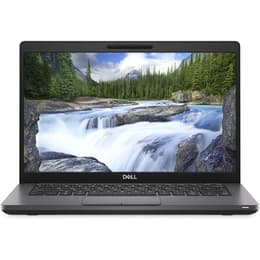
Dell Latitude 5400 14"
Starting at

Refurbished price:250.00

Versus €1,030.00 new

See options
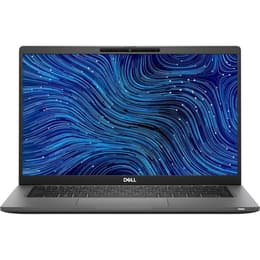
Dell Latitude 7420 14"
Starting at

Refurbished price:336.00

Versus €1,371.00 new

See options

Ratings

The Dell Latitude 5400 and Dell Latitude 7420 are business-oriented laptops designed for productivity and reliability. The Latitude 5400, released in 2019, offers a robust platform for everyday tasks, while the Latitude 7420, launched in 2021, brings updated internal components and refinements to the user experience. Both models run on the Windows operating system, providing a familiar environment for professional and academic use. The primary distinctions lie in their generational hardware, affecting performance, display options, and portability.

Scores

Durability

When considering the practical lifespan of these devices, several factors come into play, including their release timelines, operating system support, and ease of maintenance. The two-year difference in their release dates significantly impacts their long-term relevance.

  • Release Timeline: The Latitude 5400 was released in 2019, while the Latitude 7420 followed in 2021. This means the 7420 benefits from a more recent hardware generation, potentially extending its relevance for future software and performance demands. [2]
  • Software Longevity: Both laptops are compatible with Windows 11, which helps ensure continued software support for several years. The 5400, being an older model, will likely receive operating system updates for a shorter period compared to the 7420, which has a longer runway for official support. [2, 13]
  • Repairability and Upgradability: The Latitude 5400 is noted for its user-friendly design, allowing for relatively easy access to components like the battery, SSD, and RAM for upgrades or repairs. [2, 13, 24] The Latitude 7420 also offers accessible internal components for storage and battery replacement, though its RAM is soldered to the motherboard, limiting memory upgrade options. [2, 12, 19]

Year of Release

2017

2021

Last Os Compatibility

Yes

Yes

OS

Windows 11

Windows 11

Performance

The performance of a laptop is crucial for handling daily workloads, from basic document editing to more demanding applications and multitasking. The generational gap between these two models results in noticeable differences in processing power and system responsiveness.

  • Processor Capabilities: The Latitude 5400 is equipped with 8th generation Intel Core processors, which capably handle common business applications and multitasking. [2, 13] The Latitude 7420 features 11th generation Intel Core processors, offering enhanced speed and efficiency for more demanding tasks, smoother application loading, and improved responsiveness. [1, 8, 12]
  • Memory Configuration: The Latitude 5400 typically supports up to 32GB or 64GB of DDR4 RAM across two SODIMM slots, allowing for user upgrades. [13, 24] The Latitude 7420 comes with RAM soldered to the motherboard, with configurations up to 32GB LPDDR4x, which means memory cannot be upgraded after purchase. [9, 12, 19]
  • Storage Options: Both models offer fast NVMe PCIe M.2 SSD storage options, with the Latitude 5400 also having a 2.5-inch SATA drive option in some configurations. [13] The 7420 generally provides M.2 PCIe NVMe SSDs up to 1TB. [12]

Memory (GB)

16 GB

8 GB

Processor

Core i5 - Gen 8 (U)

Core i5-1145G7

Graphic card

Integrated Graphics

Integrated Graphics

Screen quality

The display quality significantly impacts the user experience, especially for tasks involving detailed work, presentations, or media consumption. Both laptops offer 14-inch displays, but with different underlying technologies and brightness levels.

  • Display Technology and Resolution: Both models commonly feature 14-inch Full HD (1920x1080) anti-glare displays. The Latitude 7420 often utilizes IPS-type WVA panels, providing wider viewing angles and better color reproduction. [6, 12]
  • Brightness Levels: The Latitude 5400's display typically offers around 220 nits of brightness, which some users find dim for bright environments. [5, 6, 13, 17] The Latitude 7420 provides options for 250 nits or a brighter 400 nits panel, enhancing visibility in varied lighting conditions. [9, 12, 19]
  • Touchscreen Availability: Both laptops offer touchscreen options, with the 7420 also having optional 4K resolution displays, though these are less common. [12, 22]

Resolution

1920 x 1080

1920 x 1080

Screen type

IPS

IPS

Camera

Audiovisual

For modern work and communication, the audio and visual capabilities of a laptop are increasingly important, particularly for virtual meetings and media consumption. There are notable differences in webcam quality and audio features between the two models.

  • Webcam Performance: The Latitude 5400 includes a standard webcam, with an optional IR camera for facial recognition. [2, 17] The Latitude 7420 often features an HD or Full HD (1080p) webcam, which delivers better detail and clarity for video recording compared to the 5400's standard offerings, though some users have found its quality to be merely adequate. [12, 20]
  • Microphone and Speakers: Both models feature integrated microphones suitable for calls. The Latitude 7420's dual speakers and microphone setup are generally considered functional for most applications, though not exceptional. [20]
  • Privacy Features: The Latitude 7420 often includes a physical privacy shutter for the webcam, a feature also available as an option on the 5400. [12, 17, 23]

Miscellaneous

Beyond core performance, practical elements like connectivity, physical design, and security features contribute significantly to the overall user experience and suitability for different environments.

  • Connectivity Options: The Latitude 5400 includes multiple USB 3.1 Gen 1 Type-A ports, a USB 3.1 Gen 2 Type-C port (with optional Thunderbolt 3), HDMI 1.4, and RJ-45 Ethernet. [13, 18] The Latitude 7420 features more modern connectivity with two Thunderbolt 4 ports (USB-C), one USB 3.2 Gen 1 Type-A port, HDMI 2.0, and supports Wi-Fi 6 and Bluetooth 5.1/5.2. [8, 12, 14, 20]
  • Portability and Build: The Latitude 5400 weighs approximately 1.48 kg. [3, 21] The Latitude 7420 is generally lighter, starting at around 1.22 kg for carbon fiber models, making it more portable. [12, 19, 23] Both offer robust build quality suitable for business use.
  • Security Features: Both laptops offer security features like fingerprint readers and optional IR cameras for facial recognition. The 7420 also includes a physical webcam shutter and optional SmartCard reader. [12, 17, 23]

Weight

1590 g

1500 g

Screen size

14

14

The Dell Latitude 5400 and 7420 cater to business users with distinct priorities. The Latitude 5400 is often praised for its robust build, user-friendly repairability, and the flexibility of upgradable RAM, making it a dependable workhorse for general productivity. Users frequently highlight its strong performance for everyday tasks and good battery life in many configurations. Some common criticisms include its less vibrant display and a design that is not as modern as newer models. [5, 16, 17, 22]

Conversely, the Latitude 7420 is generally lauded for its enhanced performance due to its newer generation processor, brighter display options, and more modern connectivity, including Thunderbolt 4. Its lighter design also appeals to users prioritizing portability. However, some users have reported concerns regarding occasional fan noise, potential overheating under certain workloads, and the inability to upgrade RAM due to it being soldered. [11, 15, 19, 20]

Users prioritizing a highly durable and easily serviceable laptop for general productivity tasks, where upgradable RAM and a wider array of legacy ports are important, may find the Latitude 5400 well-suited to their needs. Conversely, users who value cutting-edge performance, a superior visual experience, and a more portable design will likely lean towards the Latitude 7420. Both models offer a dependable computing experience, and choosing a quality-assured refurbished option for either can provide an eco-friendly alternative for individuals or organizations.
See all articles

Our recent comparisons