

Dell Latitude 5400 14" Vs Dell Latitude 7390 13"

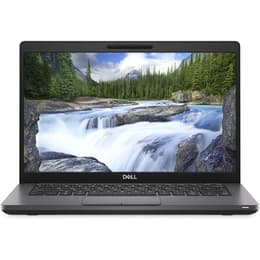
Dell Latitude 5400 14"
Starting at

Refurbished price:250.00

Versus €1,030.00 new

See options
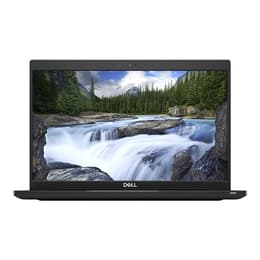
Dell Latitude 7390 13"
Starting at

Refurbished price:395.00

Versus €733.00 new

See options

The Dell Latitude 5400 14 and the Dell Latitude 7390 13 are business-oriented laptops designed for productivity and reliability. Released in 2019 and 2018 respectively, both models feature 8th generation Intel Core processors and run on the Windows operating system. The primary distinctions lie in their display sizes, overall portability, and some variations in display brightness and battery configurations.

Scores

Durability

When considering the longevity of these devices, their release timelines and the typical support cycles for business laptops are key factors.

  • Release Timeline: The Latitude 7390 was released in early 2018, making it slightly older than the Latitude 5400, which debuted in 2019. Both utilize 8th generation Intel processors, meaning their core architecture is from a similar era. [1, 4, 5, 8, 11, 13]
  • Software Longevity: Both laptops are compatible with Windows 10, and the Latitude 5400 is noted to be compatible with Windows 11, which could extend its supported lifespan for operating system updates. [28]
  • Durability Features: Both models are built with business-grade durability in mind, having undergone MIL-STD 810G testing for resistance against various environmental stresses like extreme temperatures, humidity, vibrations, and shock. The Latitude 5400 also incorporates post-industrial carbon fiber in its design. [3, 5, 9, 13, 28, 35]
  • Repairability: Dell Latitude laptops are generally designed with repairability in mind, often featuring easily accessible internal components for upgrades or servicing. The Latitude 5400's bottom plate is held by Phillips-head screws that remain attached, simplifying access. [7]

Year of Release

2017

2017

Last Os Compatibility

Yes

Yes

OS

Windows 11

Windows 11

Performance

Both the Latitude 5400 and 7390 offer solid performance for everyday business tasks, driven by similar processor generations.

  • Processor Capabilities: Equipped with 8th generation Intel Core i5 or i7 processors, both laptops handle demanding applications and multitasking smoothly. Users can expect responsive performance for office suites, web browsing with multiple tabs, and light content creation. [2, 3, 9, 11, 13, 28]
  • Storage Options: Both models typically feature fast NVMe PCIe M.2 SSDs, contributing to quick boot times and rapid application loading. The Latitude 5400 can be configured with up to 1TB SSD storage, while the 7390 commonly offers 256GB SSDs. [1, 3, 7, 9, 11, 28]
  • Battery Behavior: The Latitude 5400, especially with its larger 68Wh battery option, can deliver extended usage, with some tests showing over 13 hours of web browsing. The Latitude 7390, often equipped with a 60Wh battery, also provides substantial battery life, typically lasting 10-12 hours on a single charge, suitable for a full workday. [2, 7, 9, 12, 13, 14, 16, 20, 22, 35]
  • RAM Implications: Both laptops support DDR4 RAM, with configurations commonly ranging from 8GB to 16GB, and the Latitude 5400 supporting up to 32GB or even 64GB in some configurations across two SODIMM slots, allowing for efficient multitasking and handling of numerous open applications. [1, 7, 9, 11, 12, 28, 29]

Memory (GB)

16 GB

8 GB

Processor

Core i5 - Gen 8 (U)

Core i7 - Gen 8 (U)

Graphic card

Integrated Graphics

Integrated Graphics

Screen quality

The visual experience on these laptops differs primarily in screen size and brightness levels.

  • Display Technology and Resolution: Both the Latitude 5400 and 7390 commonly feature Full HD (1920x1080) IPS displays, providing clear visuals and wide viewing angles. Some base configurations of the 5400 might come with a lower HD (1366x768) resolution. [1, 4, 7, 11, 18, 28, 35]
  • Brightness Levels: The Latitude 7390 generally offers a brighter display, often rated around 286 to 307 nits, with some sources mentioning up to 300 nits. The Latitude 5400's Full HD panels typically have a brightness of around 220 nits, which some users might find dim in brightly lit environments. [1, 3, 4, 7, 19, 28, 38]
  • Screen Size and Viewing Experience: The Latitude 5400 features a 14-inch display, offering slightly more screen real estate for productivity. The Latitude 7390 has a more compact 13.3-inch display, contributing to its smaller footprint. Both typically come with anti-glare finishes to reduce reflections. [1, 3, 4, 5, 7, 11, 18, 23, 28, 35]
  • Refresh Rate: Both models typically feature a standard 60Hz refresh rate, suitable for general productivity tasks and media consumption. [8, 18, 38]

Resolution

1920 x 1080

1920 x 1080

Screen type

IPS

IPS

Camera

Audiovisual

For communication and media, both laptops include standard features, with some variations in audio output.

  • Camera System: Both the Latitude 5400 and 7390 are equipped with 720p webcams, suitable for video conferencing and online meetings. The 5400 often includes a physical privacy shutter, and both can feature optional IR cameras for Windows Hello facial recognition. [2, 3, 5, 23, 33, 34, 39, 40]
  • Microphone Quality: Both models integrate dual-array microphones, designed to capture clear audio for calls and recordings, aiming to reduce background noise. [3, 23, 41]
  • Speaker Output: The Latitude 5400 features speakers tuned with Waves MaxxAudio Pro, providing clear audio for media consumption and video calls. The Latitude 7390's speakers have been noted by some users as being adequate but not exceptional, with some reviews mentioning them as "shoddy." [3, 4]
  • Video Recording Quality: The 720p webcams on both devices offer standard video recording capabilities at 30 frames per second, sufficient for typical online interactions. [33, 34]

Miscellaneous

Beyond core performance, several practical elements differentiate these two business laptops.

  • Connectivity Options: Both laptops offer robust connectivity, including Wi-Fi (802.11ac or Wi-Fi 5), Bluetooth, and Gigabit Ethernet (RJ-45). The Latitude 5400 also has an optional LTE SIM card slot. [2, 7, 11, 17, 24, 28, 35, 41]
  • Port Types: Both feature a good selection of ports. The Latitude 5400 includes multiple USB 3.1 Gen 1 Type-A ports, a USB 3.1 Gen 2 Type-C port with Power Delivery and DisplayPort support (optional Thunderbolt 3), and HDMI 1.4. The Latitude 7390 also offers Thunderbolt 3, HDMI, USB 3.0/3.1 Type-A, and a Smart Card reader. [2, 3, 5, 7, 11, 17, 21, 26, 27, 28, 39, 41]
  • Security Features: Both models include security features like fingerprint readers and optional IR cameras for Windows Hello facial recognition. They also support TPM 2.0 for hardware-based security. [2, 3, 5, 9, 13, 23, 28, 31]
  • Weight and Dimensions: The Latitude 7390 is the more compact and lighter option, weighing between 1.17 kg and 1.3 kg, with a 13.3-inch display. The Latitude 5400 is slightly heavier at around 1.48 kg due to its larger 14-inch display. [1, 5, 8, 9, 11, 13, 24, 31, 35]
  • Build Materials: The Latitude 7390 features a magnesium alloy body, while the 5400 incorporates post-industrial carbon fiber, both contributing to their business-grade durability. [1, 3, 27, 28, 35]

Weight

1590 g

1500 g

Screen size

14

13

User feedback for both the Dell Latitude 5400 14 and the Dell Latitude 7390 13 generally highlights their reliability and suitability for professional use. The Latitude 5400 is often praised for its strong performance and exceptional battery life, particularly with the larger battery configurations, making it a dependable workhorse. [2, 9, 16] However, some users have noted that its display can be dim in certain configurations and its integrated graphics are not suited for demanding gaming. [2, 4, 15, 23, 36]

The Latitude 7390 receives commendation for its vivid display, robust performance, and long-lasting battery. [3, 13, 14] Common criticisms include a somewhat bland design, a keyboard that some find to have low travel, and occasional fan noise. [3, 13, 14]

For users prioritizing a slightly larger screen and potentially longer battery life for extended work sessions, the Dell Latitude 5400 14 could be a more suitable choice. Its robust build and optional discrete graphics also cater to those needing a bit more visual processing power. Conversely, individuals seeking a more compact and lighter device with a brighter display for frequent travel or on-the-go use might find the Dell Latitude 7390 13 to be a better fit. Both models offer solid performance for general business and academic tasks. Considering a quality-assured refurbished option for either model can be an eco-friendly alternative.

See all articles

Our recent comparisons