
HP EliteBook X360 1040 G8 14" Vs Microsoft Surface Pro 7 12"

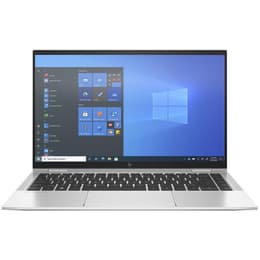
HP EliteBook X360 1040 G8 14"
Starting at

Refurbished price:460.00

Versus €1,382.49 new

See options
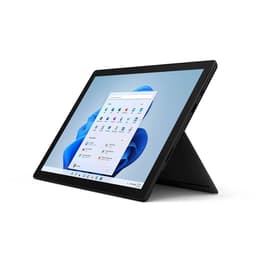
Microsoft Surface Pro 7 12"
Starting at

Refurbished price:334.00

Versus €1,399.00 new

See options

Ratings

The HP EliteBook x360 1040 G8, released in 2021, and the Microsoft Surface Pro 7, launched in 2019, are both versatile 2-in-1 devices designed for productivity and flexibility. While the EliteBook x360 1040 G8 functions primarily as a convertible laptop with a larger screen, the Surface Pro 7 emphasizes a tablet-first design with a detachable keyboard. Both devices operate on the Windows ecosystem, offering a familiar software experience, but cater to slightly different user preferences through their distinct form factors and hardware generations.

Scores

Durability

When considering the long-term usability of these devices, their release timelines and design philosophies play a significant role.

  • Release Timeline: The HP EliteBook x360 1040 G8, being a 2021 release, benefits from a more recent hardware platform, which generally translates to a longer period of software support and compatibility with newer applications compared to the Microsoft Surface Pro 7, which was released in 2019. This difference in age means the EliteBook will likely receive operating system updates for a longer duration.
  • Build and Repairability: The EliteBook x360 1040 G8 features a durable all-metal CNC aluminum chassis, designed for business environments [30]. The Surface Pro 7 utilizes a full-body magnesium alloy construction [2]. However, the Surface Pro 7 received a low repairability score of 1 out of 10 from iFixit, indicating challenges in accessing internal components and replacing parts like the glued display and battery [8, 26]. Information regarding the EliteBook's repairability is less specific, though its soldered RAM limits future upgradeability [17].
  • Practical Lifespan: Both devices are built for professional use, suggesting a robust construction. The EliteBook's newer components and potentially longer software support might offer a slightly extended practical lifespan for users who prioritize staying current with the latest software features and performance demands.

Year of Release

2020

2019

Last Os Compatibility

Yes

Yes

OS

Windows 11

Windows 11

Performance

The performance capabilities of these two devices reflect their respective release years and intended use cases.

  • Processing Power: The HP EliteBook x360 1040 G8 is equipped with a more recent generation of processors, which provides enhanced speed and efficiency for demanding business applications and multitasking [1, 17]. This allows for smoother operation when running multiple programs simultaneously or handling complex tasks. The Surface Pro 7, with its earlier generation processors, delivers reliable performance for everyday computing, web browsing, and standard productivity applications [4, 6].
  • Multitasking and Responsiveness: The EliteBook x360 1040 G8 offers configurations with up to 32GB of RAM, providing substantial headroom for intensive multitasking and running numerous applications without slowdowns [1, 17]. The Surface Pro 7 offers up to 16GB of RAM, which is suitable for typical multitasking scenarios but may show limitations with extremely heavy workloads [6, 10]. Both devices utilize solid-state drives (SSDs) for storage, ensuring quick boot times and rapid application loading [10, 17].
  • Battery Behavior: The EliteBook x360 1040 G8 offers battery options up to 78.5 Wh, with reported real-world usage of around 10 hours and claimed figures up to 22 hours depending on configuration and usage [3, 30]. The Surface Pro 7 has a 43.2Wh battery, with Microsoft claiming up to 10.5 hours of typical use [2, 4, 7]. Actual battery life for both will vary based on usage patterns and settings.

Memory (GB)

32 GB

8 GB

Processor

Core i7-1185G7

Core i5 - Gen 10 (G4)

Graphic card

Integrated Graphics

Integrated Graphics

Screen quality

The visual experience on both devices is shaped by their display technology, resolution, and size.

  • Display Technology and Clarity: The HP EliteBook x360 1040 G8 features a 14-inch IPS touch display, with options for Full HD (1920x1080) and even UHD HDR, providing clear visuals and good color reproduction [1, 3, 30]. The Microsoft Surface Pro 7 comes with a 12.3-inch PixelSense display, known for its high resolution of 2736 x 1824 pixels and a pixel density of 267 PPI, resulting in sharp and detailed images [2, 6, 11].
  • Brightness and Viewing Experience: The EliteBook x360 1040 G8 offers configurations with high brightness levels, including options with HP Sure View Reflect privacy screens that can reach up to 1000 nits, enhancing visibility in bright environments [22]. The Surface Pro 7's display also provides a vibrant viewing experience, suitable for indoor and moderate outdoor use. The EliteBook's larger screen size offers more screen real estate for productivity, while the Surface Pro 7's 3:2 aspect ratio is often preferred for document viewing and web browsing [2, 11].
  • Touch and Pen Support: Both devices feature touch-enabled displays and support active pens, allowing for natural interaction, note-taking, and creative work. The EliteBook's convertible design allows it to be used in various modes, including tablet mode, while the Surface Pro 7's detachable keyboard makes it a dedicated tablet when needed.

Resolution

1920 x 1080

2736 x 1824

Screen type

IPS

IPS

Camera

Audiovisual

Both devices incorporate camera and audio systems designed to support communication and media consumption.

  • Camera System Capabilities: The HP EliteBook x360 1040 G8 includes a 720p HD IR camera with an integrated electronic privacy shutter, suitable for video conferencing and secure login [3]. The Microsoft Surface Pro 7 features a 5MP front-facing camera with Windows Hello facial authentication and an 8MP rear-facing camera, both capable of 1080p HD video recording [7, 11]. This provides more versatility for photography and scanning documents.
  • Audio Quality: The EliteBook x360 1040 G8 integrates Bang & Olufsen speakers, complemented by HP Sound Calibration and HP Dynamic Audio technologies, aiming for a rich audio experience for calls and media [3]. The Surface Pro 7 offers stereo speakers with Dolby Audio Premium, providing clear sound for video calls and entertainment [4, 11].
  • Microphone Quality: Both devices are equipped with dual microphones, designed to capture clear audio for video calls and voice commands, helping to reduce background noise during virtual meetings [4, 11].

Miscellaneous

Beyond core performance and display, several practical elements differentiate these two devices in daily use.

  • Connectivity Options: The HP EliteBook x360 1040 G8 offers modern connectivity with two Thunderbolt 4 ports, two USB Type-A ports, and an HDMI 2.0 port, along with optional 5G or 4G LTE for mobile connectivity [3, 24, 30]. The Microsoft Surface Pro 7 includes one USB-C port, one USB-A port, a 3.5mm headphone jack, a Surface Connect port, and a microSDXC card reader [2, 4, 7]. It also supports Wi-Fi 6 and Bluetooth 5.0 [6, 7]. The EliteBook's Thunderbolt 4 ports offer higher data transfer speeds and broader peripheral compatibility.
  • Physical Design and Handling: The EliteBook x360 1040 G8 is a 14-inch convertible laptop, starting at 1.32 kg, offering a traditional laptop feel with the flexibility of a 360-degree hinge [1, 3]. The Surface Pro 7 is a lighter, more compact 12.3-inch tablet weighing around 775g without its detachable keyboard, making it highly portable and ideal for tablet-first usage [2, 7, 11].
  • Security and Sensors: The EliteBook x360 1040 G8 includes a suite of security features like HP Sure View Reflect, HP Sure Shutter, and a fingerprint reader [1, 3]. The Surface Pro 7 features Windows Hello facial authentication for secure and convenient login [4, 7].

Weight

1310 g

775 g

Screen size

14

12

The choice between the HP EliteBook x360 1040 G8 and the Microsoft Surface Pro 7 largely depends on individual priorities and workflow. Users who prioritize a traditional laptop experience with a larger screen, more recent internal components for demanding tasks, and a comprehensive suite of security features may find the HP EliteBook x360 1040 G8 well-suited to their needs. Its convertible design offers flexibility without fully detaching the keyboard, making it a robust option for professionals who frequently switch between laptop and presentation modes.

Conversely, users who value extreme portability, a tablet-first design, and a high-resolution, compact display for on-the-go productivity and creative work might lean towards the Microsoft Surface Pro 7. Its detachable keyboard and integrated kickstand provide a versatile platform for note-taking and media consumption, though its older processor generation and lower repairability score are considerations.

Ultimately, both devices offer a Windows computing experience, but their form factors and hardware generations cater to different preferences. For those seeking a more sustainable choice, considering quality-assured refurbished options for either model can provide an eco-friendly alternative to purchasing new.

See all articles

Our recent comparisons