
Microsoft Surface Laptop 4 13" Vs Microsoft Surface Pro 7 12"

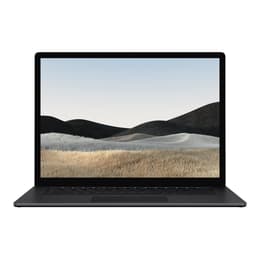
Microsoft Surface Laptop 4 13"
Starting at

Refurbished price:370.00

Versus €754.00 new

See options
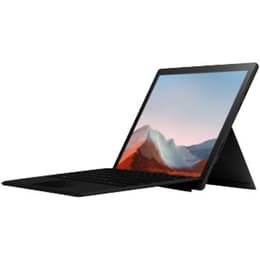
Microsoft Surface Pro 7 12"
Starting at

Refurbished price:334.00

Versus €1,399.00 new

See options

Ratings

The Microsoft Surface Laptop 4 13-inch, released in April 2021, is a traditional clamshell laptop designed for productivity and everyday computing. In contrast, the Microsoft Surface Pro 7, launched in October 2019, is a versatile 2-in-1 detachable tablet that offers both laptop and tablet functionalities. These devices cater to different user preferences, primarily differing in their form factor and the generation of their internal components.

Scores

Durability

The expected practical lifespan of these devices is influenced by their release dates and Microsoft's software support policies. The Surface Laptop 4, being a newer model, generally benefits from a longer period of software updates and hardware relevance compared to the Surface Pro 7.

  • Release Timeline: The Surface Laptop 4 was released in April 2021, while the Surface Pro 7 debuted in October 2019. This difference means the Laptop 4 will likely receive operating system updates and security patches for a longer duration.
  • Software Longevity: Both devices run Windows and are eligible for upgrades to newer Windows versions. However, the Surface Laptop 4's more recent hardware platform is better positioned for future software demands and extended support.
  • Repairability: The Surface Pro 7 has historically received very low repairability scores, often rated 1 out of 10 by iFixit, due to its glued-in components like the display and battery, and soldered RAM and SSD. The Surface Laptop 4 offers some improvements, notably featuring a removable SSD, though its RAM remains soldered. This makes certain repairs or upgrades more feasible on the Laptop 4.

Year of Release

2021

2019

Last Os Compatibility

Yes

Yes

OS

Windows 11

Windows 11

Performance

Performance varies between these two Surface devices, primarily due to their different processor generations and thermal designs, impacting how smoothly they handle various tasks.

  • Processor Capabilities: The Surface Laptop 4 features 11th-generation Intel Core processors or AMD Ryzen 4000 series processors, offering a noticeable performance uplift for everyday computing, multitasking, and more demanding applications. The Surface Pro 7 is equipped with 10th-generation Intel Core processors, which provide solid performance for general use like web browsing, document editing, and streaming, but may show limitations with intensive tasks.
  • Multitasking and Responsiveness: Both devices offer various RAM configurations, with the Surface Laptop 4 available with up to 32GB in some Intel models, while the Surface Pro 7 goes up to 16GB. Higher RAM configurations on either device contribute to smoother multitasking and quicker application switching. Users of the Surface Pro 7 have occasionally reported performance slowdowns or freezing with multiple applications open.
  • Storage Options: Both devices offer SSD storage, ranging from 128GB up to 1TB. The Surface Laptop 4's SSD is removable, offering a potential advantage for maintenance or future upgrades.
  • Battery Behavior: The Surface Laptop 4 generally provides longer battery life, with real-world usage often reaching 10-14 hours, and some AMD configurations claiming up to 19 hours under specific conditions. The Surface Pro 7's battery life has been a frequent point of criticism, with users often experiencing 3-8 hours of use, falling short of its advertised 10.5 hours.

Memory (GB)

16 GB

8 GB

Processor

Ryzen 5 4680U

Core i5 - Gen 10 (G4)

Graphic card

Integrated Graphics

Integrated Graphics

Screen quality

Both the Surface Laptop 4 and Surface Pro 7 feature high-quality PixelSense touchscreens, but they differ in size, resolution, and overall viewing experience.

  • Display Technology and Clarity: Both devices utilize IPS panels, offering wide viewing angles and good color reproduction. The Surface Laptop 4 has a 13.5-inch display with a 2256 x 1504 resolution, resulting in 201 pixels per inch (PPI). The Surface Pro 7 features a slightly smaller 12.3-inch display with a higher 2736 x 1824 resolution, yielding a sharper 267 PPI.
  • Brightness and Color: Both screens offer good brightness levels, typically around 390-400 nits, making them suitable for indoor use. They also provide good color accuracy and coverage, with the Surface Laptop 4 covering about 95% of the sRGB gamut and the Surface Pro 7 covering around 97%.
  • Aspect Ratio and Refresh Rate: Both devices feature a 3:2 aspect ratio, which provides more vertical screen real estate, beneficial for productivity tasks like document editing and web browsing. Both displays operate at a standard 60Hz refresh rate, which is suitable for general use but not optimized for high-refresh-rate gaming.

Resolution

2256 x 1504

2736 x 1824

Screen type

LED

IPS

Audiovisual

The camera systems on the Surface Laptop 4 and Surface Pro 7 are designed primarily for video conferencing and facial recognition, with some differences in their configurations.

  • Front-Facing Camera: The Surface Laptop 4 is equipped with a 720p HD front-facing camera, which supports Windows Hello for secure facial authentication. The Surface Pro 7 features a 5-megapixel front-facing camera that also supports Windows Hello and records in 1080p HD, generally providing clear images for video calls.
  • Rear-Facing Camera: The Surface Laptop 4 does not include a rear-facing camera. The Surface Pro 7, however, has an 8-megapixel rear-facing camera capable of 1080p HD video recording, which can be useful for scanning documents or quick photos in tablet mode.
  • Audio for Communication: Both devices incorporate dual far-field Studio Mics, designed to capture clear audio during calls and virtual meetings by reducing background noise.
  • Speaker Output: The Surface Laptop 4 features Omnisonic Speakers with Dolby Audio, providing a balanced audio experience for media consumption. The Surface Pro 7 has front-facing speakers that offer decent sound quality, particularly for a tablet, suitable for video calls and casual listening.

Miscellaneous

Beyond core specifications, several practical elements differentiate the user experience between the Surface Laptop 4 and the Surface Pro 7, including connectivity, physical ports, and overall design.

  • Connectivity Options: Both devices support modern wireless standards. The Surface Laptop 4 includes Wi-Fi 6 (802.11ax) and Bluetooth 5.0. The Surface Pro 7 also features Wi-Fi 6 and Bluetooth 5.0, ensuring reliable wireless connections.
  • Port Selection: The Surface Laptop 4 offers one USB-C port (USB 3.2 Gen 2 with Power Delivery), one USB-A port (USB 3.2 Gen 2), a 3.5mm headphone jack, and a Surface Connect port. The Surface Pro 7 includes one USB-C port (not Thunderbolt), one USB-A port, a 3.5mm audio port, a Surface Connect port, and a microSDXC card reader for expandable storage.
  • Design and Handling: The Surface Laptop 4 is a traditional laptop with a sleek, thin, and lightweight design, available in metal or Alcantara finishes. It weighs between 1.265-1.288 kg (2.79-2.84 lbs) for the 13.5-inch model. The Surface Pro 7 is a more portable 2-in-1 device, weighing around 0.771-0.790 kg (1.7-1.74 lbs) as a tablet, making it significantly lighter for handheld use. Its integrated kickstand allows for flexible positioning.
  • Security Features: Both devices support Windows Hello facial recognition for convenient and secure login.

Weight

1288 g

775 g

Screen size

13

12

User feedback for the Surface Laptop 4 often highlights its elegant design, comfortable keyboard and trackpad, and vibrant display as key strengths. Many appreciate its improved battery life over previous generations, making it a reliable companion for a full workday. Criticisms sometimes point to the presence of thicker display bezels compared to some competitors and a port selection that, while functional, lacks Thunderbolt support.

The Surface Pro 7 is frequently praised for its versatility as a 2-in-1 device, offering the flexibility of a tablet with the functionality of a Windows laptop. Its sharp display and capable cameras for video conferencing are also commonly cited positives. However, a recurring concern among users is its often-underwhelming battery life, which can necessitate frequent charging. Some users also note its relatively thick bezels and the challenges associated with repairability.

Users prioritizing a traditional laptop experience with strong performance for everyday tasks, a comfortable typing experience, and longer battery life will likely find the Surface Laptop 4 well-suited to their needs. Its more recent hardware also offers a longer expected support window. Conversely, individuals who require the flexibility of a tablet and a laptop in one device, frequently engage in video calls, or need a highly portable form factor, may lean towards the Surface Pro 7. For those considering either device, exploring quality-assured refurbished options can provide an eco-friendly alternative, extending the life cycle of these products and offering a sustainable choice.

See all articles

Our recent comparisons