
Microsoft Surface Laptop 3 13" Vs Microsoft Surface Pro 7 12"

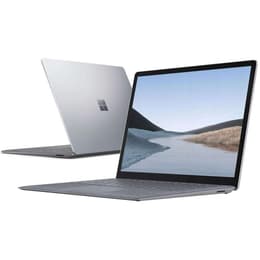
Microsoft Surface Laptop 3 13"
Starting at

Refurbished price:234.00

Versus €689.99 new

See options
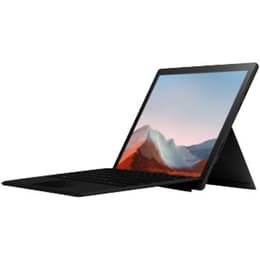
Microsoft Surface Pro 7 12"
Starting at

Refurbished price:334.00

Versus €1,399.00 new

See options

Ratings

The Microsoft Surface Laptop 3 13-inch and the Microsoft Surface Pro 7, both released in October 2019, offer distinct approaches to portable computing within the Windows ecosystem. The Surface Laptop 3 presents itself as a traditional clamshell laptop, prioritizing a conventional typing experience, while the Surface Pro 7 is a versatile 2-in-1 device, functioning as both a tablet and a laptop with its detachable keyboard. Both devices run on the Windows operating system, providing a familiar software environment for users.

Scores

Durability

When considering the longevity of these devices, several factors come into play, including their release timeline, operating system support, and repairability.

  • Release Timeline: Both the Surface Laptop 3 13-inch and the Surface Pro 7 were launched in October 2019, meaning they share a similar starting point for software support and expected hardware lifespan.
  • OS Support: As Windows devices, both models benefit from Microsoft's ongoing software updates, including feature updates and security patches, which typically extend for several years from their release. Users can expect continued support for the Windows operating system on both devices for a comparable duration.
  • Repairability: The Surface Laptop 3 13-inch was designed with some aspects of serviceability in mind, notably featuring a removable solid-state drive (SSD) that can be accessed by a skilled technician. In contrast, the Surface Pro 7 has historically received a low repairability score, primarily due to its tablet-first design which makes internal access and component replacement challenging, often involving glued-in parts.
  • Practical Lifespan: For general productivity and media consumption, both devices are built to offer several years of reliable use. The Laptop 3's more traditional construction might offer a slightly more straightforward path for certain hardware interventions, potentially extending its practical life for users comfortable with professional repairs.

Year of Release

2019

2019

OS

Windows 11

Windows 11

Performance

Both the Surface Laptop 3 13-inch and the Surface Pro 7 are equipped to handle everyday computing tasks, though their performance characteristics can vary based on configuration and form factor.

  • Processor Capabilities: Both devices feature 10th Generation Intel Core processors, offering responsive performance for common applications, web browsing, and multitasking. The Surface Pro 7 also had an entry-level Core i3 option, while the Laptop 3 13-inch typically started with more capable Core i5 configurations. This means that for demanding applications, higher-tier configurations of either device will offer a smoother experience.
  • Multitasking and Responsiveness: With various RAM options available, both devices can manage multiple applications simultaneously without significant slowdowns. Users engaging in light photo editing or moderate creative tasks will find either device capable, with higher RAM configurations providing more headroom for intensive workflows.
  • Battery Behavior: In typical usage scenarios, the Surface Laptop 3 13-inch generally provides slightly longer battery life, often lasting around 9 hours on a single charge for web browsing and productivity. The Surface Pro 7, while also offering all-day battery life for many users, typically ranges from 7 to 8 hours in real-world use, which can be influenced by its more portable, tablet-focused design.
  • Storage Options: Both models offer a range of solid-state drive (SSD) storage capacities, from 128GB up to 1TB, providing fast boot times and quick application loading.

Memory (GB)

8 GB

8 GB

Processor

Core i5 - Gen 10 (G7)

Core i5 - Gen 10 (G4)

Graphic card

Integrated Graphics

Integrated Graphics

Screen quality

The visual experience on both Surface devices is characterized by their high-resolution PixelSense displays, though there are differences in size and pixel density.

  • Display Technology: Both the Surface Laptop 3 13-inch and the Surface Pro 7 feature PixelSense touchscreens, known for their vibrant colors and good contrast. These displays offer comfortable viewing angles, making them suitable for various tasks.
  • Resolution and Clarity: The Surface Laptop 3 13-inch has a 13.5-inch display with a resolution of 2256 x 1504 pixels, resulting in a pixel density of 201 pixels per inch (PPI). The Surface Pro 7 features a slightly smaller 12.3-inch display but a higher resolution of 2736 x 1824 pixels, leading to a sharper pixel density of 267 PPI. This higher PPI on the Pro 7 can result in slightly crisper text and finer details.
  • Brightness Levels: Both displays offer good brightness for indoor use. The Surface Laptop 3 13-inch typically reaches around 350-400 nits of brightness, while the Surface Pro 7 also offers comparable brightness levels, ensuring visibility in well-lit environments.
  • Aspect Ratio and Viewing Experience: Both devices utilize a 3:2 aspect ratio, which provides more vertical screen real estate compared to traditional 16:9 displays. This can be beneficial for productivity tasks like document editing and web browsing. The larger screen of the Laptop 3 offers a more expansive viewing area, while the Pro 7's smaller, denser screen is well-suited for its tablet form factor.

Audiovisual

The camera and audio capabilities of these two Surface devices cater to different primary use cases, reflecting their distinct designs.

  • Camera System: The Surface Laptop 3 13-inch includes a 720p HD front-facing camera, suitable for video calls and basic online meetings. The Surface Pro 7, designed with more tablet-like versatility, features a 5-megapixel front-facing camera capable of 1080p HD video and an 8-megapixel rear-facing camera with autofocus, also supporting 1080p HD video. The Pro 7's rear camera offers more flexibility for capturing photos or scanning documents.
  • Low-Light Performance: The front-facing camera on the Surface Pro 7 is generally considered capable for video conferencing, even in less-than-ideal lighting conditions. While some users have reported issues with blurriness on the Pro 7's front camera, its specifications suggest a more capable sensor than the Laptop 3's.
  • Microphone Quality: Both devices are equipped with dual far-field Studio Mics, designed to capture clear audio for calls and voice commands, even from a distance.
  • Speaker Output: Both the Surface Laptop 3 13-inch and the Surface Pro 7 feature Omnisonic Speakers with Dolby Audio Premium, providing clear and immersive sound for media consumption and video conferencing.

Miscellaneous

Beyond core performance and display, several practical elements differentiate the Surface Laptop 3 13-inch and the Surface Pro 7, influencing their suitability for various users.

  • Form Factor and Portability: The most significant difference lies in their design. The Surface Laptop 3 13-inch is a traditional clamshell laptop, weighing approximately 1.25 to 1.29 kg and measuring 14.5 mm thick. This makes it a comfortable and stable device for lap use. The Surface Pro 7 is a 2-in-1 detachable tablet, with the tablet portion weighing around 0.775 to 0.79 kg and being 8.5 mm thick. Its lighter weight and thinner profile make it highly portable as a tablet, though the optional Type Cover adds to its weight and thickness when used as a laptop.
  • Connectivity Options: Both devices include a USB-C port, a USB-A port, a 3.5mm headphone jack, and a Surface Connect port for charging and docking. The Surface Pro 7 additionally features a MicroSDXC card reader, offering expandable storage that the Laptop 3 lacks. Both support Wi-Fi 6 and Bluetooth 5.0 for wireless connectivity.
  • Build Materials: The Surface Laptop 3 13-inch is constructed with an aluminum casing, with some configurations offering an Alcantara fabric keyboard deck. The Surface Pro 7 features a magnesium alloy construction.
  • Security and Sensors: Both devices support Windows Hello facial recognition for secure and convenient login. The Surface Pro 7 also includes an accelerometer, gyroscope, and magnetometer, which are useful for tablet-specific applications.

Weight

3000 g

775 g

Screen size

13

12

The Microsoft Surface Laptop 3 13-inch and the Surface Pro 7, while sharing a release year and core Windows experience, cater to different user preferences through their distinct designs and feature sets. Users often praise the Surface Laptop 3 for its traditional laptop form factor, comfortable keyboard, and solid build quality, making it a reliable choice for focused productivity. Criticisms sometimes point to its limited port selection and thicker display bezels compared to some contemporaries.

The Surface Pro 7 is frequently lauded for its exceptional versatility, seamlessly transitioning between a tablet and a laptop, and its portability. Its high-resolution display and pen support are often highlighted for creative and note-taking tasks. However, some users have noted that its real-world battery life can fall short of expectations, and the thick display bezels are a common point of critique. Additionally, some users have reported inconsistencies with the front camera quality.

Users prioritizing a conventional laptop experience with a comfortable, stable typing platform and slightly longer battery life will find the Surface Laptop 3 13-inch well-suited to their needs. This device is ideal for students, professionals, or anyone who primarily works at a desk or on their lap. Conversely, individuals who require the flexibility of a tablet for drawing, note-taking, or presentations, combined with the option of a full desktop experience, may lean toward the Surface Pro 7. Its lighter tablet form factor makes it a strong contender for travelers or those who frequently move between different work environments.

For those considering either of these models, exploring quality-assured refurbished options can provide an eco-friendly alternative, offering access to these capable devices while extending their lifecycle.

See all articles

Our recent comparisons