

Compare models
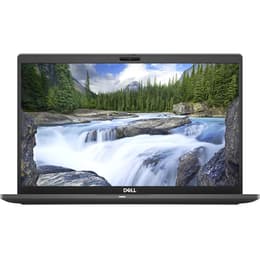
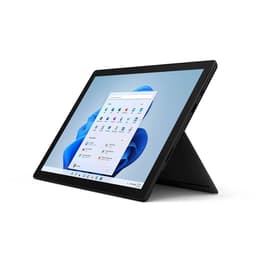
Dell Latitude 7410 14" Vs Microsoft Surface Pro 7 12"
- 1-year minimum warranty
- Free delivery on all orders
- Free 30-day returns
Differences at a glance
The Dell Latitude 7410 14" (2020) and Microsoft Surface Pro 7 12" (2019) represent two distinct portable computing form factors designed for mobile professionals and students. While the Dell Latitude functions as a traditional clamshell laptop with an integrated keyboard and standard screen size, the Microsoft Surface Pro operates as a versatile hybrid device featuring a detachable keyboard and touch-enabled screen. Both systems run desktop operating systems, but their physical design approaches cater to different daily workflows.
Available Models
Storage (GB)
Processor
Memory (GB)
Scores
Durability
When evaluating the long-term viability and physical durability of these two machines, users must consider hardware support timelines and structural construction.
- Software Support and Updates: Both models receive standard operating system updates and security patches, though longevity depends heavily on the chosen operating system configuration and hardware driver support from respective manufacturers.
- Repairability and Build: The Dell Latitude 7410 utilizes a conventional laptop chassis that allows for relatively straightforward internal component access, whereas the Microsoft Surface Pro 7 features a sealed design with glued elements, making hardware repairs significantly more challenging.
- Expected Lifespan: Both systems deliver reliable multi-year operational life for standard office applications, though the standard clamshell structure of the Dell Latitude generally offers better physical resilience against daily wear and tear.
Year of Release
2020
2019
Last Os Compatibility
Yes
Yes
OS
Windows 11
Windows 11
Performance
Daily responsiveness and multitasking capabilities vary across these devices due to their differing thermal designs and hardware configurations.
- Multitasking and Application Loading: Both machines handle web browsing, document editing, and video conferencing smoothly, though the larger chassis of the Dell Latitude manages sustained demanding tasks with greater thermal stability.
- Memory and Storage Configurations: Available configurations vary widely on the secondhand market, with both models offering multiple solid-state storage capacities and memory options to suit light office work or heavier data processing.
- Battery Behavior: The Dell Latitude typically houses a larger battery capable of sustaining a full day of mobile work, while the compact Surface Pro 7 requires more frequent charging during continuous heavy usage.
Graphic card
Integrated Graphics
Integrated Graphics
Screen quality
The viewing experiences differ significantly between these devices, primarily driven by panel dimensions, aspect ratios, and touch input capabilities.
- Display Technology and Resolution: Both models offer sharp, high-resolution screens with accurate color reproduction, but the Surface Pro 7 utilizes a distinct three-by-two aspect ratio optimized for vertical document viewing and tablet usage.
- Brightness and Outdoor Legibility: Maximum brightness levels on both screens allow for comfortable indoor use, though bright outdoor environments may require positioning adjustments to minimize screen glare.
- Interaction and Workspace: The Dell Latitude provides a fixed fourteen-inch non-touch workspace tailored for traditional typing, while the Surface Pro 7 offers a twelve-inch touch-sensitive panel that supports active stylus input for handwritten notes and sketching.
Resolution
1920 x 1080
2736 x 1824
Screen type
IPS
IPS
Audiovisual
Media consumption, audio output, and remote communication capabilities shape the multimedia experience on each portable device.
- Camera Systems: The Surface Pro 7 includes both front-facing and rear-facing cameras suitable for scanning documents and video calls, whereas the Dell Latitude relies on a single standard web camera positioned above the display.
- Microphone and Voice Clarity: Integrated dual microphone arrays on both units capture clear audio during virtual meetings, reducing background room noise effectively during calls.
- Speaker Output: Built-in stereo speakers on both devices deliver adequate sound volume for casual video viewing and voice communication, though external headphones or speakers provide a richer audio experience for music.
Miscellaneous
Physical dimensions, weight distribution, and port selections define the portability and peripheral compatibility of each computer.
- Port Selection: The Dell Latitude offers a comprehensive array of built-in connections including traditional USB ports, HDMI, and USB-C slots, while the Surface Pro 7 utilizes a more minimalist approach with a single USB-C port, a proprietary charging connection, and a headphone jack.
- Weight and Dimensions: The Surface Pro 7 prioritizes ultra-portability as a lightweight tablet configuration, whereas the Dell Latitude 7410 provides a slightly heavier, sturdier clamshell footprint that rests comfortably on traditional desk surfaces and laps.
- Security Features: Both models incorporate advanced authentication options, including facial recognition capabilities where configured, to secure user data effectively.
Weight
7500 g
775 g
Screen size
14
12
What the community thinks
User feedback highlights distinct preferences for each device based on everyday working habits. Owners of the Dell Latitude frequently praise its comfortable keyboard layout, comprehensive port selection, and reliable all-day battery performance, making it a dependable choice for desk-bound or traditional office environments. Conversely, Surface Pro 7 users appreciate the exceptional portability, responsive touch interface, and flexibility of transitioning between a tablet and a laptop workspace. However, some users note that the Surface Pro keyboard cover requires a stable surface for optimal typing, while others mention that the Latitude's traditional hinge design lacks the versatility of a detachable screen.
Users prioritizing a traditional laptop experience with robust physical connectivity and comfortable lap typing will find the Dell Latitude well-suited to their needs. Meanwhile, users prioritizing maximum portability, touch input, and a tablet form factor may lean toward the Microsoft Surface Pro 7. For those seeking an eco-friendly, quality-assured alternative, exploring a refurbished model provides a sustainable choice that extends device lifecycles without compromising on operational readiness. Ultimately, the choice depends entirely on whether a traditional clamshell workspace or a flexible hybrid tablet design aligns better with daily routines.