

Dell Latitude 5490 14" Vs Lenovo ThinkPad L390 13"

Dell Latitude 5490 14"
Starting at

Refurbished price:325.00

Versus €793.00 new

See options
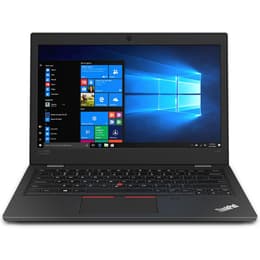
Lenovo ThinkPad L390 13"
Starting at

Refurbished price:299.00

Versus €766.00 new

See options

Ratings

The Dell Latitude 5490, released in 2017-2018, and the Lenovo ThinkPad L390, launched in 2019, are both business-oriented laptops designed for productivity. While the Latitude 5490 offers a slightly larger 14-inch display, the ThinkPad L390 features a more compact 13.3-inch form factor. Both devices run on the Windows operating system and are built to handle everyday professional tasks, though they present distinct approaches to design and features.

Scores

Durability

When considering the longevity of these devices, their release timelines play a role in expected software support and overall practical lifespan. The Dell Latitude 5490, introduced around 2017-2018, and the Lenovo ThinkPad L390, released in 2019, both feature 8th generation Intel processors, suggesting a similar window for major operating system updates and security patches from Microsoft.

  • Software Longevity: Both laptops, running on 8th generation Intel processors, are likely to receive comparable durations of Windows operating system support, ensuring continued access to essential features and security updates for several years.
  • Build Quality: The Latitude 5490 features a durable chassis with a carbon fiber lid and a sturdy feel, designed for business use. The ThinkPad L390 is MIL-SPEC tested, indicating a robust construction capable of withstanding various environmental conditions.
  • Repairability: Both models generally offer user-serviceable components. The Dell Latitude 5490 allows for replacement of parts such as the battery, RAM, and storage drives. Similarly, the ThinkPad L390's main components, including RAM and SSD, are upgradeable.

Year of Release

2017

2018

Last Os Compatibility

Yes

Yes

OS

Windows 11

Windows 11

Performance

Both the Dell Latitude 5490 and the Lenovo ThinkPad L390 are equipped with 8th generation Intel processors, providing capable performance for typical business and academic workloads. The real-world impact of these processors means smooth operation for common applications and efficient multitasking.

  • Processing Power: Both laptops handle demanding applications and multitasking smoothly thanks to their current-generation processors. Users can expect responsive performance for tasks such as document editing, web browsing with multiple tabs, and video conferencing.
  • Storage and Memory: The Latitude 5490 offers a range of storage options, including traditional hard drives and faster M.2 PCIe NVMe solid-state drives, with RAM configurable up to 32GB. The ThinkPad L390 typically comes with M.2 PCIe NVMe SSDs, offering quick boot times and application loading, and also supports up to 32GB of DDR4 RAM.
  • Battery Behavior: The Latitude 5490, with various battery capacities, has shown real-world battery life ranging from around 10 to over 15 hours depending on the task and configuration. The ThinkPad L390, with its 45Wh battery, generally provides 8 to 14 hours of use, making it suitable for a full workday.

Memory (GB)

8 GB

8 GB

Processor

Core i5 - Gen 8 (U)

Core i5 - Gen 8 (U)

Graphic card

Integrated Graphics

Integrated Graphics

Screen quality

The visual experience on these laptops is shaped by their display characteristics, with differences in size and panel technology influencing clarity and brightness for daily use.

  • Display Size and Technology: The Dell Latitude 5490 features a 14-inch display, while the Lenovo ThinkPad L390 has a slightly smaller 13.3-inch screen. Both models offer Full HD (1920x1080) resolution options, often with IPS panels for wider viewing angles and anti-glare finishes to reduce reflections.
  • Brightness and Clarity: The Latitude 5490's display typically offers brightness levels around 200-220 nits, which is suitable for indoor environments but may appear dim in bright outdoor conditions. The ThinkPad L390 generally provides a slightly brighter screen, often around 250-261 nits, offering a more comfortable viewing experience in varied lighting.
  • Touchscreen Options: Both laptops offer configurations with touchscreen functionality, providing an alternative input method for users who prefer direct interaction with the display.

Resolution

1920 x 1080

1366 x 768

Screen type

IPS

LCD

Camera

Audiovisual

For communication and media consumption, the audio and visual components of these laptops offer functional capabilities tailored for business and general use.

  • Webcam Performance: Both the Dell Latitude 5490 and the Lenovo ThinkPad L390 are equipped with 720p webcams. The Latitude 5490's camera provides decent colors but can lack detail, resulting in a somewhat washed-out image. The ThinkPad L390's webcam is also described as decent but not exceptionally crisp, though it handles lighting conditions reasonably well.
  • Microphone Quality: Both devices include integrated microphones suitable for video calls and voice recording. While specific details on microphone quality are less prominent, they are generally adequate for standard communication needs.
  • Speaker Output: The audio experience differs between the two. The Latitude 5490's speakers have been noted for being adequate in volume but lacking in bass, sometimes described as lackluster. In contrast, the ThinkPad L390 features Dolby-tuned speakers that deliver clear vocals and percussion, offering a more satisfying media consumption experience for a laptop of its size.

Miscellaneous

Beyond core performance and display, several practical elements contribute to the overall user experience, including connectivity, physical design, and security features.

  • Connectivity Options: The Dell Latitude 5490 offers a comprehensive selection of ports, including multiple USB-A ports, a USB-C port with DisplayPort, HDMI, VGA, and an Ethernet port, catering to a wide range of peripherals and older display connections. The Lenovo ThinkPad L390 also provides a good array of modern ports, including two USB-A, two USB-C (for power delivery and DisplayPort), HDMI, and a microSD card reader, along with an Ethernet extension connector.
  • Weight and Dimensions: The Latitude 5490, being a 14-inch laptop, weighs approximately 1.6 kg (3.5 lbs). The more compact 13.3-inch ThinkPad L390 is slightly lighter at around 1.46 kg (3.2 lbs), making it a bit more portable.
  • Security and Input: Both laptops offer robust security features. The Latitude 5490 can include optional fingerprint readers and IR cameras for facial recognition, alongside a TPM 2.0 chip. The ThinkPad L390 also offers optional fingerprint readers and IR cameras, and is known for its comfortable, spill-resistant keyboard and TrackPoint pointing device, a signature ThinkPad feature.

Weight

1600 g

1460 g

Screen size

14

13

User feedback for both the Dell Latitude 5490 and the Lenovo ThinkPad L390 generally highlights their strengths as reliable business machines. For the Latitude 5490, common praise points include its robust performance for demanding tasks and its extensive port selection, which is beneficial for connecting various peripherals. Some users, however, have noted that the display could be brighter and the audio quality is not its strongest suit.

The ThinkPad L390 is frequently lauded for its excellent keyboard, durable build quality, and decent battery life that can last through a workday. Criticisms often point to its display, which, while Full HD IPS, can be somewhat dim compared to other laptops in its class, and its design might be considered less modern due to thicker bezels.

Users prioritizing a larger screen and a wider array of legacy ports for diverse connectivity needs may find the Dell Latitude 5490 well-suited to their requirements. Conversely, those who value a more compact form factor, a superior typing experience, and slightly better audio for media consumption might lean towards the Lenovo ThinkPad L390. Both devices serve as dependable workhorses, and choosing between them often comes down to these specific preferences. For those seeking an eco-friendly alternative, quality-assured refurbished options for both models are available, offering a sustainable choice without compromising on functionality.

See all articles

Our recent comparisons