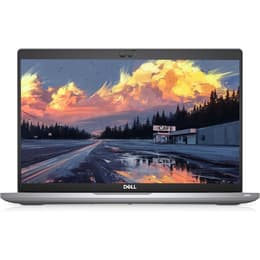


Dell Latitude 5420 14" Vs Dell Latitude 5490 14"

Dell Latitude 5420 14"
Starting at

Refurbished price:263.52

Versus €986.84 new

See options
Dell Latitude 5490 14"
Starting at

Refurbished price:325.00

Versus €793.00 new

See options

Ratings

The Dell Latitude 5420 and Dell Latitude 5490 are 14-inch business-oriented laptops designed for productivity and reliability. Released in 2021, the Latitude 5420 features more modern internal components and connectivity options, while the Latitude 5490, launched in 2018, offers a robust and dependable platform. Both models typically run on the Windows operating system, providing a familiar environment for professional users.

Scores

Durability

When considering the longevity of these devices, several factors come into play, primarily their release timelines and ongoing support.

  • Release Timeline: The Latitude 5420, released in early 2021, benefits from a more recent manufacturing date compared to the Latitude 5490, which debuted in 2018. This difference in age directly impacts the expected duration of software support and hardware relevance.
  • OS Support: Both laptops are designed to run Windows, and their ability to receive future operating system updates will depend on Microsoft's and Dell's support policies. The newer Latitude 5420 is likely to receive official Windows updates for a longer period, potentially extending its usable life by several years over the 5490.
  • Repairability: Dell Latitude laptops are generally known for their serviceability. User reports indicate that components like RAM and storage are often accessible for upgrades or replacement in both models, contributing to their practical lifespan. The Latitude 5490, in particular, is noted by some users for its robust and repairable design.

Year of Release

2020

2017

Last Os Compatibility

Yes

Yes

OS

Windows 11

Windows 11

Performance

The performance capabilities of these two Latitude models show a notable difference, primarily due to their respective processor generations and storage technologies.

  • Processor Capabilities: The Latitude 5420 is equipped with an 11th-generation Intel Core processor, offering improved processing power and efficiency for everyday tasks, demanding applications, and multitasking. The Latitude 5490 features 8th-generation Intel Core processors, which are capable for general business tasks but offer less performance headroom.
  • Storage Options: The Latitude 5420 primarily utilizes faster M.2 PCIe NVMe Solid State Drives (SSDs), contributing to quicker boot times, faster application loading, and more responsive overall system performance. The Latitude 5490, while also offering SSD options, was commonly configured with traditional Hard Disk Drives (HDDs) or SATA SSDs, which are generally slower in data access speeds.
  • Multitasking Support: Both models support DDR4 RAM, with the Latitude 5420 often featuring faster 3200 MHz memory compared to the 5490's 2400 MHz. The Latitude 5420 can also support up to 64GB of RAM, while the 5490 typically supports up to 32GB, allowing the newer model to handle more intensive multitasking and larger datasets.

Memory (GB)

16 GB

8 GB

Processor

Core i5-1135G7

Core i5 - Gen 8 (U)

Graphic card

Integrated Graphics

Integrated Graphics

Screen quality

The visual experience on these laptops varies, with the newer model offering more advanced display options.

  • Display Technology and Resolution: The Latitude 5420 commonly features IPS panels with Full HD (1920x1080) resolution, providing comfortable viewing angles and good contrast. Some configurations of the 5420 also offer HD (1366x768) resolution. The Latitude 5490 also offers both HD and Full HD resolutions, with IPS panels available in some configurations.
  • Brightness Levels: The Latitude 5420 offers a range of brightness options, with some Full HD panels reaching up to 400 nits, which improves visibility in brighter environments. The Latitude 5490's displays typically range from 200 to 220 nits, which is suitable for indoor office use but may struggle in bright outdoor conditions.
  • Color Reproduction: While the 5420's Full HD IPS panels can offer up to 100% sRGB coverage in higher-end configurations, base models may have a narrower color gamut. The 5490's displays are generally noted for being acceptable for typical office use, though some users have reported issues with white balance.

Resolution

1920 x 1080

1920 x 1080

Screen type

IPS

IPS

Camera

Audiovisual

For communication and media consumption, both laptops offer functional but distinct audio-visual experiences.

  • Camera System: The Latitude 5420 often includes a Full HD IR webcam, which can be beneficial for video conferencing and secure logins using facial recognition. The Latitude 5490 typically features a 720p webcam. Reviews suggest that while both cameras are usable for video calls, the 5490's camera can produce washed-out details and blurry images. The 5420's camera, while Full HD, has also been noted for poor color accuracy and image noise in some reviews.
  • Microphone Quality: Both models include integrated microphones suitable for calls and basic audio recording. The 5420 features a dual-mic array.
  • Speaker Output: The Latitude 5490's speakers are described as decent for a business laptop, offering considerable volume and balanced mids and highs, though lacking in bass. The 5420 also provides clear sound, suitable for video conferencing and business audio needs. For a richer audio experience on either device, external speakers or headphones are recommended.

Miscellaneous

Beyond core performance, several practical elements differentiate these two business laptops.

  • Connectivity Options: The Latitude 5420 offers more advanced connectivity, including two Thunderbolt 4 ports, which provide versatile high-speed data transfer, video output, and power delivery capabilities. It also supports Wi-Fi 6 for faster and more stable wireless connections. The Latitude 5490 includes USB 3.1 Gen 1 ports and typically Wi-Fi 5 (802.11ac), which are still functional but offer slower speeds compared to the newer standards. Both models retain an RJ-45 Ethernet port for wired network connections.
  • Port Types: While both have HDMI and USB-A ports, the 5420's HDMI 2.0 offers greater bandwidth than the 5490's HDMI 1.4. The 5490 also includes a VGA port in some configurations, catering to older display connections.
  • Weight and Dimensions: The Latitude 5420 is generally lighter, starting from approximately 1.37 kg (3.03 lbs), making it slightly more portable. The Latitude 5490 typically weighs around 1.59 kg (3.52 lbs) to 1.694 kg (3.73 lbs).

Weight

1400 g

1600 g

Screen size

14

14

User feedback on platforms like Reddit and other review sites indicates that both the Dell Latitude 5420 and 5490 are generally well-regarded for their business-oriented durability and reliability. The Latitude 5490 is often praised for its robust build and long battery life, with some users appreciating its repairability and the inclusion of legacy ports like VGA. However, common criticisms point to its less vibrant screen and the older processor generation.

The Latitude 5420, being a newer model, receives positive remarks for its improved performance, faster connectivity options like Thunderbolt 4 and Wi-Fi 6, and potentially brighter display options. Its lighter weight is also a frequent highlight. Some users note that while the camera is Full HD, its quality might not be exceptional, and base display options can still be modest.

Users prioritizing modern performance, faster data transfer, and future-proof connectivity will find the Dell Latitude 5420 well-suited to their needs. Its lighter design also benefits those who frequently travel or commute. Conversely, users who require compatibility with older peripherals, value a slightly more established and repairable design, and perform less demanding tasks may lean toward the Dell Latitude 5490. Both models offer a dependable computing experience, and opting for a quality-assured refurbished option can be an eco-friendly alternative for either device, providing a reliable laptop while making a sustainable choice.
See all articles

Our recent comparisons