
Lenovo ThinkPad L390 13" Vs Microsoft Surface Pro 7 12"

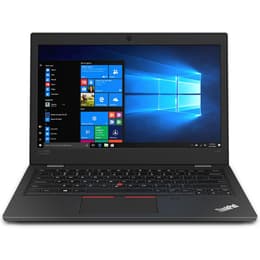
Lenovo ThinkPad L390 13"
Starting at

Refurbished price:299.00

Versus €766.00 new

See options
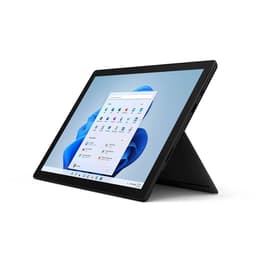
Microsoft Surface Pro 7 12"
Starting at

Refurbished price:334.00

Versus €1,399.00 new

See options

Ratings

The Lenovo ThinkPad L390, released in 2019, is a traditional clamshell laptop designed for productivity and business use. In contrast, the Microsoft Surface Pro 7, also launched in 2019, is a versatile 2-in-1 device that functions as both a tablet and a laptop. Both devices operate on the Windows platform, but they cater to different user preferences through their distinct form factors and feature sets.

Scores

Durability

Both the Lenovo ThinkPad L390 and the Microsoft Surface Pro 7 were introduced in 2019, placing them at a similar point in their product lifecycles. Their practical lifespan is largely tied to ongoing software support from Microsoft for the Windows operating system.

  • OS Support: As both devices run Windows, their software longevity is primarily dependent on Microsoft's update policies for Windows versions. Users can expect continued security updates and feature enhancements for several years.
  • Repairability: The ThinkPad L390 is generally considered more repairable, with components that are often accessible for servicing or upgrades. The Surface Pro 7, however, is known for its low repairability score, largely due to components being glued in place and soldered to the motherboard, making repairs challenging and often requiring professional intervention.
  • Build Quality: The ThinkPad L390 features a robust, business-oriented construction, often incorporating MIL-SPEC durability standards for resilience in various environments. The Surface Pro 7 boasts a sleek, unibody magnesium design, offering a premium feel and a lightweight profile.

Year of Release

2018

2019

Last Os Compatibility

Yes

Yes

OS

Windows 11

Windows 11

Performance

The performance capabilities of these two devices are influenced by their internal components, particularly their processors and memory configurations, impacting how they handle daily tasks and more demanding applications.

  • Processor Generation: The ThinkPad L390 typically features 8th Generation Intel Core processors, providing solid performance for general computing and office applications. The Surface Pro 7, on the other hand, is equipped with 10th Generation Intel Core processors, which generally offer a performance uplift, especially in tasks benefiting from improved integrated graphics.
  • Real-World Responsiveness: For everyday use, the Surface Pro 7 often feels slightly snappier, particularly when handling multiple applications or light creative workloads, due to its newer processor architecture. The ThinkPad L390 delivers consistent and reliable performance for productivity-focused tasks, ensuring smooth operation for typical business and academic needs.
  • Memory and Storage: Both devices offer various configurations for solid-state drive (SSD) storage and RAM. While the ThinkPad L390 often allows for RAM upgrades, providing flexibility for users to enhance multitasking capabilities, the Surface Pro 7's RAM and storage are typically soldered to the motherboard, limiting post-purchase upgrades.

Memory (GB)

8 GB

8 GB

Processor

Core i5 - Gen 8 (U)

Core i5 - Gen 10 (G4)

Graphic card

Integrated Graphics

Integrated Graphics

Screen quality

The visual experience on the ThinkPad L390 and Surface Pro 7 differs significantly due to their display technologies, resolutions, and form factors, catering to distinct user needs.

  • Display Technology and Resolution: The ThinkPad L390 features a 13.3-inch IPS display, commonly offering Full HD (1920x1080) resolution, providing clear visuals for standard computing tasks. The Surface Pro 7 comes with a 12.3-inch PixelSense Display, boasting a higher resolution of 2736 x 1824 pixels and a 3:2 aspect ratio, resulting in a sharper and more expansive viewing area.
  • Touch and Pen Input: The Surface Pro 7's display is a multi-touch screen with active pen support, making it highly suitable for drawing, note-taking, and direct interaction with content. While some configurations of the ThinkPad L390 offer touch functionality, it is not a primary feature across all models, and pen support is less common.
  • Brightness and Clarity: The Surface Pro 7 generally offers a brighter and more vibrant display, which can be beneficial for use in varied lighting conditions and for media consumption. The ThinkPad L390's display provides a solid viewing experience, often with an anti-glare finish that helps reduce reflections in brightly lit environments.

Resolution

1366 x 768

2736 x 1824

Screen type

LCD

IPS

Camera

Audiovisual

The audio and visual capabilities of these devices vary, particularly in their camera systems, microphone quality, and speaker output, influencing their suitability for communication and media consumption.

  • Camera Systems: The Surface Pro 7 is equipped with more capable cameras, featuring a 5-megapixel front-facing camera and an 8-megapixel rear-facing camera, both supporting 1080p video recording, making it well-suited for video conferencing and occasional photography. The ThinkPad L390 includes a standard 720p HD webcam, which is functional for video calls but offers less detail.
  • Microphone Quality: For voice capture, the Surface Pro 7 incorporates dual far-field Studio Mics, designed to pick up voices clearly even from a distance, enhancing the experience for online meetings and voice commands. The ThinkPad L390 also features dual-array microphones, providing adequate audio input for communication.
  • Speaker Output: Both devices offer stereo speakers for audio playback. The Surface Pro 7 includes Dolby Audio Premium, which can contribute to a richer sound experience for media. The ThinkPad L390 also features Dolby-tuned speakers, delivering decent audio quality for a laptop of its size.

Miscellaneous

Beyond core performance and display, several practical elements differentiate the ThinkPad L390 and Surface Pro 7, impacting their daily usability and overall handling.

  • Connectivity and Ports: The ThinkPad L390 offers a comprehensive selection of ports, including multiple USB-C (with Power Delivery and DisplayPort support), USB-A, and HDMI, providing broad compatibility with various peripherals and external displays. The Surface Pro 7 includes a USB-C port, a USB-A port, and a Surface Connect port, offering modern connectivity options but with fewer traditional ports.
  • Portability and Form Factor: The Surface Pro 7 is designed for maximum portability, weighing approximately 775 grams without its optional Type Cover, making it a lightweight tablet that can transform into a laptop. The ThinkPad L390, as a traditional laptop, is heavier at around 1.46 kg, offering a more stable and robust build for desk-bound productivity.
  • Input Methods and Security: The ThinkPad L390 is renowned for its comfortable and tactile keyboard and the distinctive TrackPoint pointing device, favored by many for extended typing sessions. It often includes a fingerprint reader for secure logins. The Surface Pro 7 relies on its optional Type Cover for a full keyboard experience and supports the Surface Pen for digital ink input. It features Windows Hello facial recognition for convenient and secure authentication.

Weight

1460 g

775 g

Screen size

13

12

The Lenovo ThinkPad L390 and Microsoft Surface Pro 7, both released in 2019, offer distinct computing experiences tailored to different user priorities. User feedback for the ThinkPad L390 often highlights its robust build quality, excellent keyboard for typing, and a generous selection of traditional ports as key strengths. Some users, however, note its relatively bulkier design compared to more modern ultrabooks and a display that, while functional, may not be as vibrant as some competitors.

Conversely, the Surface Pro 7 is frequently praised for its exceptional versatility, vibrant high-resolution display, and remarkable portability, making it a strong contender for those who value a tablet-first experience with laptop capabilities. Common criticisms include battery life, which some users find can be inconsistent, and the fact that essential accessories like the Type Cover keyboard are sold separately. Additionally, its repairability is noted as being particularly challenging.

Users prioritizing a durable, reliable workhorse with a superior typing experience and extensive port options for traditional office or academic tasks may find the Lenovo ThinkPad L390 well-suited to their needs. For individuals who require maximum portability, a high-quality touch-enabled display for creative work or note-taking, and the flexibility of a 2-in-1 device, the Microsoft Surface Pro 7 could be the more appropriate choice. Both models are available as quality-assured refurbished options, providing an eco-friendly alternative for those seeking capable devices.

See all articles

Our recent comparisons