

Dell Latitude 5400 14" Vs Dell Latitude 7300 13"

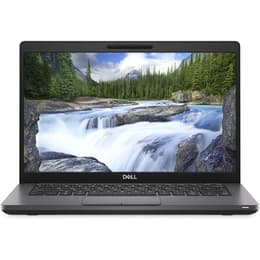
Dell Latitude 5400 14"
Starting at

Refurbished price:250.00

Versus €1,030.00 new

See options
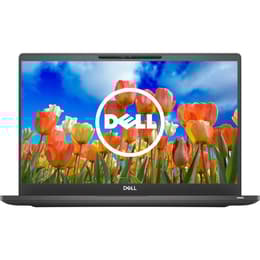
Dell Latitude 7300 13"
Starting at

Refurbished price:310.00

Versus €692.16 new

See options

Ratings

The Dell Latitude 5400 14 (released in May 2019) and the Dell Latitude 7300 13 (released around August/September 2019) are business-oriented laptops designed for productivity and reliability. While both models share a focus on robust performance and durability, their primary distinctions lie in their form factor, display characteristics, and connectivity options, catering to slightly different user preferences for portability versus screen real estate.

Scores

Durability

Both the Dell Latitude 5400 14 and the Latitude 7300 13 were released in 2019, meaning they belong to a similar generation of business laptops. They are built to withstand daily use and offer comparable software longevity, with compatibility for Windows 11 extending their usable lifespan beyond the initial Windows 10 end-of-support date.

  • OS Support: Both devices, featuring 8th or 9th generation Intel processors, are compatible with Windows 11, which helps ensure continued software support and security updates for several years.
  • Build Quality: The Latitude series is known for its durable construction. The 5400 features a carbon fiber composite chassis, incorporating post-consumer recycled materials, while the 7300 offers chassis options in either aluminum or carbon fiber. Both models have undergone MIL-STD 810G testing, indicating a high level of resilience against environmental factors and physical stress.
  • Repairability: Dell Latitude laptops are generally designed with repairability in mind, often featuring accessible internal components for upgrades to RAM and storage, which can extend their practical lifespan.

Year of Release

2017

2019

OS

Windows 11

Windows 11

Performance

Both the Latitude 5400 14 and the Latitude 7300 13 are equipped with capable processors from the same generation, providing solid performance for typical business applications and multitasking. Their configurations are well-suited for demanding office tasks, web browsing with multiple tabs, and light content creation.

  • Processing Power: These laptops handle demanding applications and multitasking smoothly, thanks to their current-generation processors. Users can expect responsive performance for tasks such as managing large spreadsheets, participating in video conferences, and running various productivity software simultaneously.
  • Memory and Storage: Both models typically come with fast solid-state drives (SSDs) for quick boot times and rapid application loading. They also offer user-upgradable RAM, allowing for increased memory capacity to enhance multitasking capabilities and extend the device's responsiveness over time.
  • Battery Behavior: Both laptops offer strong battery life, designed to last through a typical workday. The Latitude 5400, particularly with its larger battery options, can provide extended usage, while the Latitude 7300 also delivers excellent endurance, especially with its low-power display configurations. Both support ExpressCharge for faster recharging.

Memory (GB)

16 GB

16 GB

Processor

Core i5 - Gen 8 (U)

Core i7 - Gen 8 (U)

Graphic card

Integrated Graphics

Integrated Graphics

Screen quality

The display experience differs between these two Latitude models, primarily in size and typical brightness levels, influencing their suitability for various work environments and user preferences.

  • Display Technology and Size: The Latitude 5400 features a 14-inch Full HD (1920x1080) display, offering more screen real estate for productivity. The Latitude 7300, with its 13.3-inch Full HD (1920x1080) panel, prioritizes a more compact form factor. Both typically use IPS or WVA panels, providing good viewing angles.
  • Brightness and Clarity: The Latitude 7300 generally offers a brighter display, often around 300-317 nits, which contributes to better visibility in varied lighting conditions, including some outdoor use. The Latitude 5400's display typically measures around 220-228 nits, which some users may find dim, particularly in brightly lit environments. Both models feature anti-glare finishes to reduce reflections.
  • Resolution and Refresh Rate: Both laptops offer Full HD resolution, providing clear visuals for text and images. The standard refresh rate for both is 60 Hz, which is suitable for general business use and everyday tasks.

Resolution

1920 x 1080

1920 x 1080

Screen type

IPS

IPS

Audiovisual

For communication and media consumption, both Dell Latitude laptops provide standard features suitable for business use, focusing on clear audio and video for virtual meetings and presentations.

  • Webcam and Microphone: Both models typically include a 720p webcam, which is standard for video conferencing. The Latitude 5400 includes a privacy shutter for the webcam, offering an added layer of security. Both are equipped with integrated microphones for clear voice capture during calls.
  • Speaker Output: The speakers on both laptops are designed for clear audio during video calls and for general media consumption. While not optimized for high-fidelity audio, they are adequate for business presentations and casual listening.
  • Video Recording Quality: The integrated graphics processors in both devices handle video playback and basic recording tasks effectively, suitable for business-related video content. Neither is designed for intensive video editing or high-end multimedia production.

Miscellaneous

Beyond core performance, several practical elements differentiate the user experience and connectivity options of the Dell Latitude 5400 14 and the Latitude 7300 13.

  • Connectivity: The Latitude 5400 includes a built-in RJ-45 Ethernet port, which is beneficial for stable wired network connections in office environments. The Latitude 7300 notably omits a dedicated Ethernet port, requiring a USB-C adapter or dock for wired network access. Both offer modern Wi-Fi standards (802.11ac or optional Wi-Fi 6) and Bluetooth 5.0 for wireless connectivity.
  • Port Selection: Both laptops feature a versatile array of ports, including multiple USB Type-A ports, a USB Type-C port (with optional Thunderbolt 3 support on both), HDMI for external displays, and a microSD card reader. The Thunderbolt 3 port on both allows for high-speed data transfer and connection to a wider range of peripherals.
  • Portability and Handling: The Latitude 7300 is the more compact and lighter option, weighing around 1.25 kg (2.75 lbs), making it highly suitable for users who prioritize mobility. The Latitude 5400 is slightly heavier at approximately 1.48 kg (3.26 lbs) and has a larger 14-inch footprint, offering a balance between portability and screen size. Both models offer optional security features like fingerprint readers and IR cameras for facial recognition.

Weight

1590 g

3000 g

Screen size

14

13

The Dell Latitude 5400 14 and Latitude 7300 13 both stand as reliable choices for business users, each with distinct advantages. User feedback often praises the Latitude 5400 for its robust performance, excellent battery life (especially with larger battery configurations), and the convenience of a built-in Ethernet port. However, some users note its display can be dimmer compared to competitors.

The Latitude 7300 is frequently lauded for its superior portability, brighter display, and premium build materials, making it a strong contender for professionals on the go. Criticisms sometimes point to the absence of a native Ethernet port and a plastic trackpad.

Users prioritizing a larger screen for multitasking and the assurance of a wired network connection without adapters may find the Latitude 5400 14 better suited to their needs. Its extended battery life options also appeal to those who require long periods away from a power outlet. Conversely, individuals who value maximum portability, a brighter display for varied lighting conditions, and a more compact design will likely lean towards the Latitude 7300 13. Both models offer strong performance for everyday business tasks and can be excellent quality-assured refurbished options, providing a sustainable choice for budget-conscious buyers. Ultimately, the decision hinges on whether screen size and integrated Ethernet are paramount, or if a lighter, more compact design with a brighter display takes precedence.

See all articles

Our recent comparisons