

Compare models

Dell Latitude 5320 13" Vs Dell Latitude 5400 14"

  • 1-year minimum warranty
  • Free delivery on all orders
  • Free 30-day returns
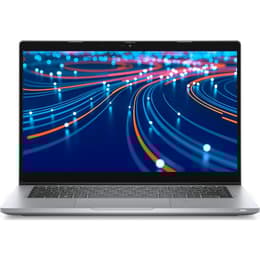
Dell Latitude 5320 13"
Starting at

Refurbished price:251.00

Versus €1,489.59 new

See options
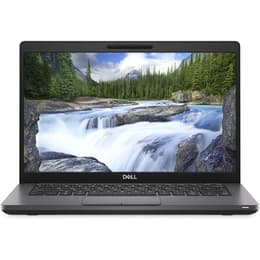
Dell Latitude 5400 14"
Starting at

Refurbished price:229.00

Versus €1,230.00 new

See options

Differences at a glance

The Dell Latitude 5320, released in 2021, and the Dell Latitude 5400, launched in 2019, are both business-oriented laptops designed for productivity and reliability. While sharing the Latitude series' focus on professional use, they differ primarily in their screen size, internal components, and overall design philosophy, catering to slightly different user preferences for portability versus screen real estate.

Available Models

Storage (GB)

Processor

Memory (GB)

Scores

Durability

When considering the longevity of these devices, their release timelines and design for business environments are key factors. The Dell Latitude 5320, being a newer model from 2021, benefits from more recent hardware and a longer projected software support window compared to the Dell Latitude 5400, which was released in 2019. Both models are built to withstand daily professional use, with the Latitude series generally known for its durability.

  • Software Support: The Latitude 5320, with its 2021 release, is expected to receive operating system updates and security patches for a longer period than the 2019 Latitude 5400, offering extended software longevity.
  • Repairability: The Latitude 5400 is noted for its user-friendly repair access, with many components like RAM, SSD, and battery being easily replaceable, contributing to a longer practical lifespan through upgrades and repairs. In contrast, the Latitude 5320 features soldered RAM, which limits upgradeability, though other components like the SSD and battery remain accessible for servicing.
  • Build Durability: Both models undergo MIL-STD 810G testing for durability, indicating a robust construction suitable for demanding environments. The Latitude 5400 often features a carbon fiber composite chassis, while the 5320 utilizes bio-plastic materials.

Year of Release

2021

2018

Last Os Compatibility

Yes

Yes

OS

Windows 11

Windows 11

Performance

The performance capabilities of these two Latitude laptops are influenced by their respective generations of internal hardware, impacting how smoothly they handle various tasks from everyday productivity to more demanding applications.

  • Processing Power: The Latitude 5320 is equipped with 11th Generation Intel Core processors, which provide enhanced efficiency and responsiveness for modern business applications and multitasking. The Latitude 5400, featuring 8th Generation Intel Core processors, delivers solid performance for general office work and web browsing, though it may show limitations with more intensive workloads compared to its newer counterpart.
  • Multitasking and Responsiveness: Both laptops support ample RAM configurations, with the Latitude 5400 offering upgradeable DDR4 memory through two SODIMM slots, allowing users to expand up to 32GB or even 64GB for extensive multitasking. The Latitude 5320's integrated DDR4 RAM, configurable up to 32GB, operates in dual-channel mode at 8GB and above, ensuring efficient data handling for smooth application switching.
  • Storage Speed: Both models utilize fast NVMe PCIe M.2 SSDs, ensuring quick boot times and rapid application loading. The Latitude 5400 also offered a 2.5-inch SATA drive option in some configurations, providing flexibility for storage capacity.
  • Battery Behavior: The Latitude 5320, with battery options up to 63Wh, can provide nearly 14 hours of web browsing on a single charge, making it suitable for extended work sessions away from power outlets. The Latitude 5400, with larger battery options up to 68Wh, can achieve even longer durations, with some configurations reporting up to 17 hours of web browsing, and features ExpressCharge for faster recharging.

Graphic card

Integrated Graphics

Integrated Graphics

Screen quality

The visual experience on these laptops is shaped by their display technologies, resolutions, and brightness levels, which are important for user comfort and productivity in various lighting conditions.

  • Display Technology and Resolution: Both the Latitude 5320 and 5400 typically feature Full HD (1920 x 1080) IPS panels, offering clear visuals and comfortable viewing angles. The Latitude 5400 also had options for lower-resolution HD (1366 x 768) TN panels, which generally provide a less vibrant viewing experience.
  • Brightness and Outdoor Use: The Latitude 5320's display often reaches 250-309 nits of brightness, making it suitable for indoor and moderately lit outdoor environments. The Latitude 5400's display typically offers around 220 nits, which some users have noted can be dim in brighter outdoor settings, though its anti-glare properties help mitigate reflections.
  • Color Accuracy and Eye Comfort: The Latitude 5320's IPS panels can offer up to 94% sRGB coverage in some configurations, making it suitable for tasks requiring more accurate color representation, and includes ComfortView Plus for reduced blue light emission. The Latitude 5400's color coverage is generally more modest, making it less ideal for graphic-intensive work where color precision is critical. Both models typically feature a 60Hz refresh rate, providing a standard smooth viewing experience for general use.

Resolution

1920 x 1080

1920 x 1080

Screen type

LCD

IPS

Camera

Audiovisual

For communication and media consumption, the camera, microphone, and speaker systems play a crucial role in the overall user experience.

  • Webcam Quality: Both the Latitude 5320 and 5400 are equipped with integrated webcams, typically HD resolution, suitable for video conferencing and online meetings. The Latitude 5320 offers optional Full HD cameras and privacy shutters for enhanced security. The Latitude 5400 also includes a webcam, often with a privacy shutter, and some configurations offer an IR camera for facial recognition.
  • Audio Experience: Both laptops feature integrated speakers, with the Latitude 5400 often tuned with Waves MaxxAudio Pro, providing clear audio for calls and media consumption, though some users describe the sound quality as average with limited bass. The Latitude 5320 also provides adequate speaker output for business use.
  • Microphone Performance: Integrated microphones on both devices are designed for clear voice pickup during calls and virtual meetings. The Latitude 5400 may have a microphone mute button with an indicator light.

Miscellaneous

Beyond core performance and display, several practical features contribute to the usability and convenience of these business laptops, including connectivity, physical design, and security options.

  • Connectivity Options: The Latitude 5320 offers more modern connectivity with two Thunderbolt 4 ports, providing versatile high-speed data transfer, display output, and power delivery, alongside USB 3.2 Gen 1 Type-A ports, HDMI 2.0, and Wi-Fi 6. The Latitude 5400 includes multiple USB 3.1 Gen 1 Type-A ports, an HDMI 1.4b port, RJ-45 Ethernet, and an optional Thunderbolt 3 port via its USB-C connection, supporting Wi-Fi 5 or optional Wi-Fi 6.
  • Physical Design and Portability: The Latitude 5320 is a more compact and lighter device, starting at 1.18 kg for the laptop variant, making it highly portable for users on the go. The Latitude 5400 is slightly larger and heavier, starting at 1.48 kg, offering a larger screen in a still manageable form factor. Both feature spill-resistant keyboards and optional backlighting for comfortable typing.
  • Security Features: Both models offer robust security features typical of the Latitude series, including optional fingerprint readers and Smart Card readers. The Latitude 5320 also provides optional IR face recognition, while the Latitude 5400 can also be configured with an IR camera for Windows Hello.

Weight

1200 g

1590 g

Screen size

13

14

What the community thinks

Choosing between the Dell Latitude 5320 and the Dell Latitude 5400 involves weighing the benefits of a newer, more portable design against the advantages of a slightly larger screen and greater upgradeability. Both laptops are designed for business professionals, offering reliable performance and robust security features.

Users frequently praise the Latitude 5320 for its enhanced portability and more modern connectivity options, including Thunderbolt 4, which provides greater versatility for peripherals and docking. Its 11th Gen Intel processors offer a noticeable boost in efficiency for contemporary software. However, some users note the soldered RAM as a limitation for future upgrades. The display, while generally good, can vary in color accuracy depending on the specific panel.

The Latitude 5400 is often commended for its strong performance for its generation, excellent battery life in configurations with larger batteries, and its highly repairable and upgradeable design, particularly its two SODIMM slots for RAM expansion. Its durable carbon fiber chassis is also a frequent point of praise. Criticisms often revolve around its display, which some users find dim, and its slightly heavier, less modern design compared to newer models. Some refurbished units have had reported issues with cooling or camera functionality.

Users prioritizing maximum portability, the latest connectivity standards, and slightly more efficient processing for daily tasks may find the Latitude 5320 more aligned with their needs. Its compact 13.3-inch form factor is ideal for frequent travel. Conversely, those who value a larger 14-inch screen, extensive upgradeability for RAM and storage, and potentially longer battery life from specific configurations, might lean towards the Latitude 5400. This model is well-suited for users who prefer to maintain and upgrade their devices over a longer period. Both models, whether new or as a quality-assured refurbished option, represent a practical choice for business users seeking a dependable workhorse laptop.

See all articles

Our recent comparisons