
Compare models
Microsoft Surface Pro 7 12" Vs Microsoft Surface Pro 9 13"
- 1-year minimum warranty
- Free delivery on all orders
- Free 30-day returns
Differences at a glance
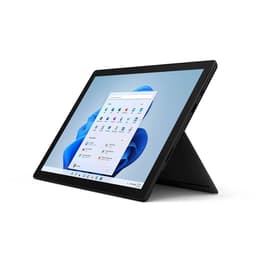
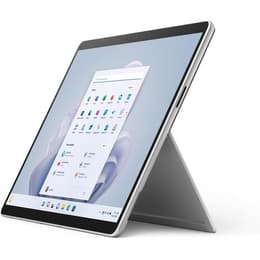
The Microsoft Surface Pro 7 (2019) and Microsoft Surface Pro 9 (2022) represent versatile generations of 2-in-1 hybrid computing devices. While both models feature the signature detachable keyboard design and kickstand functionality that bridge the gap between laptop productivity and tablet portability, the Surface Pro 9 introduces refined industrial design changes, expanded screen estate, and updated internal hardware. Operating on Windows, these devices offer familiar software environments while differing notably in their physical dimensions, display proportions, and overall processing capability.
Available Models
Storage
Processor
Memory
Scores
Durability
Evaluating the operational lifespan and maintenance expectations between these devices involves looking at release timelines, update schedules, and physical repairability.
- Software support timeline: The Surface Pro 9 benefits from a newer release date, extending its eligibility window for operating system updates and security patches compared to its predecessor.
- Hardware longevity: Both devices are engineered with sealed aluminum chassis, meaning internal component repairs require specialized care, though software optimization on the newer model maintains sustained efficiency over time.
- Practical lifespan: Users selecting the Surface Pro 9 gain additional years of primary manufacturer support, while the Surface Pro 7 remains well-suited for standard web browsing and document editing tasks as it enters its later support lifecycle.
Year of Release
2019
2022
Last Os Compatibility
Yes
Yes
OS
Windows 11
Windows 11
Performance
Daily operation and multitasking capabilities vary significantly due to architectural generations and available hardware configurations across both hybrid computers.
- Multitasking and responsiveness: The Surface Pro 9 handles heavy spreadsheet management, simultaneous browser tabs, and demanding office applications with noticeable fluidity, whereas the Surface Pro 7 manages everyday administrative tasks and media streaming reliably.
- Storage and memory configurations: Both models offer scalable storage tiers, but the Surface Pro 9 supports faster data read and write speeds alongside higher maximum memory options to accommodate complex professional workflows.
- Power management: Users report that the Surface Pro 9 delivers more consistent battery duration under moderate workloads, reducing the need for midday charging sessions compared to the earlier generation.
Graphic card
Integrated Graphics
Integrated Graphics
Screen quality
Visual output and display dimensions differ notably between the two generations, influencing media consumption and workspace layout.
- Display size and borders: The Surface Pro 9 expands the viewing area to thirteen inches with noticeably thinner bezels, while the Surface Pro 7 utilizes a twelve-inch panel surrounded by wider traditional borders.
- Refresh rate and visual smoothness: The Surface Pro 9 introduces a higher refresh rate option that results in smoother scrolling animations and responsive digital pen input, contrasting with the standard refresh rate on the predecessor.
- Brightness and outdoor visibility: Both screens provide clear text and vibrant color reproduction, though the Surface Pro 9 achieves higher peak brightness levels for comfortable viewing in brightly lit environments.
Resolution
2736 x 1824
2880 x 1920
Screen type
IPS
LED
Audiovisual
Multimedia capabilities, audio output, and recording features reflect incremental improvements across these two generations of portable devices.
- Camera hardware: The Surface Pro 9 features updated rear and front-facing camera sensors that improve clarity and low-light performance during video conferences compared to the Surface Pro 7.
- Audio recording and playback: Integrated studio microphones capture voice input clearly with reduced background interference on both models, while the built-in stereo speakers deliver balanced sound for casual media viewing.
- Video communication tools: The newer model includes automated software framing features that enhance virtual meeting experiences, making it a practical choice for remote collaboration.
Miscellaneous
Physical connectivity, port selections, and external hardware compatibility distinguish the day-to-day usability of these hybrid systems.
- Port selection and standards: The Surface Pro 9 transitions fully to modern high-speed connection ports, omitting legacy USB slots in favor of versatile multi-purpose connectivity, whereas the Surface Pro 7 retains a mix of older and newer connection standards.
- Physical dimensions and weight: Despite offering a larger screen, the Surface Pro 9 maintains a streamlined profile that balances easily on a lap or desk, closely matching the portability of the slightly smaller Surface Pro 7.
- Accessory compatibility: Both devices support detachable keyboards and active styluses, allowing users to transition seamlessly between laptop and tablet modes depending on their current workspace requirements.
Weight
775 g
883 g
Screen size
12
13
What the community thinks
When deciding between these two hybrid devices, user priorities play a central role in determining the ideal fit. Users prioritizing expansive screen space, modern connection ports, and sustained performance for demanding multitasking will find the Surface Pro 9 well-suited to their daily routines. Conversely, individuals seeking a straightforward, reliable tool for standard document processing, web browsing, and casual media consumption often find that the Surface Pro 7 meets their requirements effectively without unnecessary complexity. Real-world feedback highlights the improved screen dimensions and battery efficiency of the newer model, while acknowledging the enduring utility of the predecessor for basic office work.
For those looking to make a sustainable choice, opting for a quality-assured refurbished option provides access to these capable computing devices while extending the lifecycle of existing hardware. Ultimately, evaluating individual software demands and workspace habits ensures a satisfying selection that aligns with everyday personal or professional needs.