
Compare models

Microsoft Surface Laptop 3 13" Vs Microsoft Surface Pro 9 13"

  • 1-year minimum warranty
  • Free delivery on all orders
  • Free 30-day returns
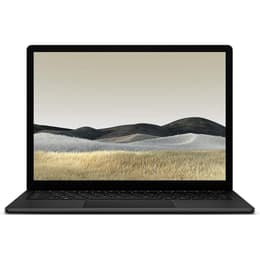
Microsoft Surface Laptop 3 13"
Starting at

Refurbished price:€255.00

Versus €689.99 new

See options
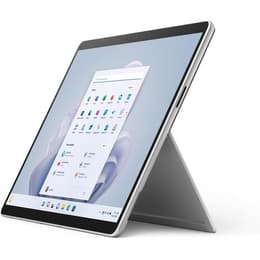
Microsoft Surface Pro 9 13"
Starting at

Refurbished price:€826.99

Versus €1,830.45 new

See options

Differences at a glance

The Microsoft Surface Laptop 3 13-inch (2019) and the Microsoft Surface Pro 9 13-inch (2022) represent distinct form factors within Microsoft's portable computing lineup. While the Surface Laptop 3 follows a traditional clamshell notebook design with an attached keyboard, the Surface Pro 9 functions as a versatile tablet equipped with a detachable keyboard cover. These two devices cater to different workflow preferences while sharing a commitment to portability, making them popular choices for mobile computing.

The primary differences lie in their mechanical construction, generation gap, and overall design philosophy. Both run on standard desktop operating systems, but their physical adaptability changes how users interact with them day-to-day.

Available Models

Storage

Processor

Memory

Scores

Durability

When examining longevity and physical construction, these devices offer different update timelines and repair considerations shaped by their respective release years and mechanical formats.

  • Release timeline and support: The Surface Pro 9 benefits from a newer release year, allowing for an extended window of firmware and operating system support compared to the earlier Surface Laptop 3.
  • Repairability and build: The traditional clamshell layout of the Surface Laptop 3 features a slightly more accessible internal layout for component servicing, whereas the tightly sealed tablet chassis of the Surface Pro 9 prioritizes slimness over straightforward internal component replacement.
  • Expected lifespan: Both models accommodate everyday workloads effectively, but the newer processor generation inside the Surface Pro 9 provides a higher probability of maintaining long-term software compatibility. Choosing a quality-assured refurbished option extends the active lifecycle of these devices while supporting sustainable technology habits.

Year of Release

2019

2022

OS

Windows 11

Windows 11

Performance

Under everyday workloads, both computers handle typical office tasks, web browsing, and document editing efficiently, though their underlying processing hardware reflects a multi-year generational gap.

  • Multitasking and responsiveness: The newer internal components in the Surface Pro 9 allow for smoother handling of demanding applications and rapid switching between numerous open browser tabs, while the Surface Laptop 3 manages standard multitasking adequately for routine office duties.
  • Storage and memory configurations: Both machines offer various solid-state drive configurations and random-access memory allocations to suit different workflow demands, ensuring quick file access and system boot times.
  • Thermal behavior and battery: The Surface Pro 9 utilizes fanless cooling configurations on certain processor variants for silent operation, whereas the Surface Laptop 3 incorporates active cooling fans that activate during intensive tasks to maintain steady processing speeds.

Graphic card

Integrated Graphics

Integrated Graphics

Screen quality

Visual output differs notably in aspect ratio flexibility, pixel density, and how users interact directly with the display surface during daily tasks.

  • Display technology: Both devices feature high-resolution touchscreens with vibrant color reproduction, but the Surface Pro 9 introduces a higher maximum refresh rate option for smoother scrolling and enhanced digital pen responsiveness.
  • Brightness and outdoor visibility: The panel on the Surface Pro 9 achieves higher peak luminance levels, making on-screen content easier to read in brightly lit environments or under direct sunlight compared to its counterpart.
  • Physical dimensions: The Surface Laptop 3 provides a fixed 13.5-inch traditional display workspace, while the Surface Pro 9 utilizes a slightly larger 13-inch PixelSense Flow screen with rounded corners designed specifically for multi-modal tablet and laptop usage.

Audiovisual

Multimedia capabilities vary to reflect the distinct physical design choices of a standard clamshell notebook versus a tablet-first architecture.

  • Video conferencing equipment: Both models include high-definition front-facing cameras equipped with facial recognition sensors for secure biometric sign-in, though the Surface Pro 9 integrates updated sensor placement for improved alignment during virtual meetings.
  • Rear imaging options: The Surface Laptop 3 omits a rear-facing camera entirely, whereas the Surface Pro 9 features an additional rear camera suitable for capturing quick document scans or photos in tablet mode.
  • Audio reproduction: Both devices deliver clear stereo sound through integrated speakers suited for casual media consumption, accompanied by dependable microphone arrays that isolate voice input effectively during calls.

Miscellaneous

Physical connectivity, port selection, and accessory compatibility dictate how these machines integrate into existing workspace setups.

  • Port selection: The Surface Laptop 3 includes a traditional mix of USB-A ports, a USB-C port, and a dedicated charging connection, while the Surface Pro 9 transitions fully to modern USB-C ports with high-speed data transfer capabilities while dropping older legacy connectors.
  • Physical footprint: The Surface Laptop 3 weighs slightly more as a complete clamshell unit, whereas the Surface Pro 9 offers a lighter standalone tablet body that becomes heavier only when the magnetic keyboard cover is attached.
  • Accessory integration: The Surface Pro 9 relies heavily on its detachable keyboard accessories and specialized digital pens, providing flexible input methods that the fixed keyboard deck of the Surface Laptop 3 does not replicate.

Weight

3000 g

883 g

Screen size

13

13

What the community thinks

User feedback from online communities highlights distinct operational preferences for each device. Owners of the Surface Laptop 3 frequently praise its comfortable typing experience, sturdy metal palm rest, and reliable performance for standard desktop tasks. Conversely, users of the Surface Pro 9 highlight its exceptional portability, versatile tablet conversion, and bright high-refresh-rate display as major daily advantages. Common criticisms for the Surface Laptop 3 center on its aging processor generation and limited port variety, while Surface Pro 9 users occasionally note that the detachable keyboard requires a stable surface for comfortable lap typing.

Users prioritizing a traditional, rigid lap-friendly keyboard and a classic clamshell setup may prefer the Surface Laptop 3. Meanwhile, users prioritizing maximum portability, digital pen annotation, and a flexible form factor that converts easily between a tablet and a desktop workstation will lean toward the Surface Pro 9. Opting for a quality-assured refurbished device provides a sustainable path to acquiring either model while reducing electronic waste.

Ultimately, the choice depends entirely on whether your daily routine calls for a fixed notebook experience or a detachable multi-purpose tablet architecture.
Our recent comparisons