
Compare models

Microsoft Surface Go 2 10" Vs Microsoft Surface Pro 7 12"

  • 1-year minimum warranty
  • Free delivery on all orders
  • Free 30-day returns
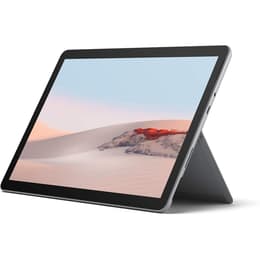
Microsoft Surface Go 2 10"
Starting at

Refurbished price:249.00

Versus €590.00 new

See options
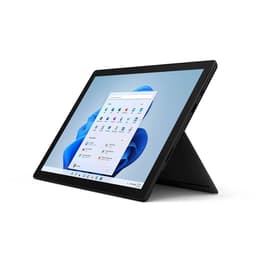
Microsoft Surface Pro 7 12"
Starting at

Refurbished price:336.00

Versus €1,399.00 new

See options

Differences at a glance

The Microsoft Surface Go 2, released in May 2020, and the Microsoft Surface Pro 7, launched in October 2019, are both versatile 2-in-1 devices designed to bridge the gap between a tablet and a laptop. While they share the Windows operating system and a similar design philosophy, they cater to different user needs through variations in size, processing power, and overall portability. The Surface Go 2 emphasizes compact design and mobility, whereas the Surface Pro 7 offers a larger display and more robust performance capabilities.

Available Models

Storage (GB)

Processor

Memory (GB)

Scores

Durability

When considering the longevity of these devices, several factors come into play, including their release timelines, software support, and physical construction.

  • Release Timeline & Software Support: The Surface Pro 7, released in late 2019, is slightly older than the Surface Go 2, which came out in mid-2020. Both devices run Windows 10 and are upgradable to Windows 11, ensuring continued software updates and security patches for several years. The practical lifespan for both will largely depend on Microsoft's ongoing support for their respective hardware generations.
  • Build Quality & Repairability: Both models feature a magnesium alloy construction, contributing to a solid feel. User experiences suggest the Surface Pro 7's screen, often with Gorilla Glass, offers reasonable durability against minor impacts. However, the Alcantara material on the optional Type Cover for the Pro 7 has been noted by some users to show wear over time. In terms of repairability, the Surface Go 2 received a score of 3 out of 10 from iFixit, an improvement over its predecessor, with easier screen removal but still many soldered components. The Surface Pro 7 is also generally considered difficult to repair.
  • Expected Practical Lifespan: Given their robust build and ongoing software support, both devices are expected to offer a practical lifespan of several years for typical usage. Users often report Surface devices lasting around 5 years with proper care.

Year of Release

2019

2019

Last Os Compatibility

Yes

Yes

OS

Windows 11

Windows 11

Performance

The performance capabilities of the Surface Go 2 and Surface Pro 7 differ significantly, impacting their suitability for various tasks.

  • Processing Power & Responsiveness: The Surface Go 2 is equipped with either an Intel Pentium Gold or an 8th-generation Intel Core m3 processor, paired with 4GB or 8GB of RAM. This configuration handles everyday tasks such as web browsing, email, and document editing smoothly. The Surface Pro 7, on the other hand, features 10th-generation Intel Core i3, i5, or i7 processors, with RAM options extending up to 16GB. This allows the Pro 7 to manage more demanding applications, extensive multitasking, and some creative workloads with greater efficiency. Users of the Pro 7 have noted that while it handles most tasks well, it can become warm under heavy load.
  • Storage Options: The Surface Go 2 offers storage configurations of 64GB eMMC or 128GB SSD. The Surface Pro 7 provides more expansive SSD options, ranging from 128GB up to 1TB, offering faster data access and more space for applications and files.
  • Real-world Usage: For users primarily focused on light productivity and media consumption, the Surface Go 2 provides adequate performance. However, for those requiring more power for professional applications, complex spreadsheets, or moderate photo editing, the Surface Pro 7 delivers a more capable experience.

Graphic card

Integrated Graphics

Integrated Graphics

Screen quality

The display is a central feature for both Surface devices, offering distinct viewing experiences based on their size and resolution.

  • Display Technology & Clarity: Both devices feature Microsoft's PixelSense IPS displays with a 3:2 aspect ratio, which is well-suited for productivity tasks by offering more vertical screen space. The Surface Go 2 has a 10.5-inch screen with a 1920 x 1280 resolution, resulting in a pixel density of 220 pixels per inch (PPI). The Surface Pro 7 boasts a larger 12.3-inch display with a higher 2736 x 1824 resolution, yielding a sharper 267 PPI.
  • Brightness & Color Accuracy: Both screens offer good brightness levels, typically around 390-408 nits, making them suitable for indoor and some outdoor use. They also provide good color accuracy and comfortable viewing angles, making them suitable for multimedia consumption and general use.
  • Viewing Experience: The Surface Pro 7's larger and higher-resolution display offers a more expansive and detailed visual experience, beneficial for tasks requiring more screen real estate or for immersive media viewing. The Surface Go 2's smaller screen prioritizes portability.

Resolution

1920 x 1280

2736 x 1824

Screen type

IPS

IPS

Camera

Audiovisual

Both the Surface Go 2 and Surface Pro 7 are equipped with camera systems designed for video conferencing and casual photography.

  • Camera System Capabilities: Both devices feature a 5-megapixel front-facing camera capable of 1080p HD video recording and an 8-megapixel rear-facing camera also capable of 1080p HD video.
  • Photography & Video Performance: The front-facing camera on the Surface Go 2 is generally well-regarded for video calls, providing clear images. However, some Surface Pro 7 users have reported that its front camera can appear blurry or apply an unwanted "smoothing" filter, which can be a concern for frequent video conferencing. The rear cameras on both are suitable for quick document scans or casual photos.
  • Audio Quality: Both models incorporate dual Studio Mics, designed to enhance voice clarity and reduce background noise during calls. They also feature decent integrated speakers that provide clear audio for media consumption and video calls.

Miscellaneous

Beyond core performance and display, several practical elements differentiate the Surface Go 2 and Surface Pro 7.

  • Connectivity & Ports: Both devices support Wi-Fi 6 and Bluetooth 5.0 for wireless connectivity. The Surface Go 2 includes a USB-C port, a Surface Connect port, a 3.5mm headphone jack, and a MicroSDXC card reader, with an optional LTE Advanced model for mobile data. The Surface Pro 7 offers a more comprehensive selection, adding a traditional USB-A port alongside its USB-C port, Surface Connect, 3.5mm jack, and MicroSDXC card reader. It is important to note that the USB-C port on the Surface Pro 7 does not support Thunderbolt 3.
  • Security & Handling: Both models feature Windows Hello facial recognition for secure and convenient login. The Surface Go 2 is significantly lighter at approximately 544 grams (1.2 pounds) and more compact with its 10.5-inch screen, making it highly portable. The Surface Pro 7, with its 12.3-inch screen, weighs around 775 grams (1.7 pounds), offering a larger display experience at the cost of some portability. Both include a built-in kickstand for adjustable viewing angles.

Weight

800 g

775 g

Screen size

10

12

What the community thinks

The Microsoft Surface Go 2 and Surface Pro 7 each offer distinct advantages, making them suitable for different user priorities. The Surface Go 2 is frequently praised for its enhanced portability, improved battery life compared to its predecessor, and a screen that is clear for its size. Its compact design makes it a strong contender for users who prioritize mobility and require a device for lighter tasks such as web browsing, email, and basic document creation. However, some users have noted that the base model's performance can be limited for more intensive applications, and accessories are sold separately.

The Surface Pro 7 is often lauded for its versatile 2-in-1 form factor, offering a larger and sharper display that enhances productivity and media consumption. Its more powerful processor options make it well-suited for professionals and students who need to run more demanding software or engage in extensive multitasking. Conversely, common criticisms include its battery life, which some users found did not meet expectations, and reports of inconsistent front camera quality.

Users prioritizing a highly portable device for everyday tasks and on-the-go use may find the Surface Go 2 to be a fitting choice. Those who require a larger screen, more robust processing power for productivity, and a more traditional laptop-like experience will likely lean towards the Surface Pro 7. Both devices represent quality-assured refurbished options, providing an eco-friendly alternative for consumers seeking reliable technology.

See all articles

Our recent comparisons