
HP EliteBook 840 G8 14" Vs Microsoft Surface Pro 7 12"

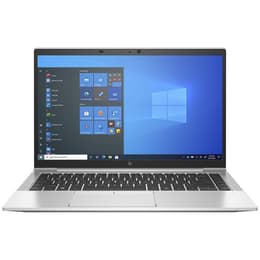
HP EliteBook 840 G8 14"
Starting at

Refurbished price:350.00

Versus €696.00 new

See options
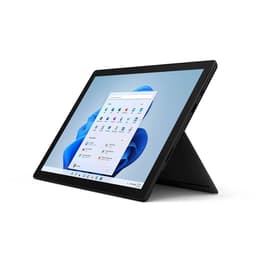
Microsoft Surface Pro 7 12"
Starting at

Refurbished price:334.00

Versus €1,399.00 new

See options

Ratings

The HP EliteBook 840 G8, released in 2021, and the Microsoft Surface Pro 7, launched in 2019, represent distinct approaches to portable computing. The EliteBook 840 G8 is a traditional business-oriented laptop, emphasizing robust build quality and extensive connectivity. In contrast, the Surface Pro 7 is a versatile 2-in-1 device, functioning as both a tablet and a laptop with its detachable keyboard and touch-enabled display. Both devices operate on the Windows platform, but their form factors and design philosophies cater to different user priorities.

Scores

Durability

When considering the longevity of these devices, several factors come into play, including their release timelines, software support, and physical durability.

  • Release Timeline and Software Support: The HP EliteBook 840 G8, being a 2021 release, benefits from a more recent hardware platform, specifically 11th Gen Intel processors. This generally translates to a longer period of official software updates and security patches from Microsoft compared to the Surface Pro 7, which was released in 2019 with 10th Gen Intel processors. Users prioritizing the longest possible software support will find the EliteBook 840 G8 to have an advantage.
  • Physical Durability and Repairability: The EliteBook 840 G8 is designed as a business laptop, often featuring MIL-STD 810H testing for ruggedness, indicating a build intended to withstand more demanding environments. It typically offers better repairability and upgradability for components like RAM and storage, which can extend its practical lifespan. The Surface Pro 7, while featuring a premium magnesium alloy construction, is less user-serviceable, with RAM and storage generally not upgradable. Its tablet-first design, while sleek, may not offer the same level of impact resistance as a dedicated business laptop.
  • Expected Practical Lifespan: For users who frequently upgrade internal components or require a device that can endure significant physical stress, the EliteBook 840 G8 may offer a longer practical lifespan. For those who prefer a sealed unit and prioritize portability, the Surface Pro 7's lifespan will be more tied to its initial configuration and the longevity of its non-upgradable components.

Year of Release

2020

2019

OS

Windows 11

Windows 11

Performance

The performance capabilities of these two devices are largely influenced by their respective processor generations and design considerations for thermal management.

  • Processor Capabilities: The HP EliteBook 840 G8 is equipped with 11th Generation Intel processors, offering improved processing power and integrated graphics performance compared to the 10th Generation Intel processors found in the Microsoft Surface Pro 7. This means the EliteBook can handle more demanding applications and complex multitasking with greater efficiency.
  • Multitasking and Responsiveness: For everyday tasks such as web browsing, document editing, and video conferencing, both devices provide a responsive experience. However, when running multiple resource-intensive applications simultaneously or engaging in tasks like light video editing or data analysis, the EliteBook 840 G8 generally offers smoother performance and quicker application loading times due to its newer processor architecture and often more generous, upgradable RAM configurations.
  • Storage and Thermal Management: Both devices typically come with fast SSD storage, contributing to quick boot times and data access. The EliteBook's traditional laptop form factor often allows for more effective thermal management, enabling sustained performance under heavy loads for longer durations. The more compact design of the Surface Pro 7, while excellent for portability, can sometimes lead to performance throttling during extended periods of intensive use to manage heat.

Memory (GB)

16 GB

8 GB

Processor

Core i5-1145G7

Core i5 - Gen 10 (G4)

Graphic card

Integrated Graphics

Integrated Graphics

Screen quality

The display experience on the HP EliteBook 840 G8 and the Microsoft Surface Pro 7 differs significantly in terms of size, technology, and interactive features.

  • Display Technology and Resolution: The HP EliteBook 840 G8 features a 14-inch Full HD (1920 x 1080) IPS anti-glare display, with various brightness options available, some including privacy features. The Microsoft Surface Pro 7, on the other hand, boasts a 12.3-inch PixelSense display with a higher resolution of 2736 x 1824 pixels, offering a sharper and more detailed visual experience. The Surface Pro 7's display also supports 10-point multi-touch and pen input, enhancing its versatility for creative tasks and note-taking.
  • Brightness and Viewing Experience: While the EliteBook offers options for high brightness levels and privacy screens, the Surface Pro 7's PixelSense display is known for its vibrant colors and excellent contrast, making it well-suited for media consumption and tasks requiring color accuracy. The smaller size and higher resolution of the Surface Pro 7 result in a higher pixel density, leading to crisper text and images.
  • Refresh Rate and Aspect Ratio: Both devices typically feature a standard 60Hz refresh rate. The EliteBook 840 G8 generally uses a 16:9 aspect ratio, common for laptops, while the Surface Pro 7 employs a 3:2 aspect ratio, which provides more vertical screen real estate, beneficial for productivity tasks like document editing and web browsing.

Audiovisual

The audio-visual capabilities, particularly camera and speaker performance, vary between these two devices, reflecting their primary design intentions.

  • Camera System Capabilities: The HP EliteBook 840 G8 typically includes a standard 720p HD webcam, suitable for general video conferencing. Some configurations may offer an infrared webcam for facial recognition. The Microsoft Surface Pro 7 features a more advanced camera setup, including a 5-megapixel front-facing camera and an 8-megapixel rear-facing camera, which generally provide clearer images for video calls and casual photography.
  • Microphone and Speaker Quality: The EliteBook 840 G8 often incorporates audio by Bang & Olufsen with dual stereo speakers and a multi-array microphone system, designed to enhance clarity during calls and provide a decent audio output. The Surface Pro 7 also features dual microphones, often referred to as Studio Mics, which are optimized for voice pickup in various environments, and its speakers deliver clear audio for media consumption.
  • Media Consumption Experience: For users who frequently engage in video calls or consume multimedia content, the Surface Pro 7's higher-resolution display and capable cameras offer a more immersive experience. The EliteBook, while providing solid audio, focuses more on functional communication for business environments.

Miscellaneous

Beyond core performance and display, several practical elements differentiate the user experience of the HP EliteBook 840 G8 and the Microsoft Surface Pro 7.

  • Connectivity Options: The HP EliteBook 840 G8 offers a comprehensive array of ports, including multiple USB-A ports, Thunderbolt 4 enabled USB-C ports, HDMI, and often an Ethernet port, catering to a wide range of peripherals and external displays without requiring adapters. It also supports Wi-Fi 6 and optional 4G/5G mobile broadband. The Surface Pro 7 has a more limited selection, typically featuring one USB-A, one USB-C (without Thunderbolt support), a Surface Connect port, and a headphone jack, requiring adapters for many common connections. It supports Wi-Fi 6 and Bluetooth.
  • Form Factor and Portability: The EliteBook 840 G8 is a traditional clamshell laptop, weighing around 1.32 kg to 1.46 kg depending on configuration, offering a stable typing experience. The Surface Pro 7 is a 2-in-1 detachable tablet, weighing approximately 0.77 kg (tablet only) and around 1.1 kg with its optional Type Cover, making it significantly lighter and more versatile for on-the-go use and tablet-style interaction.
  • Input Methods and Security: The EliteBook features a comfortable, often spill-resistant, backlit keyboard and a responsive trackpad, along with security features like a fingerprint reader and optional IR camera for facial recognition. The Surface Pro 7 relies on its optional Type Cover for a keyboard and trackpad experience, and supports pen input for drawing and note-taking, alongside facial recognition via Windows Hello.

Weight

2500 g

775 g

Screen size

14

12

User feedback for the HP EliteBook 840 G8 often praises its robust build quality, extensive port selection, and reliable performance for business and productivity tasks. Users appreciate its comfortable keyboard and the option for upgradable components, which contributes to its long-term usability. Some common criticisms include its relatively standard display compared to devices with higher resolutions or OLED panels, and its more traditional laptop form factor which makes it less adaptable than 2-in-1 devices.

The Microsoft Surface Pro 7 is frequently lauded for its exceptional portability, vibrant high-resolution touchscreen display, and the versatility offered by its 2-in-1 design and pen support. Users find it ideal for note-taking, creative work, and media consumption. However, common concerns include its more limited port selection, the fact that the Type Cover keyboard and Surface Pen are often sold separately, and its battery life, which some users find to be moderate for a full day of heavy use.

Users prioritizing a durable, traditional laptop experience with ample connectivity and potential for internal upgrades will find the HP EliteBook 840 G8 well-suited to their needs. This device is a strong choice for professionals or students who require a reliable workhorse for demanding applications and prefer a stable, fixed form factor. Conversely, users who value extreme portability, a high-quality touch display with pen input, and the flexibility of a tablet-laptop hybrid will likely lean towards the Microsoft Surface Pro 7. It caters well to creative individuals, students, or those who frequently present or take notes digitally. Both devices offer solid performance within their respective categories, and choosing a quality-assured refurbished option for either can be an eco-friendly alternative to purchasing new.

See all articles

Our recent comparisons