iPhone

Compare models
Differences at a glance
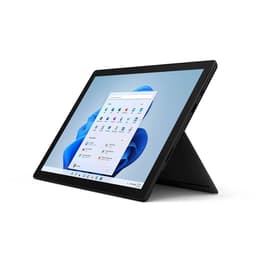
The HP EliteBook 840 G5, a business laptop released in 2018, and the Microsoft Surface Pro 7, a 2-in-1 tablet/laptop launched in 2019, offer distinct computing experiences. While both devices operate on the Windows platform, the EliteBook prioritizes a traditional laptop form factor with robust security features, whereas the Surface Pro 7 emphasizes portability and versatility with its detachable keyboard and touch-enabled display. These differences cater to varying user needs, from dedicated office work to flexible on-the-go productivity.
Storage
Processor
Memory
The expected practical lifespan of these devices is influenced by their release timelines, operating system support, and repairability. Both devices initially shipped with Windows 10, which reached its end of support on October 14, 2025, meaning technical assistance and security updates are no longer provided for that specific OS version. However, both the EliteBook 840 G5 and Surface Pro 7 are generally compatible with Windows 11, which is expected to receive security updates until approximately 2031, extending their software longevity.
Year of Release
Last Os Compatibility
OS
Performance capabilities differ between the two devices, largely due to their distinct processor generations and design philosophies. The EliteBook 840 G5 typically features 8th-generation Intel Core processors, while the Surface Pro 7 utilizes 10th-generation Intel Core processors, offering a generational leap in processing power.
Graphic card
The display experience is a key differentiator, with each device offering distinct characteristics in terms of size, technology, and functionality. The HP EliteBook 840 G5 features a larger 14-inch display, while the Microsoft Surface Pro 7 has a more compact 12.3-inch screen.
Resolution
Screen type
Both devices include integrated cameras and audio systems designed for communication and media, but with different strengths reflecting their primary use cases. The EliteBook 840 G5 is built as a business laptop, while the Surface Pro 7 is a versatile 2-in-1 device.
Beyond core performance and display, several practical elements contribute to the overall user experience, including connectivity, physical design, and security features. These aspects highlight the different design philosophies of a traditional business laptop versus a portable 2-in-1 device.
Weight
Screen size
Users evaluating the HP EliteBook 840 G5 and the Microsoft Surface Pro 7 will find that each device excels in different areas, aligning with distinct priorities. Common praise for the EliteBook 840 G5 often highlights its robust build quality, comfortable keyboard, and comprehensive port selection, making it a reliable choice for traditional office environments and business professionals. Users appreciate its upgradeable components, which can extend its practical life and allow for customization. Criticisms sometimes point to the base model's display brightness and its more conventional laptop form factor, which is less suited for highly mobile or tablet-centric tasks.
The Microsoft Surface Pro 7 is frequently lauded for its vibrant, high-resolution touch display, versatile 2-in-1 design with a kickstand, and strong performance for its compact size. Its portability and pen support make it a favored option for students, artists, and professionals who require a flexible device for presentations, note-taking, or creative work on the go. However, frequent concerns include its comparatively shorter battery life, especially under heavy use, and its limited repairability due to soldered components and a glued screen. The design, while iconic, has also been noted for its somewhat dated bezels.
Users prioritizing a traditional, durable laptop experience with extensive connectivity and upgrade potential may find the HP EliteBook 840 G5 better suited to their needs. Conversely, those who value a highly portable, touch-enabled device with a superior display and 2-in-1 versatility, despite potential battery life trade-offs and repair challenges, may lean toward the Microsoft Surface Pro 7. Both devices can be excellent quality-assured refurbished options, offering a sustainable choice for consumers looking to extend the life cycle of electronic products.