

Compare models

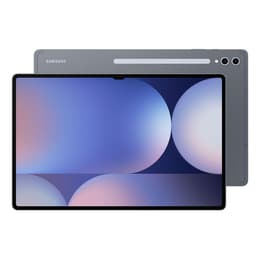
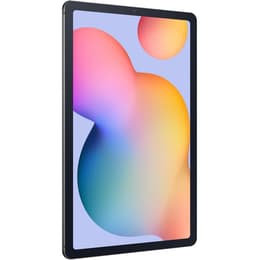
Galaxy Tab S10 Ultra (14.6", 2024) Vs Galaxy Tab S6 Lite (10.4", 2022)

  • 1-year minimum warranty
  • Free delivery on all orders
  • Free 30-day returns
Galaxy Tab S10 Ultra (14.6", 2024)
Starting at

Refurbished price:€762.00

Versus €1,454.07 new

See options
Galaxy Tab S6 Lite (10.4", 2022)
Starting at

Refurbished price:€203.00

Versus €499.00 new

See options

Differences at a glance

The Samsung Galaxy Tab S10 Ultra (2024) and the Samsung Galaxy Tab S6 Lite (2022) represent two vastly different tiers and eras within Samsung's tablet lineup, catering to entirely distinct use cases. While the Galaxy Tab S10 Ultra is a massive, high-performance productivity powerhouse built for demanding workflows, the Galaxy Tab S6 Lite is a compact, portable device designed for casual media consumption and note-taking. Both tablets run on Android with Samsung's custom interface, but they offer contrasting hardware capabilities and physical form factors that shape everyday user experiences.

Available Models

Colour

Storage

Scores

Durability

When examining longevity and durability, the Galaxy Tab S10 Ultra and Galaxy Tab S6 Lite differ significantly due to their release years and market positioning.

  • Software support lifecycle: The Galaxy Tab S10 Ultra benefits from an extensive multi-year software update commitment extending well into the 2030s, whereas the Galaxy Tab S6 Lite operates closer to the end of its primary update window.
  • Build and repair framework: Both tablets feature sturdy metal frames, though the larger surface area of the Ultra requires more careful handling, and repairability for both models relies on specialized component replacement procedures.
  • Expected practical lifespan: The higher processing headroom and larger memory capacity of the Galaxy Tab S10 Ultra ensure it remains viable for intensive tasks for a longer duration compared to its lighter counterpart.

Year of Release

2024

2022

OS

Android

Android

Performance

Performance capabilities diverge sharply between these two models, impacting how they handle multitasking, demanding applications, and daily workloads.

  • System responsiveness and multitasking: The Galaxy Tab S10 Ultra handles heavy applications, split-screen workflows, and graphic-intensive mobile games smoothly, while the Galaxy Tab S6 Lite is best suited for lighter, single-app tasks like web browsing and reading.
  • Storage configurations: The Galaxy Tab S10 Ultra provides generous internal storage tiers accompanied by substantial RAM, whereas the Galaxy Tab S6 Lite offers more modest base storage that can be expanded using a microSD card slot.
  • Battery behavior: The Galaxy Tab S10 Ultra houses a large capacity battery to support its expansive screen through full workdays, while the Galaxy Tab S6 Lite manages efficient power draw for modest daily use despite its smaller battery size.

Screen quality

Display characteristics form one of the most prominent distinctions between these two devices, dictating visual immersion and portability.

  • Display technology: The Galaxy Tab S10 Ultra features a vast 14.6-inch vibrant OLED display with deep blacks and high contrast, whereas the Galaxy Tab S6 Lite utilizes a standard 10.4-inch LCD panel with conventional color reproduction.
  • Resolution and sharpness: Both screens offer high pixel densities for crisp text rendering, but the Ultra's expansive canvas provides significantly more workspace for multi-window productivity.
  • Outdoor and motion clarity: The Galaxy Tab S10 Ultra delivers high peak brightness levels and a fluid refresh rate for smooth scrolling, while the Galaxy Tab S6 Lite features standard brightness and a traditional refresh rate suitable for indoor reading.

Resolution

1848 x 2960

1200 x 2000

Pixel density

240ppp

230ppp

Audiovisual

Audio-visual hardware varies to match each tablet's intended role as either a multimedia production tool or a casual viewing companion.

  • Camera capabilities: The Galaxy Tab S10 Ultra is equipped with dual front and rear camera setups capable of handling video calls and document scanning with clarity, while the Galaxy Tab S6 Lite features a single basic front and rear camera configuration.
  • Speaker output: Both models include multi-speaker sound systems tuned for media playback, though the larger acoustic chamber of the Ultra delivers a richer audio experience for movies and music.
  • Microphone performance: The Galaxy Tab S10 Ultra integrates multiple far-field microphones that isolate voice clarity effectively during virtual meetings and video recordings.

Miscellaneous

Practical everyday features, connectivity standards, and physical dimensions shape how comfortably each tablet integrates into specific routines.

  • Connectivity standards: The Galaxy Tab S10 Ultra supports rapid Wi-Fi standards and optional high-speed cellular connectivity, whereas the Galaxy Tab S6 Lite relies on older generation Wi-Fi and Bluetooth protocols.
  • Physical dimensions and weight: The Galaxy Tab S10 Ultra is exceptionally thin yet heavy due to its large 14.6-inch footprint, making it ideal for desk setups, while the Galaxy Tab S6 Lite is lightweight and compact for effortless one-handed holding.
  • Accessory integration: Both tablets include stylus support out of the box, though the Ultra benefits from advanced low-latency tracking suitable for digital artists and precise note-takers.

Weight

576 g

467 g

Screen size (in)

14.6

10.4

Network

Wi-Fi

Wi-Fi + 4G

Carrier compatibility

Unlocked

Unlocked

Connector

USB Type-C

USB Type-C

What the community thinks

Choosing between these two Samsung tablets depends heavily on individual workflow requirements and portability preferences. Users prioritizing expansive screen space, heavy multitasking capabilities, and top-tier performance will find the Galaxy Tab S10 Ultra well-suited to their needs. Conversely, users prioritizing lightweight portability, simple note-taking, and casual media viewing will lean toward the Galaxy Tab S6 Lite as a practical everyday companion.

For buyers exploring sustainable purchasing options, choosing a quality-assured refurbished option provides a reliable and eco-friendly alternative that extends the lifecycle of these electronics. Evaluating core priorities like screen size and app demands will ultimately guide you toward the right device for your routine.


Our recent comparisons