

Dell Latitude 7390 13" Vs Lenovo ThinkPad L390 13"

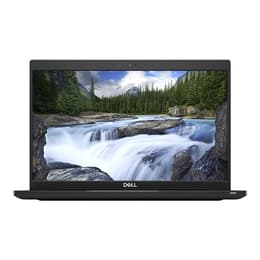
Dell Latitude 7390 13"
Starting at

Refurbished price:395.00

Versus €733.00 new

See options
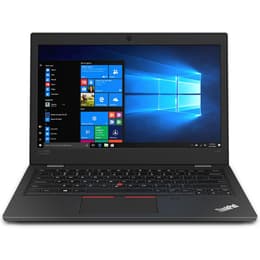
Lenovo ThinkPad L390 13"
Starting at

Refurbished price:299.00

Versus €766.00 new

See options

The Dell Latitude 7390 13 and the Lenovo ThinkPad L390 13 are both compact business-oriented laptops designed for productivity and portability. Released in 2018 and 2019 respectively, these devices offer a blend of performance and features tailored for professional use. While sharing a similar form factor and target audience, the ThinkPad L390 13 generally offers slightly more modern internal components and a focus on user-centric features, whereas the Latitude 7390 13 emphasizes robust security and a premium build.

Scores

Durability

When considering the long-term usability of these laptops, several factors come into play, including their initial release, expected software support, and physical resilience.

  • Release Timeline: The Dell Latitude 7390 13 was released in 2018, making it slightly older than the Lenovo ThinkPad L390 13, which debuted in 2019. This difference in release year can impact the duration of official software updates and overall technological relevance.
  • Software Longevity: Both laptops, running on Windows, benefit from Microsoft's extended support for their operating systems. However, the ThinkPad L390 13, being a year newer, may receive official Windows updates for a slightly longer period, potentially extending its secure and feature-rich operational life.
  • Build Quality and Repairability: Both models are built with durability in mind for business environments. The Latitude 7390 features an alloy chassis and soft-touch paint, with some configurations offering woven carbon fiber for enhanced durability. The ThinkPad L390 incorporates an aluminum lid and a glass fiber reinforced polymer body, and has undergone MIL-STD 810G durability testing. User reports suggest both are generally robust, though the ThinkPad's design often allows for easier access to internal components for upgrades or repairs.

Year of Release

2017

2018

Last Os Compatibility

Yes

Yes

OS

Windows 11

Windows 11

Performance

Both the Dell Latitude 7390 13 and the Lenovo ThinkPad L390 13 are equipped to handle typical business and productivity tasks, though there are nuances in their configurations and real-world performance.

  • Processing Power: Both laptops typically feature 8th generation Intel Core i5 or i7 processors. The ThinkPad L390 13 often comes with slightly newer iterations of these 8th gen processors, which can offer marginal improvements in efficiency and clock speeds for demanding applications and multitasking.
  • Memory and Storage: The Latitude 7390 13 generally supports up to 16GB of DDR4 RAM, while the ThinkPad L390 13 can be configured with up to 32GB of DDR4 RAM, providing more headroom for intensive multitasking or future-proofing. Both models offer fast SSD storage options, contributing to quick boot times and responsive application loading.
  • Battery Performance: The Dell Latitude 7390 13 is often cited with a 60 Whr battery, with some configurations offering over 10 hours of battery life in real-world usage. The Lenovo ThinkPad L390 13 typically features a 45 Whr battery, with Lenovo claiming up to 14 hours of battery life, though real-world usage often sees around 8-12 hours. The ThinkPad also supports Rapid Charge technology, allowing for quick recharges.

Memory (GB)

8 GB

8 GB

Processor

Core i7 - Gen 8 (U)

Core i5 - Gen 8 (U)

Graphic card

Integrated Graphics

Integrated Graphics

Screen quality

The visual experience on these 13-inch laptops is crucial for productivity, and both offer capable displays with some distinctions.

  • Display Technology and Resolution: Both the Latitude 7390 13 and the ThinkPad L390 13 commonly feature 13.3-inch Full HD (1920x1080) IPS displays, providing sharp images and good viewing angles. Some configurations of the Latitude 7390 also offered a lower resolution HD (1366x768) option, which is less common on the L390.
  • Brightness and Clarity: The Dell Latitude 7390 13's display typically offers a brightness of around 300 nits, which is suitable for indoor and some outdoor use. The Lenovo ThinkPad L390 13's display also generally reaches around 250-300 nits of brightness. Both often come with anti-glare finishes, which helps reduce reflections in various lighting conditions.
  • Touchscreen Options: Both models offer optional touchscreen configurations, with the ThinkPad L390 also having a 2-in-1 Yoga variant that fully supports touch and pen input.

Resolution

1920 x 1080

1366 x 768

Screen type

IPS

LCD

Camera

Audiovisual

For communication and multimedia, the audio and visual components of these laptops provide a functional experience for business users.

  • Camera Quality: Both the Dell Latitude 7390 13 and the Lenovo ThinkPad L390 13 typically include a 720p webcam. User reviews for both suggest that the camera quality is generally adequate for video conferencing in well-lit environments but may not offer exceptional detail or low-light performance.
  • Microphone and Speakers: Both laptops are equipped with integrated microphones suitable for calls and recordings. The ThinkPad L390 features Dolby Audio tuning for its speakers, which generally provides clear sound for media consumption and video calls. The Latitude 7390's speakers are generally considered functional for typical use.
  • Additional Features: The Latitude 7390 offers an optional infrared camera for facial recognition, enhancing login security.

Miscellaneous

Beyond core performance and display, several practical features differentiate these two business laptops, impacting daily usability and connectivity.

  • Connectivity Options: Both laptops offer a comprehensive set of ports. The Dell Latitude 7390 13 includes USB 3.1, HDMI, Ethernet, a microSD card reader, and notably, Thunderbolt 3 over USB-C in many configurations, offering versatile high-speed connectivity. The Lenovo ThinkPad L390 13 also provides USB-C, USB 3.1, HDMI, and a microSD card reader, with some models featuring an Ethernet extension connector.
  • Biometric Security: The Latitude 7390 offers optional features like a fingerprint reader and infrared facial recognition for secure logins. The ThinkPad L390 also includes an optional fingerprint reader and a discrete TPM 2.0 chip for enhanced data security.
  • Portability and Build: The Dell Latitude 7390 13 starts at a lighter weight of approximately 1.17 kg (2.58 lbs), making it highly portable. The Lenovo ThinkPad L390 13 is slightly heavier, starting around 1.46 kg (3.22 lbs). Both are constructed with durable materials suitable for business travel.

Weight

1500 g

1460 g

Screen size

13

13

The Dell Latitude 7390 13 and the Lenovo ThinkPad L390 13 are both solid choices for users seeking a compact and reliable business laptop. Users often praise the Latitude 7390 for its robust build quality, comprehensive security features, and the inclusion of Thunderbolt 3, which offers extensive connectivity options. Some users have noted its keyboard travel might be shallower than preferred, and its design, while durable, might appear less modern compared to newer devices.

The ThinkPad L390 is frequently lauded for its comfortable keyboard, a hallmark of the ThinkPad line, and its overall balance of features for its category. Its slightly newer release and potential for higher RAM configurations are also often highlighted. Some common criticisms include its slightly heavier build compared to some competitors and display brightness that, while adequate, might not be ideal for bright outdoor conditions.

Users prioritizing a lighter device with strong security options and Thunderbolt 3 connectivity may find the Dell Latitude 7390 13 well-suited to their needs. Conversely, those who value a superior typing experience, higher maximum RAM capacity, and a slightly more recent internal component set might lean toward the Lenovo ThinkPad L390 13. Both laptops are excellent candidates for an eco-friendly, quality-assured refurbished option, providing reliable performance for various professional and academic tasks.

See all articles

Our recent comparisons