

Dell Latitude 5520 15" Vs HP EliteBook 830 G5 13"

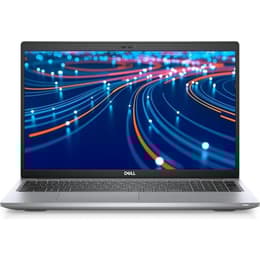
Dell Latitude 5520 15"
Starting at

Refurbished price:490.00

Versus €1,251.88 new

See options
HP EliteBook 830 G5 13"
Starting at

Refurbished price:333.00

Versus €1,160.00 new

See options

Ratings

The Dell Latitude 5520 15, released in 2021, and the HP EliteBook 830 G5 13, launched in 2018, are both business-oriented laptops designed for productivity in professional environments. These devices primarily differentiate themselves through their release year, screen size, and the generation of their internal components. Both run on the Windows operating system, providing a consistent software experience for users.

Scores

Durability

The practical lifespan of a laptop is influenced by its release date, ongoing software support, and physical durability. The Dell Latitude 5520 15, being a more recent model, generally benefits from a longer expected period of software updates and security patches compared to the HP EliteBook 830 G5 13.

  • Release Timeline: The Latitude 5520 15 was introduced in 2021, making it three years newer than the EliteBook 830 G5 13, which debuted in 2018. This difference impacts the duration of official operating system support and driver updates.
  • OS Support: Both laptops operate on Windows, and their software longevity is tied to Microsoft's update policies and hardware compatibility. The newer Latitude 5520 15 is likely to receive feature updates and security patches for a longer period, extending its functional life.
  • Durability Standards: Both models are constructed to business-grade durability standards. The Latitude 5520 15 features a durable chassis and lid, while the EliteBook 830 G5 13 has passed MIL-STD tests for resistance to shock and vibration.

Year of Release

2020

2017

Last Os Compatibility

Yes

Yes

OS

Windows 11

Windows 11

Performance

The performance capabilities of these laptops are largely determined by their internal components, with the Dell Latitude 5520 15 featuring a more recent generation of processing power. This translates to differences in how smoothly demanding applications run and the overall responsiveness of the system.

  • Processing Power: The Latitude 5520 15 incorporates a more current generation of processors, which generally provides enhanced speed and efficiency for complex tasks, data processing, and multitasking compared to the EliteBook 830 G5 13's earlier generation processor.
  • Multitasking Capability: The Dell Latitude 5520 15 typically offers higher maximum RAM configurations, supporting up to 64GB. This allows for more applications to run simultaneously without slowdowns, which can be beneficial for users who frequently switch between many programs. The EliteBook 830 G5 13 supports up to 32GB of RAM, offering solid multitasking for its generation.
  • Storage Options: Both laptops offer fast solid-state drive (SSD) storage options, contributing to quick boot times and rapid application loading. The Latitude 5520 15 may support newer, faster SSD technologies, potentially offering a slight edge in data transfer speeds.

Memory (GB)

16 GB

8 GB

Processor

Core i5-1135G7

Core i5 - Gen 8 (U)

Graphic card

Integrated Graphics

Integrated Graphics

Screen quality

The visual experience on these laptops differs primarily in screen size and display technology, impacting how content is viewed and the overall workspace available for users.

  • Display Size and Type: The Dell Latitude 5520 15 features a larger 15.6-inch Full HD (1920x1080) IPS display, providing more screen real estate for productivity and media consumption. The HP EliteBook 830 G5 13, with its 13.3-inch Full HD (1920x1080) IPS screen, offers a more compact form factor.
  • Brightness and Clarity: Both models generally offer displays suitable for indoor office environments. The Latitude 5520 15 can be configured with panels offering up to 400 nits of brightness. The EliteBook 830 G5 13 also has configurations with up to 400 nits, but some standard options are around 220 nits.
  • Viewing Experience: The larger screen of the Latitude 5520 15 can enhance the experience for tasks requiring more visual information, such as spreadsheets or graphic design. The EliteBook 830 G5 13's smaller screen is well-suited for portability and users who prefer a more condensed workspace.

Resolution

1920 x 1080

1920 x 1080

Screen type

LCD

IPS

Camera

Audiovisual

For communication and media consumption, the camera, microphone, and speaker quality are important considerations. Both laptops are equipped for standard business use, but there are subtle differences in their capabilities.

  • Webcam Performance: Both the Latitude 5520 15 and EliteBook 830 G5 13 typically include HD webcams suitable for video conferencing. The Latitude 5520 15 features a privacy shutter and optional IR for facial recognition. The EliteBook 830 G5 13 also offers an optional IR camera for Windows Hello.
  • Microphone Quality: Both devices feature integrated microphones designed to capture voice clearly for online meetings and dictation. The EliteBook 830 G5 13 includes a noise-cancelling microphone system. Users generally report clear audio capture for standard communication needs on both models.
  • Speaker Output: The integrated speakers on both laptops are designed for clear voice reproduction during calls and for general media consumption. The EliteBook 830 G5 13 features Bang & Olufsen tuned speakers, which can provide a robust sound experience. The Latitude 5520 15 has stereo speakers.

Miscellaneous

Beyond core performance and display, practical elements like connectivity, physical ports, and overall design contribute significantly to the user experience of these business laptops.

  • Connectivity Options: The Dell Latitude 5520 15 supports Wi-Fi 6 and Bluetooth 5.1 or 5.2, offering potentially faster and more stable wireless connections. The HP EliteBook 830 G5 13 features Wi-Fi 5 (802.11ac) and Bluetooth 4.2.
  • Port Selection: The Latitude 5520 15 typically offers a comprehensive selection of ports, including two Thunderbolt 4 (USB-C), two USB 3.2 Gen 1 (USB-A), HDMI 2.0, RJ45 Ethernet, and a MicroSD card reader. The EliteBook 830 G5 13 also features a Thunderbolt 3 (USB-C) port, two USB 3.0 Type-A ports, HDMI 1.4b, and an RJ-45 Ethernet port.
  • Portability and Design: The EliteBook 830 G5 13, with its 13.3-inch screen, is lighter, starting at 1.33 kg (2.9 lbs), making it highly portable. The Latitude 5520 15, with its 15.6-inch screen, starts at 1.59 kg (3.5 lbs), offering a larger workspace at the expense of some portability.

Weight

1590 g

1510 g

Screen size

15

13

User feedback for the Dell Latitude 5520 15 often highlights its solid build quality, reliable performance for everyday business tasks, and comprehensive port selection. Many users appreciate the larger screen for enhanced productivity. Some criticisms occasionally mention its weight compared to more compact alternatives. For the HP EliteBook 830 G5 13, users frequently praise its excellent portability, robust design, and comfortable keyboard for extended typing sessions. A common consideration, given its earlier release, can be the battery life compared to newer models and its performance for very demanding applications.

Users prioritizing a larger display, more recent internal components for extended future compatibility, and a wider array of direct ports may find the Dell Latitude 5520 15 better suited to their needs. This device is well-aligned for professionals who work with extensive spreadsheets, multiple applications simultaneously, or require a larger visual workspace. Conversely, users who value maximum portability, a compact form factor, and a lighter device for frequent travel will likely lean towards the HP EliteBook 830 G5 13. Both laptops are available as quality-assured refurbished options, providing an eco-friendly alternative for those seeking reliable business machines. The choice ultimately depends on whether a larger screen and newer performance or superior portability and a more compact design are the primary considerations for their daily workflow.

See all articles

Our recent comparisons