

Lenovo ThinkPad L390 13" Vs Lenovo ThinkPad T14 G1 14"

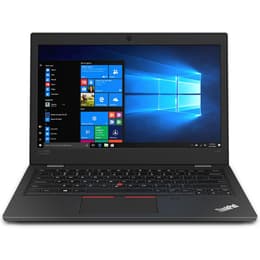
Lenovo ThinkPad L390 13"
Starting at

Refurbished price:299.00

Versus €766.00 new

See options
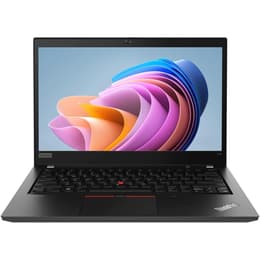
Lenovo ThinkPad T14 G1 14"
Starting at

Refurbished price:262.00

Versus €612.00 new

See options

Ratings

The Lenovo ThinkPad L390, released in 2019, and the Lenovo ThinkPad T14 Gen 1, launched in 2020, are both business-oriented laptops designed for productivity. While they share the robust build quality and user-centric features characteristic of the ThinkPad line, the T14 Gen 1 introduces more modern internal components and a slightly larger display, offering an evolution in performance and connectivity. Both devices operate on the Windows platform, providing a familiar user experience for professionals and students alike.

Scores

Durability

Both the ThinkPad L390 and T14 Gen 1 are built to withstand daily use, reflecting the ThinkPad series' reputation for durability. The primary differences in their practical lifespan stem from their release dates and component generations.

  • Release Timeline: The L390, released in 2019, features 8th generation Intel processors, while the T14 Gen 1, from 2020, offers 10th generation Intel or AMD Ryzen 4000 series processors. This newer hardware in the T14 Gen 1 generally translates to a longer period of optimal performance and software compatibility.
  • Software Support: Both laptops run Windows, which receives long-term updates. However, the T14 Gen 1's newer components may receive driver and firmware updates for a slightly extended period, potentially offering a longer supported lifespan from the manufacturer. Lenovo typically provides 4-5 years of BIOS and driver updates for its business laptops.
  • Repairability: ThinkPads are generally known for their user-friendly design regarding maintenance and component upgrades. Both models allow for RAM and SSD upgrades, contributing to their longevity by enabling users to refresh key components as needed.

Year of Release

2018

2019

OS

Windows 11

Windows 11

Performance

The performance capabilities of these two ThinkPads differ primarily due to their respective processor generations and available memory configurations, impacting their suitability for various workloads.

  • Processing Power: The L390 is equipped with previous-generation processors, which handle everyday tasks, web browsing, and standard office applications smoothly. The T14 Gen 1, with its newer generation processors, provides a noticeable boost in performance, making it more capable for demanding applications, extensive multitasking, and some content creation tasks.
  • Multitasking and Memory: The L390 supports up to 32GB of RAM, which is ample for most users. The T14 Gen 1, however, can be configured with up to 48GB or even 64GB of RAM (depending on the specific configuration), offering greater headroom for power users who frequently run multiple applications simultaneously or work with large datasets.
  • Battery Behavior: The L390 typically features a 45Wh battery, providing a full workday's worth of power for general productivity. The T14 Gen 1 often comes with a 50Wh or 57Wh battery, which, combined with more efficient newer processors, can result in longer usage times, particularly for AMD configurations.

Memory (GB)

8 GB

16 GB

Processor

Core i5 - Gen 8 (U)

Core i5 - Gen 10 (U)

Graphic card

Integrated Graphics

Intel HD Graphics

Screen quality

Both laptops offer displays suitable for productivity, but there are distinctions in size, available panel options, and overall viewing experience.

  • Display Technology and Resolution: Both the L390 and T14 Gen 1 commonly feature 13.3-inch and 14-inch Full HD (1920x1080) IPS displays, respectively, providing clear visuals and comfortable viewing angles. The T14 Gen 1 also offers higher-resolution options, including 4K UHD, for users who prioritize maximum screen detail.
  • Brightness and Clarity: The L390's display typically offers around 250-270 nits of brightness, which is adequate for indoor environments. The T14 Gen 1 provides a wider range of brightness options, with some panels reaching 400 or 500 nits, improving visibility in brighter conditions or for outdoor use.
  • Screen Size and Viewing Experience: The L390's 13.3-inch screen offers a compact form factor, ideal for portability. The T14 Gen 1's 14-inch display provides a slightly larger workspace, which can be beneficial for multitasking or viewing detailed content, without significantly increasing the overall device footprint.

Resolution

1366 x 768

1920 x 1080

Audiovisual

For communication and media consumption, both ThinkPads provide standard features, with some minor enhancements in the newer model.

  • Camera System: Both the L390 and T14 Gen 1 are equipped with a 720p HD webcam, which is standard for business laptops of their respective generations. This resolution is suitable for video conferencing and online meetings. The T14 Gen 1 also offers an optional IR camera for enhanced security features like Windows Hello facial recognition.
  • Microphone Quality: Both models feature dual-array microphones, designed to capture clear audio and reduce background noise during calls.
  • Speaker Output: Stereo speakers with Dolby Audio are present in both laptops, providing clear sound for video calls, presentations, and casual media playback. The T14 Gen 1's speakers are often noted for a slightly better sound stage compared to some other ThinkPads.

Miscellaneous

Beyond core performance, several practical elements differentiate these two ThinkPads, influencing their usability and connectivity options.

  • Connectivity Options: The L390 supports Wi-Fi 5 (802.11ac) and Bluetooth 5.0. The T14 Gen 1 offers more advanced connectivity, including Wi-Fi 6 (802.11ax) and Bluetooth 5.1, providing faster wireless speeds and improved network efficiency. Intel models of the T14 Gen 1 also include Thunderbolt 3, enabling high-speed data transfer and versatile docking solutions.
  • Port Types: The L390 includes USB-C, USB-A, HDMI, and a microSD card reader. The T14 Gen 1 expands on this with a dedicated Ethernet port (RJ-45) and, in Intel configurations, Thunderbolt 3 ports, offering more comprehensive wired connectivity and peripheral support.
  • Weight and Dimensions: The L390, with its 13.3-inch screen, weighs around 1.46 kg and has dimensions of 321.8mm x 224.2mm x 18.8mm. The T14 Gen 1, despite its larger 14-inch display, maintains a similar weight profile, starting at approximately 1.46 kg, and measures 329mm x 227mm x 17.9mm, making both highly portable for their respective screen sizes.

Weight

1460 g

2500 g

Screen size

13

14

User feedback for the Lenovo ThinkPad L390 often highlights its solid build quality, comfortable keyboard, and adequate performance for general productivity tasks. It is frequently praised for its portability and reliability as a workhorse machine. Some common criticisms include its previous-generation processors and display brightness that might be less suitable for very bright environments.

The ThinkPad T14 Gen 1 generally receives positive remarks for its improved performance, enhanced connectivity options like Thunderbolt 3 (on Intel models), and longer battery life, especially with AMD configurations. Users appreciate its robust design and suitability for more demanding workloads. Some Intel models have occasionally faced comments regarding thermal management under sustained heavy load.

Users prioritizing a compact and reliable laptop for everyday office work, web browsing, and light multitasking may find the ThinkPad L390 well-suited to their needs. Its slightly smaller footprint makes it a good choice for those who value maximum portability. Conversely, users requiring more processing power for complex applications, extensive multitasking, or those who benefit from advanced connectivity standards like Wi-Fi 6 and Thunderbolt 3 will likely lean towards the ThinkPad T14 Gen 1. Its larger screen also offers a more expansive viewing area for productivity. Both models are available as quality-assured refurbished options, providing an eco-friendly alternative for consumers seeking dependable business laptops.

See all articles

Our recent comparisons