
Compare models
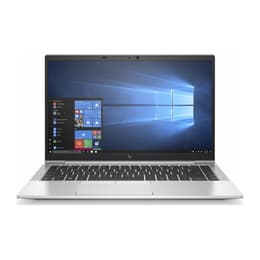
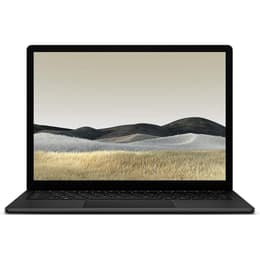
HP EliteBook 840 G7 14" Vs Microsoft Surface Laptop 3 13"
- 1-year minimum warranty
- Free delivery on all orders
- Free 30-day returns
Differences at a glance
The HP EliteBook 840 G7 14" (released in 2020) and the Microsoft Surface Laptop 3 13" (released in 2019) represent reliable business-class laptop options designed for productivity and mobile professionals. While both devices offer robust build quality and professional aesthetics, they differ significantly in their approach to screen size, port selection, and keyboard mechanics. Choosing a quality-assured refurbished option for either model provides an eco-friendly alternative for everyday computing needs.
Available Models
Storage
Processor
Memory
Scores
Durability
When evaluating long-term usability, both machines offer solid construction designed to withstand daily transport, though their hardware support timelines and repairability characteristics differ.
- Software longevity: Both laptops run standard desktop operating systems with ongoing security updates, though support duration depends on the specific processor generation installed and manufacturer driver lifecycles.
- Repairability and build: The HP EliteBook features a more modular design with accessible internal components, while the Microsoft Surface Laptop prioritizes a sleek, sealed chassis that makes internal component replacement more complex.
- Expected lifespan: Solid-state storage and durable metal chassis construction ensure both devices maintain reliable performance for routine multitasking, document editing, and web browsing over several years of ownership.
Year of Release
2019
2019
OS
Windows 11
Windows 11
Performance
Performance capabilities across both laptops cater efficiently to standard office tasks, web research, and remote collaboration, supported by varying configurations of system memory and internal storage.
- Multitasking and responsiveness: Both devices handle multiple browser tabs, document processing, and video conferencing smoothly, though configurations with higher random access memory maintain stability during heavier workloads.
- Storage and battery behavior: Solid-state drive options provide rapid boot times and quick file transfers, while battery longevity varies under continuous workloads, typically requiring a recharge during a full workday of mixed usage.
- Thermal management: Passive and active cooling designs maintain comfortable keyboard temperatures during standard tasks, though intensive applications may trigger fan noise on the HP EliteBook.
Graphic card
Integrated Graphics
Integrated Graphics
Screen quality
Display configurations on these laptops emphasize different aspect ratios and visual workspace layouts tailored to writing, spreadsheet management, and media consumption.
- Display technology and size: The HP EliteBook features a 14-inch traditional widescreen layout, whereas the Microsoft Surface Laptop utilizes a taller 13.5-inch screen with a unique aspect ratio that displays more vertical document content at once.
- Resolution and clarity: High-definition panels on both models deliver sharp text rendering and clear image details suitable for professional presentations and daily reading tasks.
- Brightness and outdoor use: Maximum brightness levels allow for comfortable indoor visibility and shaded outdoor use, though direct sunlight can introduce glare on both glossy and matte surfaces.
Audiovisual
Media consumption and video communication features play a crucial role for remote workers, balancing integrated camera quality with internal audio output.
- Webcam performance: Built-in high-definition webcams provide adequate clarity for routine video meetings in well-lit environments, though low-light performance shows standard graininess on both models.
- Microphone clarity: Integrated multi-array microphones capture clear voice audio for calls while actively reducing background room noise during virtual conferences.
- Speaker output: Stereo speakers deliver balanced sound for conference calls and casual video streaming, though external headphones remain preferable for deep audio immersion.
Miscellaneous
Physical design choices, connectivity ports, and input methods define the daily user experience and peripheral compatibility of each device.
- Port selection: The HP EliteBook offers a comprehensive array of traditional USB ports, modern type-C connections, and video output, whereas the Microsoft Surface Laptop relies on a minimalist port layout requiring adapters for legacy accessories.
- Keyboard and trackpad: Both laptops provide comfortable typing experiences with distinct tactile feedback, accompanied by smooth, responsive glass trackpads for navigation.
- Portability: Compact dimensions and lightweight metal chassis designs make both machines easy to slip into backpacks for daily commuting or travel.
Weight
2500 g
3000 g
Screen size
14
13
What the community thinks
Users prioritizing expandability, a traditional widescreen format, and a wide selection of built-in physical ports often lean toward the HP EliteBook 840 G7 14". Conversely, users valuing a taller screen layout, minimalist aesthetics, and a lightweight frame frequently prefer the Microsoft Surface Laptop 3 13". Real-world feedback highlights both devices for reliable daily typing and professional styling, though some users note limited battery life on older configurations and restricted port selection on the Microsoft model. Opting for a quality-assured refurbished laptop from sustainable sources allows consumers to secure dependable computing power while reducing electronic waste. Reviewing personal priorities regarding port availability and screen proportions will help guide the final decision between these two reliable productivity tools.