

Compare models
Dell Latitude 7490 14" Vs Microsoft Surface Pro 7 12"
- 1-year minimum warranty
- Free delivery on all orders
- Free 30-day returns
Differences at a glance
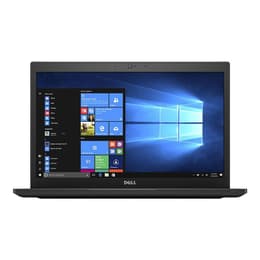
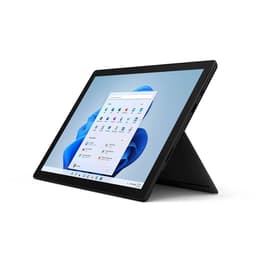
The Dell Latitude 7490 14" (2018) and Microsoft Surface Pro 7 12" (2019) represent two distinct approaches to portable computing for professionals, students, and travelers. While the Dell Latitude operates as a traditional, clamshell business laptop with a conventional keyboard configuration, the Microsoft Surface Pro functions as a versatile 2-in-1 detachable device that transitions between a tablet and a laptop form factor. Both devices rely on the Windows operating system, offering a familiar software ecosystem, yet they cater to entirely different physical handling preferences and daily workflow setups.
Choosing between these two models involves balancing the traditional laptop stability of the Latitude against the lightweight, multi-mode flexibility of the Surface Pro.
Available Models
Storage
Processor
Memory
Scores
Durability
When examining longevity and hardware endurance, both computing solutions offer different structural advantages tailored to distinct office and travel routines.
- Software support and operating system updates: Both machines run standard Windows operating systems, receiving routine security patches and feature upgrades, though hardware lifespan depends heavily on the chosen processing tier and day-to-day work demands.
- Repairability and physical maintenance: The Dell Latitude features a modular clamshell design that allows straightforward access to internal components for maintenance, whereas the Surface Pro uses a sealed assembly that makes component replacement significantly more challenging.
- Expected practical lifespan: The Latitude's rugged business-class build handles heavy daily transport reliably over years of service, while the Surface Pro provides durable mobility provided the integrated kickstand and detachable keyboard cover are managed carefully during travel.
Year of Release
2017
2019
Last Os Compatibility
Yes
Yes
OS
Windows 11
Windows 11
Performance
Performance capabilities vary based on thermal management and hardware configurations, impacting how each machine handles multi-application workloads.
- Multitasking and everyday responsiveness: Both devices switch smoothly between web browsers, document editors, and communication software, though the Latitude maintains sustained processing speeds longer during intensive tasks due to its traditional cooling layout.
- Storage configurations and data management: Available solid-state drive options on both models ensure rapid file access and quick system boot times, accommodating large document libraries and media files efficiently.
- Battery behavior during mobile use: The Latitude's larger chassis accommodates a more substantial battery that reliably powers through standard office hours, whereas the Surface Pro's compact profile requires more frequent charging intervals during heavy workloads.
Graphic card
Integrated Graphics
Integrated Graphics
Screen quality
Display characteristics differ significantly in size, aspect ratio, and tactile interaction, influencing visual comfort and media consumption.
- Panel technology and visual clarity: The Latitude features a traditional 14-inch matte display that reduces glare under harsh office lighting, while the Surface Pro offers a vibrant 12.3-inch glossy touchscreen optimized for direct finger and stylus navigation.
- Resolution and workspace proportions: The Surface Pro utilizes a 3:2 aspect ratio that displays more vertical document content comfortably, whereas the Latitude uses a standard widescreen format well-suited for side-by-side window multitasking and video playback.
- Brightness and outdoor visibility: Both screens provide sufficient luminance for indoor environments and shaded outdoor areas, though reflective glare may require careful positioning when working near direct sunlight.
Resolution
1920 x 1080
2736 x 1824
Screen type
IPS
IPS
Audiovisual
Multimedia capabilities reflect the contrasting design philosophies of a traditional clamshell notebook and a tablet-first device.
- Video conferencing equipment: The Surface Pro incorporates high-resolution front and rear cameras suited for scanning documents and clear video meetings, while the Latitude focuses on a standard webcam positioned above the display for everyday professional calls.
- Microphone and audio output: Integrated dual microphones capture voice input clearly during virtual meetings on both machines, accompanied by stereo speakers that deliver adequate sound clarity for podcasts, calls, and casual video viewing.
- Media consumption experience: The Surface Pro excels as a handheld tablet for viewing media content and reading digital publications, whereas the Latitude provides a stable, desk-bound audio-visual experience with its anchored keyboard base.
Miscellaneous
Physical dimensions, port selections, and connectivity standards dictate how easily each device integrates into existing accessory ecosystems.
- Port selection and physical connectivity: The Latitude provides a comprehensive array of built-in connections including traditional USB ports, HDMI, and Ethernet without requiring external adapters, while the Surface Pro relies on a minimalist port layout featuring a single USB-C connection and a proprietary charging interface.
- Mobility and physical dimensions: The Surface Pro offers exceptional portability as an ultra-lightweight tablet configuration for frequent flyers, whereas the Latitude provides a slightly heavier, rigid frame designed for stable lap and desk usage.
- Security and authentication sensors: Both devices support modern authentication features, with the Latitude frequently offering fingerprint recognition options and the Surface Pro utilizing advanced facial recognition technology for quick sign-in.
Weight
1400 g
775 g
Screen size
14
12
What the community thinks
Users prioritizing a traditional typing experience, robust physical port selection, and straightforward component maintenance will find the Dell Latitude 7490 well-suited to their daily routines. This model fits office workers, students, and professionals who spend long hours typing documents at a desk and require a dependable, sturdy notebook framework without needing external connection adapters.
On the other hand, users prioritizing maximum portability, touch navigation, and a flexible form factor that converts easily between a tablet and a laptop will lean toward the Microsoft Surface Pro 7. This device aligns with frequent travelers, digital artists, and mobile professionals who value a lightweight silhouette and digital pen compatibility for taking notes on the go.
For those mindful of environmental impact, choosing a quality-assured refurbished option provides a sustainable way to acquire either device while extending the operational lifecycle of reliable hardware. Ultimately, the choice rests entirely on whether a traditional laptop build or a versatile tablet hybrid better complements your personal workflow.