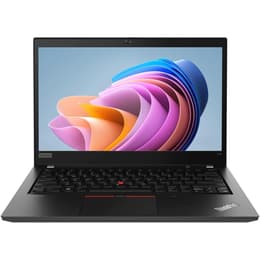


Dell Latitude 5320 13" Vs Lenovo ThinkPad T14 G1 14"

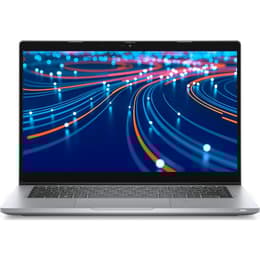
Dell Latitude 5320 13"
Starting at

Refurbished price:307.00

Versus €1,051.43 new

See options
Lenovo ThinkPad T14 G1 14"
Starting at

Refurbished price:262.00

Versus €612.00 new

See options

Ratings

The Dell Latitude 5320, released in 2021, and the Lenovo ThinkPad T14 Gen 1, introduced in 2020, are both business-oriented laptops designed for productivity and reliability. While they share a focus on professional use, they present distinct approaches to design, upgradeability, and port selection. Both devices operate on the Windows platform, offering a familiar experience for most users.

A key difference lies in their screen sizes, with the Latitude 5320 featuring a 13.3-inch display and the ThinkPad T14 Gen 1 offering a slightly larger 14-inch screen. These laptops cater to professionals seeking dependable performance for daily tasks, with each model bringing its own set of advantages to the table.

Scores

Durability

When considering the long-term viability of these laptops, several factors come into play, including their release timelines, software support, and ease of maintenance.

  • Release Timeline: The Lenovo ThinkPad T14 Gen 1 was released in the second quarter of 2020 and was in production through 2020–2021. The Dell Latitude 5320 followed, launching in 2021. This means the Latitude 5320 benefits from a slightly newer hardware generation.
  • Software Longevity: Lenovo typically provides 4–5 years of BIOS and driver updates for its ThinkPads, ensuring continued compatibility and security for a substantial period. The Dell Latitude 5320, running on 11th Gen Intel processors, is also expected to receive Windows updates for a considerable time, though some sources note it is now several generations behind the latest hardware.
  • Repairability and Upgrades: The ThinkPad T14 Gen 1 offers a hybrid memory design, featuring one soldered RAM module and an additional SO-DIMM slot, allowing for memory expansion up to 48GB. Its NVMe SSD is also fully upgradeable, and the keyboard is designed for easy replacement. In contrast, the Dell Latitude 5320's RAM is soldered to the motherboard, limiting future memory upgrades, though its M.2 SSD remains user-upgradeable.
  • Build Quality: The ThinkPad T14 Gen 1 features a durable magnesium alloy chassis, known for its robust construction. The Dell Latitude 5320 comes with a chic metal casing, though some user reports indicate potential flex in the lid and base under pressure.

Year of Release

2021

2019

OS

Windows 11

Windows 11

Performance

Both laptops are equipped to handle typical business workloads, but their underlying architectures and configurations lead to differences in overall responsiveness and capability.

  • Processor Capabilities: The Dell Latitude 5320 is powered by 11th Generation Intel Core processors (Tiger Lake), offering a balance of performance and efficiency for professional applications. The Lenovo ThinkPad T14 Gen 1 comes with options for 10th Generation Intel Core processors or AMD Ryzen 4000 series Pro processors. The AMD variants of the T14 Gen 1 are often noted for their integrated graphics performance.
  • Memory Configuration: The Latitude 5320 features integrated DDR4 3200 MHz RAM, with configurations from 4 GB to 32 GB. For optimal performance, 8 GB and above operate in dual-channel mode. The ThinkPad T14 Gen 1 utilizes a hybrid memory setup, combining a soldered module (8GB or 16GB) with an additional SO-DIMM slot, supporting up to 48GB of total RAM.
  • Storage Options: Both devices employ fast NVMe SSDs for storage. The Latitude 5320 offers configurations up to 1 TB, while the ThinkPad T14 Gen 1 can be configured with up to 2 TB of M.2 PCIe NVMe SSD storage.
  • Real-World Responsiveness: The Dell Latitude 5320 efficiently handles daily productivity applications, multitasking, and can manage heavier applications like photo and video editing software without significant lag. The ThinkPad T14 Gen 1, particularly with its AMD processor options, also delivers solid performance for everyday computing and light creative tasks.

Memory (GB)

8 GB

16 GB

Processor

Core i5-1135G7

Core i5 - Gen 10 (U)

Graphic card

Integrated Graphics

Intel HD Graphics

Screen quality

The visual experience on these laptops is shaped by their display technology, resolution, and brightness levels, impacting usability in various environments.

  • Display Technology and Size: The Dell Latitude 5320 features a 13.3-inch Full HD (1920 x 1080) IPS panel. The Lenovo ThinkPad T14 Gen 1 offers a slightly larger 14-inch display, with various panel options including Full HD (1920x1080) IPS.
  • Resolution and Clarity: Both laptops commonly offer Full HD resolution, providing clear and sharp visuals for typical office work, web browsing, and media consumption. The ThinkPad T14 Gen 1 also has configurations available with a 4K UHD (3840x2160) IPS display for enhanced detail.
  • Brightness Levels: The Latitude 5320 typically has a brightness range of 250-300 nits, with some configurations reaching up to 338 nits. The ThinkPad T14 Gen 1 offers a wider range of brightness options for its Full HD IPS panels, including 250, 300, 400, and 500 nits. Some T14 Gen 1 screens may not be ideal for bright outdoor conditions.
  • Special Features: The Dell Latitude 5320 includes ComfortView Plus, a low blue light solution designed to reduce eye strain. The ThinkPad T14 Gen 1 offers optional features like Privacy Guard and touchscreen functionality on some display configurations.

Resolution

1920 x 1080

1920 x 1080

Audiovisual

For communication and multimedia, the camera, microphone, and speaker systems contribute to the overall user experience.

  • Camera System: The Dell Latitude 5320 comes with an HD camera, with an optional Full HD camera available, both typically including a privacy shutter. User feedback suggests the webcam quality can be modest for video calls. The Lenovo ThinkPad T14 Gen 1 features a 720p webcam, which includes a physical ThinkShutter for privacy.
  • Microphone Quality: The Latitude 5320's microphone is reported to perform well for calls and recordings. The ThinkPad T14 Gen 1 is equipped with dual microphones, contributing to clear audio capture during online meetings.
  • Speaker Output: The Dell Latitude 5320 provides decent sound quality from its speakers, though some minor deviations across the frequency spectrum have been noted. The Lenovo ThinkPad T14 Gen 1 features a Dolby audio speaker system with front-firing speakers, delivering sound that is considered good for a business laptop.
  • Additional Features: The Latitude 5320 offers an optional IR face recognition sensor for secure logins. The ThinkPad T14 Gen 1's physical ThinkShutter provides a clear visual indicator of camera status, enhancing privacy.

Miscellaneous

Beyond core performance and display, practical elements like connectivity, physical ports, and design considerations influence daily usability.

  • Connectivity Options: Both laptops support modern wireless standards, including Wi-Fi 6 and Bluetooth. The Dell Latitude 5320 also offers optional 4G LTE mobile broadband for connectivity on the go.
  • Port Selection: The Latitude 5320 is equipped with two Thunderbolt 4 ports, two USB 3.2 Gen 1 ports, an HDMI 2.0 port, a microSD card slot, and a 3.5mm audio jack. The ThinkPad T14 Gen 1 provides a comprehensive selection including two USB-C ports (with Thunderbolt 3 on Intel models), two USB-A 3.0/3.1 Gen 1 ports, an HDMI port, a headphone jack, a microSD card reader, and an Ethernet port. Notably, the Latitude 5320 omits a built-in Ethernet port, which is present on the ThinkPad T14 Gen 1.
  • Security Features: Both devices prioritize security with features like optional fingerprint readers and webcam privacy shutters. The Latitude 5320 can also be configured with an optional IR face recognition sensor, while the ThinkPad T14 Gen 1's physical ThinkShutter offers a tangible privacy solution.
  • Physical Design: The Dell Latitude 5320 is a compact and lightweight device, starting at 1.18 kg for the laptop model. The Lenovo ThinkPad T14 Gen 1 is slightly heavier, around 1.5 kg, but maintains a portable form factor. The ThinkPad's magnesium alloy chassis is durable, though some users note it can be a fingerprint magnet.

Weight

1200 g

2500 g

Screen size

13

14

Both the Dell Latitude 5320 and the Lenovo ThinkPad T14 Gen 1 offer compelling features for business users, each with distinct strengths and considerations.

The Dell Latitude 5320 is often praised for its strong performance in daily productivity and its ability to handle some demanding applications, along with its compact and lightweight design. Its inclusion of modern Thunderbolt 4 ports is also a significant advantage for connectivity. However, common criticisms include its soldered RAM, which limits future upgradeability, and some configurations may have lower screen brightness or modest webcam quality.

The Lenovo ThinkPad T14 Gen 1 is frequently lauded for its robust and durable build quality, its comfortable and highly regarded keyboard, and its comprehensive port selection, including a dedicated Ethernet port. The ability to upgrade RAM (via an additional slot) and the SSD is also a notable benefit. On the other hand, some users have reported that certain screen configurations may not be bright enough for outdoor use, and there have been occasional reports of software or driver issues, particularly with AMD models running specific operating systems. The chassis can also be prone to fingerprints.

Users prioritizing a highly portable and lightweight device with cutting-edge Thunderbolt 4 connectivity and strong performance for general business tasks may find the Dell Latitude 5320 well-suited to their needs. Conversely, individuals who value a highly durable, user-upgradeable laptop with a superior typing experience and a broader range of traditional ports, including Ethernet, might lean towards the Lenovo ThinkPad T14 Gen 1. Both models are available as quality-assured refurbished options, providing an eco-friendly alternative for those seeking reliable business laptops.

See all articles

Our recent comparisons