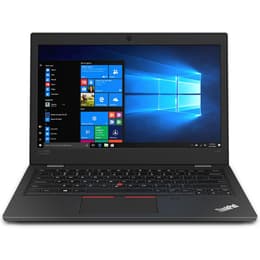
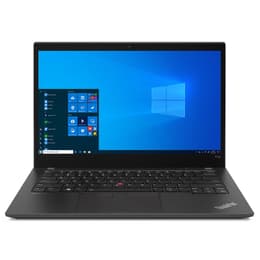


Lenovo ThinkPad L390 13" Vs Lenovo ThinkPad T14 G2 14"

Lenovo ThinkPad L390 13"
Starting at

Refurbished price:299.00

Versus €766.00 new

See options
Lenovo ThinkPad T14 G2 14"
Starting at

Refurbished price:421.43

Versus €1,485.00 new

See options

Ratings

The Lenovo ThinkPad L390, released in early 2019, and the Lenovo ThinkPad T14 Gen 2, launched in 2021, are business-oriented laptops from Lenovo's reputable ThinkPad line. While both offer a robust computing experience, the T14 Gen 2 represents a newer generation with advancements in processing power, display technology, and connectivity. Both devices operate on the Windows operating system, providing a familiar environment for most users.

Scores

Durability

When considering the practical lifespan of these two ThinkPads, their release timelines and the typical duration of software support are key factors. The T14 Gen 2, being a newer model, generally benefits from a longer expected period of official operating system updates and security patches.

  • Release Timeline: The ThinkPad L390 debuted in early 2019, while the ThinkPad T14 Gen 2 followed in 2021. This two-year difference means the T14 Gen 2 will likely receive software support for a longer duration. [2, 19, 27]
  • OS Support & Longevity: Both devices run Windows, and their longevity is tied to Microsoft's support cycles. The T14 Gen 2, with its newer hardware, is better positioned for future Windows versions and extended driver support, potentially offering a longer practical lifespan before performance or compatibility issues arise.
  • Build & Durability: Both models are MIL-STD 810G tested, indicating a degree of ruggedness against environmental stresses like drops and temperature extremes. However, the T-series is generally regarded for its more premium build materials and enhanced durability compared to the L-series, suggesting the T14 Gen 2 might withstand heavy use over a longer period. [4, 7, 13, 20, 23, 29, 30, 31, 32, 34]

Year of Release

2018

2020

Last Os Compatibility

Yes

Yes

OS

Windows 11

Windows 11

Performance

The performance capabilities of these laptops are largely influenced by their respective generations of internal components, impacting how smoothly they handle daily tasks and more demanding applications.

  • Processing Power: The ThinkPad L390 features 8th Gen Intel processors, which capably handle everyday productivity tasks, web browsing, and light multitasking. The ThinkPad T14 Gen 2, on the other hand, incorporates 11th Gen Intel processors or AMD Ryzen 5000 series mobile CPUs, offering a noticeable uplift in performance for more intensive applications, complex data processing, and smoother handling of multiple demanding programs simultaneously. [1, 6, 7, 8, 12, 14, 19, 22, 23, 26, 28]
  • Memory & Storage: The L390 supports up to 32GB of DDR4-2400 RAM, typically with two SO-DIMM slots for user upgrades. The T14 Gen 2 can be configured with up to 48GB of faster DDR4-3200MHz RAM, often with some memory soldered and one accessible SO-DIMM slot, providing more headroom for extensive multitasking and memory-intensive workloads. Both utilize fast PCIe NVMe SSDs for storage, ensuring quick boot times and application loading. [2, 5, 6, 7, 8, 12, 14, 19, 20, 22, 24, 28]
  • Battery Behavior: The L390 is equipped with a 45Wh battery, with Lenovo claiming up to 14 hours of use under specific benchmarks, though real-world usage typically falls in the 8-12 hour range. The T14 Gen 2 features a 50Wh battery, with advertised battery life up to 10.7-13 hours, and generally offers efficient power management for all-day use. Both support rapid charging to quickly replenish battery levels. [1, 3, 6, 7, 10, 12, 14, 15, 16, 17, 19, 28, 29]

Memory (GB)

8 GB

8 GB

Processor

Core i5 - Gen 8 (U)

Core i5-1135G7

Graphic card

Integrated Graphics

Integrated Graphics

Screen quality

The visual experience on these laptops differs in terms of display technology, resolution options, and overall brightness, catering to various user preferences and working environments.

  • Display Technology & Resolution: Both models typically feature Full HD (1920x1080) IPS anti-glare displays, providing wide viewing angles and reducing reflections. The L390's display generally offers a standard visual experience suitable for everyday office tasks. The T14 Gen 2, however, offers a wider range of display options, including higher brightness levels, and in some configurations, a UHD (3840x2160) IPS panel with Dolby Vision for enhanced clarity and color reproduction. [2, 5, 6, 7, 11, 12, 14, 15, 18, 19, 20, 22, 23, 24, 25, 26, 27, 28, 29, 35]
  • Brightness & Color: The L390's display typically has a brightness of around 250-278 nits and covers approximately 116% of the sRGB color gamut, which is adequate for indoor use. The T14 Gen 2 offers options ranging from 300 nits to 500 nits, with some panels covering up to 99% sRGB, 72% NTSC, or even 100% Adobe RGB for the UHD variants, making it more suitable for outdoor work or tasks requiring accurate color representation. [5, 6, 11, 14, 20, 22, 28, 29, 35]
  • Screen Size & Aspect Ratio: The L390 features a 13.3-inch display, offering a compact form factor. The T14 Gen 2 has a slightly larger 14-inch display. Both maintain a 16:9 aspect ratio, which is common for media consumption and general productivity. [2, 6, 7, 14, 18, 19, 20, 22, 24, 25, 26, 27, 28]

Resolution

1366 x 768

1920 x 1080

Screen type

LCD

IPS

Camera

Audiovisual

The audio and visual components are important for communication and media consumption, with both laptops offering standard features for business use.

  • Camera Performance: Both the ThinkPad L390 and T14 Gen 2 are equipped with a 720p HD webcam. The T14 Gen 2 often includes a physical privacy shutter for the webcam, and some configurations offer an optional IR camera for facial recognition, enhancing security and privacy. The L390 may also have an optional IR camera in some configurations. [6, 7, 8, 11, 14, 20, 22, 23, 29, 35]
  • Microphone & Speakers: Both laptops feature dual-array microphones for clearer voice input during calls and recordings. For audio output, both come with stereo speakers, often enhanced with Dolby Audio technology, providing a decent sound experience for video conferences and media playback. [7, 11, 14, 23, 35]
  • Video Recording Quality: The 720p resolution of the webcams on both models provides sufficient quality for standard video conferencing. While not designed for high-fidelity video production, they are functional for typical business communication needs.

Miscellaneous

Beyond core performance and display, several practical elements contribute to the overall user experience, including connectivity, port selection, and physical design.

  • Connectivity Options: The L390 supports Wi-Fi 5 (802.11ac) and Bluetooth 5.0. The T14 Gen 2 offers more advanced wireless connectivity with Wi-Fi 6 or Wi-Fi 6E (802.11ax) and Bluetooth 5.1/5.2, providing faster and more stable wireless connections. The T14 Gen 2 also has optional 4G LTE for mobile internet access. [6, 7, 12, 14, 22, 23, 26]
  • Port Types: The L390 includes two USB-C 3.1 Gen 1 ports (with power delivery and DisplayPort), two USB-A 3.1 Gen 1 ports, HDMI, an Ethernet extension connector, and a microSD card reader. The Intel variants of the T14 Gen 2 feature two Thunderbolt 4 ports, two USB-A 3.2 Gen 1 ports, HDMI 2.0, RJ45 Ethernet, and a microSD card reader, offering more versatile and higher-bandwidth connectivity, especially with Thunderbolt 4. [4, 6, 7, 14, 15, 22, 24, 26, 28, 34, 37]
  • Weight & Dimensions: The L390 starts at approximately 1.46 kg (3.22 lbs) and is 18.8mm thick. The T14 Gen 2 starts at a similar weight of around 1.47 kg (3.23 lbs) and is slightly thinner at 17.9mm. Both are designed for portability, though the T14 Gen 2's slightly larger screen size comes in a comparable form factor. [2, 4, 5, 6, 7, 9, 12, 14, 15, 20, 21, 22, 24, 28, 37]
  • Security Features: Both models include a discrete TPM 2.0 chip for hardware-level security. The T14 Gen 2 often integrates ThinkShield security solutions, offering a more comprehensive suite of protection features. Both may offer optional fingerprint readers and IR cameras for biometric authentication. [1, 3, 6, 7, 14, 15, 16, 17, 20, 23, 29, 35]

Weight

1460 g

7500 g

Screen size

13

14

User feedback for the ThinkPad L390 often praises its solid build quality for its class, comfortable keyboard, and reliable performance for everyday business tasks. Common criticisms sometimes point to its display brightness being adequate but not exceptional, and its slightly thicker bezels. Users generally appreciate its port selection for a compact device. [4, 5, 11, 29, 35]

The ThinkPad T14 Gen 2 receives commendation for its significant performance upgrades, improved display options, and the inclusion of Thunderbolt 4 ports on Intel models, making it a more future-proof option. Users frequently highlight its robust durability and excellent keyboard. Some common observations include the continued use of a 16:9 aspect ratio and the presence of noticeable display bezels, which some users find a bit dated. [6, 14, 20, 22, 23, 26, 37]

Users prioritizing a more compact form factor and a dependable machine for general productivity and administrative tasks may find the Lenovo ThinkPad L390 well-suited to their needs. It offers a robust and practical experience for students or professionals who value reliability without needing the absolute latest in performance or display technology. Conversely, users who require higher processing power for demanding applications, superior display quality, advanced connectivity like Thunderbolt 4, and a slightly larger screen for enhanced multitasking will likely lean towards the Lenovo ThinkPad T14 Gen 2. Its newer components and more premium features make it a strong choice for professionals and power users. Both models are available as quality-assured refurbished options, providing an eco-friendly alternative for those seeking reliable technology.

See all articles

Our recent comparisons