

Dell Latitude 7490 14" Vs Lenovo ThinkPad L390 13"

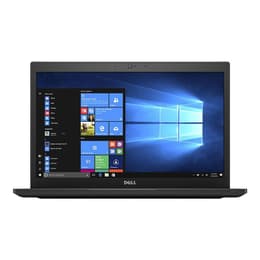
Dell Latitude 7490 14"
Starting at

Refurbished price:307.00

Versus €636.00 new

See options
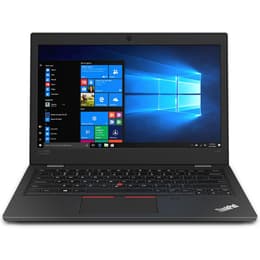
Lenovo ThinkPad L390 13"
Starting at

Refurbished price:299.00

Versus €766.00 new

See options

Ratings

The Dell Latitude 7490 14-inch and the Lenovo ThinkPad L390 13-inch are business-oriented laptops designed for productivity and reliability. Released in 2018 and 2019 respectively, these devices offer distinct form factors and features tailored for professional use. While the Latitude 7490 provides a slightly larger display, the ThinkPad L390 emphasizes portability and a robust build, both running on the Windows operating system.

Scores

Durability

When considering the long-term usability of these laptops, their release timelines and design philosophies play a significant role in their expected practical lifespan.

  • Release Timeline: The Dell Latitude 7490 was released in 2018, while the Lenovo ThinkPad L390 followed in 2019. This difference means the L390 may receive software updates and security patches for a slightly longer period, potentially extending its functional life by about a year.
  • OS Support: Both devices originally shipped with Windows 10 Pro and are capable of running later versions of Windows, offering a consistent software experience. The duration of official OS support from Microsoft is a key factor in their longevity.
  • Repairability and Build: The Latitude 7490 features a durable magnesium alloy chassis, designed to withstand daily professional use. The ThinkPad L390 is also built for durability, with some configurations featuring an aluminum top and GFRP bottom, and is MIL-SPEC tested for ruggedness. Both models are generally considered serviceable, allowing for component upgrades like RAM and storage, which can prolong their useful life.

Year of Release

2017

2018

Last Os Compatibility

Yes

Yes

OS

Windows 11

Windows 11

Performance

Both laptops are equipped to handle typical business and academic workloads, offering solid performance for multitasking and everyday applications.

  • Processor Capabilities: Both the Dell Latitude 7490 and the Lenovo ThinkPad L390 utilize 8th-generation processors. This allows them to manage demanding applications and facilitate smooth multitasking, providing responsive performance for common productivity software, web browsing, and light content creation.
  • Storage and Responsiveness: Both models typically come with fast M.2 PCIe NVMe Solid State Drives (SSDs). This type of storage contributes to quick boot times, rapid application loading, and overall system responsiveness, making file transfers and data access efficient.
  • Battery Behavior: The Latitude 7490 generally offers around 8 to 9 hours of battery life under moderate usage, with some configurations extending this further. The ThinkPad L390 provides a comparable battery life, often reported around 7 to 8 hours in real-world scenarios, though advertised for longer durations. Both include rapid charging capabilities, allowing for quick power replenishment.

Memory (GB)

8 GB

8 GB

Processor

Core i5 - Gen 8 (U)

Core i5 - Gen 8 (U)

Graphic card

Integrated Graphics

Integrated Graphics

Screen quality

The visual experience on these laptops is designed for productivity, with differences in size and display characteristics.

  • Display Technology and Size: The Dell Latitude 7490 features a 14-inch Full HD (1920x1080) IPS anti-glare display, providing a larger viewing area. The Lenovo ThinkPad L390 comes with a 13.3-inch Full HD (1920x1080) IPS anti-glare panel, offering a more compact footprint. Both IPS panels offer wide viewing angles.
  • Brightness and Clarity: The Latitude 7490 typically offers brightness levels around 277-294 nits, which is suitable for indoor use and provides decent visibility in shaded outdoor environments. The ThinkPad L390's display generally ranges from 250-278 nits. Both provide clear text and images for daily tasks.
  • Color Reproduction: The Latitude 7490's display offers good color and contrast, with some configurations covering a healthy color gamut. The ThinkPad L390's color reproduction can vary, with some panels covering around 53% of the sRGB spectrum, while others reach up to 116%, indicating a range of visual vibrancy depending on the specific panel.

Resolution

1920 x 1080

1366 x 768

Screen type

IPS

LCD

Camera

Audiovisual

For communication and media consumption, both laptops offer standard features suitable for professional and personal use.

  • Camera System: Both the Dell Latitude 7490 and the Lenovo ThinkPad L390 are equipped with 720p webcams. This resolution is adequate for video conferencing and online meetings, providing clear enough visuals for typical virtual interactions.
  • Microphone Quality: The ThinkPad L390 features dual array microphones, designed to capture clear audio and reduce background noise during calls. The Latitude 7490 also includes a microphone, suitable for standard voice communication.
  • Speaker Output: The Latitude 7490's speakers, enhanced by Waves MaxxAudio Pro, deliver decent sound quality for a business laptop, suitable for presentations and casual media consumption. The ThinkPad L390 comes with 2x 2W stereo speakers, often featuring Dolby Audio Premium, which provides a clear and relatively full sound experience for its size.

Miscellaneous

Beyond core performance, several practical elements differentiate these two business laptops in terms of connectivity, design, and user interaction.

  • Connectivity and Ports: The Latitude 7490 offers a comprehensive selection including multiple USB 3.1 Gen 1 ports, HDMI, an RJ45 Ethernet port, an SD card reader, and optional Thunderbolt 3 via USB-C. The ThinkPad L390 provides two USB-C 3.1 Gen 1 ports (with power delivery and DisplayPort), two USB 3.1 Gen 1 ports, HDMI, an Ethernet extension connector (requiring an adapter), and a microSD card reader. Both support Wi-Fi 5 (802.11ac) and Bluetooth.
  • Weight and Dimensions: The Latitude 7490, with its 14-inch screen, starts at approximately 1.4 kg (3.1 lbs) and has dimensions of 331 x 221 x 17.9 mm. The more compact 13.3-inch ThinkPad L390 weighs around 1.46 kg (3.22 lbs) and measures 321.8 x 224.2 x 18.8 mm. The ThinkPad L390 is slightly thicker and heavier for its smaller screen size.
  • Security and Input: Both laptops feature fingerprint readers for secure login. The Latitude 7490 has a comfortable, spill-resistant keyboard and a responsive touchpad. The ThinkPad L390 is renowned for its excellent, spill-resistant keyboard and includes the signature TrackPoint pointing stick alongside a Precision touchpad.

Weight

7500 g

1460 g

Screen size

14

13

The Dell Latitude 7490 and Lenovo ThinkPad L390 both stand as capable business laptops, each with characteristics that appeal to different user priorities. Users frequently praise the Latitude 7490 for its robust build quality, comfortable keyboard, and consistent performance for everyday tasks. Its battery life is often highlighted as a strong point, providing ample power for a workday. Some users, however, note that the display brightness could be improved in certain configurations.

The ThinkPad L390 receives commendation for its legendary ThinkPad keyboard and TrackPoint, which are favored by those who type extensively. Its compact size and MIL-SPEC tested durability are also frequently mentioned as benefits for mobile professionals. Criticisms sometimes point to the display, with some panels offering less vibrant color reproduction or brightness compared to higher-end alternatives.

Users prioritizing a slightly larger screen and a traditional business laptop experience with solid all-around performance may prefer the Dell Latitude 7490. Its magnesium alloy construction and comprehensive port selection make it a reliable workstation. Conversely, users who value a highly portable device with an exceptional typing experience and a focus on ruggedness will find the Lenovo ThinkPad L390 well-suited to their needs. Its smaller footprint and renowned input devices cater to those constantly on the move or engaged in heavy text-based work. Both models represent a practical and sustainable choice, especially when considering quality-assured refurbished options, which provide an eco-friendly alternative for acquiring these dependable machines.

See all articles

Our recent comparisons