
Compare models

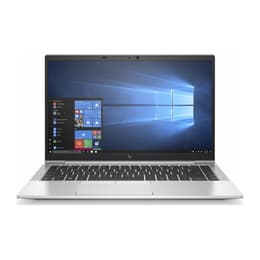
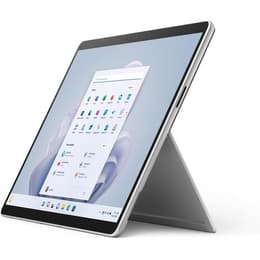
HP EliteBook 840 G7 14" Vs Microsoft Surface Pro 9 13"

  • 1-year minimum warranty
  • Free delivery on all orders
  • Free 30-day returns
HP EliteBook 840 G7 14"
Starting at

Refurbished price:€347.00

Versus €675.00 new

See options
Microsoft Surface Pro 9 13"
Starting at

Refurbished price:€826.99

Versus €1,830.45 new

See options

Differences at a glance

The HP EliteBook 840 G7 14" (2020) and the Microsoft Surface Pro 9 13" (2022) represent two distinct approaches to portable computing: a traditional clamshell business laptop versus a versatile detachable two-in-one tablet. While both devices cater to professionals and students needing reliable daily performance, they differ significantly in form factor, operating system interface flexibility, and design philosophy. The HP EliteBook functions as a conventional, sturdy notebook designed for desk and lap productivity, whereas the Surface Pro 9 offers a flexible hybrid design that transitions between a tablet and a laptop via a detachable keyboard.

Available Models

Storage

Processor

Memory

Scores

Durability

When evaluating long-term usability, both machines offer robust build quality and multi-year support profiles, though their hardware modularity differs significantly.

  • Software support and longevity: Both devices receive regular operating system and security updates, with the Surface Pro 9 benefiting from a two-year newer release date for extended longevity.
  • Repairability and maintenance: The traditional laptop design of the HP EliteBook allows for more straightforward component servicing, while the sealed tablet build of the Surface Pro presents greater challenges for physical repairs.
  • Expected practical lifespan: Both units handle daily productivity workloads reliably over several years, making them solid candidates when considering a quality-assured refurbished option to reduce electronic waste.

Year of Release

2019

2022

OS

Windows 11

Windows 11

Performance

Handling everyday tasks, multitasking, and demanding office applications depends heavily on internal component harmony, memory allocation, and thermal management across both form factors.

  • Multitasking and application speed: Both devices manage heavy web browsing, document editing, and collaborative video conferencing smoothly, though higher random-access memory configurations prevent slowdowns during intensive multitasking.
  • Storage and battery behavior: Solid-state drive storage options ensure quick system boot times, while battery endurance varies with usage intensity, requiring occasional daytime recharging for heavy mobile workflows.
  • System responsiveness: Modern thermal engineering keeps both units operating quietly during standard office workloads, maintaining consistent interface fluidity throughout the workday.

Graphic card

Integrated Graphics

Integrated Graphics

Screen quality

Display characteristics shape the daily media consumption and document viewing experience, highlighting distinct panel technologies and physical dimensions.

  • Display technology and clarity: The Surface Pro 9 features a high-resolution pixel-dense touch panel with vibrant color reproduction, while the HP EliteBook utilizes a matte or anti-glare screen coating that minimizes distracting reflections under harsh office lighting.
  • Brightness and outdoor usability: Both screens provide adequate luminance levels for indoor environments and shaded outdoor spaces, ensuring text remains legible during mobile work sessions.
  • Size and viewing format: The HP offers a traditional 14-inch widescreen layout suited for side-by-side window multitasking, whereas the Surface utilizes a taller 3-to-2 aspect ratio optimized for document reading and vertical scrolling.

Resolution

1920 x 1080

2880 x 1920

Screen type

LCD

LED

Audiovisual

Audio and visual peripherals dictate the quality of virtual meetings, remote lectures, and casual media playback during daily usage.

  • Camera systems and video calls: Both models are equipped with reliable front-facing web cameras suitable for clear video conferencing, supported by dependable microphones that isolate background noise during conversations.
  • Speaker output: Integrated stereo speakers deliver clear vocal reproduction for speech and meetings, though external headphones or speakers provide a richer audio profile for music and movies.
  • Media consumption experience: The combination of balanced audio output and crisp display panels makes both devices well-equipped for streaming video content and reviewing multimedia presentations.

Miscellaneous

Physical dimensions, port selections, and connectivity standards determine how seamlessly each device integrates into mobile travel kits and desktop workspaces.

  • Port selection and connectivity: The HP EliteBook includes a diverse array of traditional physical ports like USB-A and HDMI alongside modern USB-C connectors, while the Surface Pro 9 relies primarily on versatile USB-C ports requiring adapters for older legacy accessories.
  • Weight and handling: The Surface Pro offers exceptional portability as a lightweight standalone tablet, whereas the HP provides a more rigid, traditional clamshell footprint that rests comfortably on various lap surfaces.
  • Security and biometrics: Both machines feature biometric authentication options, including facial recognition capabilities, to streamline secure logins and protect private user data.

Weight

2500 g

883 g

Screen size

14

13

What the community thinks

Users navigating the choice between these two portable computers often praise the HP EliteBook 840 G7 for its traditional keyboard layout, comprehensive port selection, and stable lap usability, though some note its slightly older release timeline. Conversely, community feedback highlights the Microsoft Surface Pro 9 for its versatile detachable form factor, high-resolution touch display, and modern aesthetic, though users frequently mention the necessity of purchasing the keyboard accessory separately and managing limited physical ports. Reviewing these characteristics helps clarify which machine fits specific daily habits.

Users prioritizing a traditional laptop experience with built-in legacy connectivity and stable lap typing will find the HP EliteBook well-suited to their needs. Meanwhile, users who value a lightweight tablet design, touchscreen versatility, and a taller screen format for reading will lean toward the Surface Pro 9. Buyers looking for an eco-friendly alternative can find both models available as quality-assured refurbished options, supporting sustainable technology consumption without compromising on functional capability.
Our recent comparisons