
Compare models

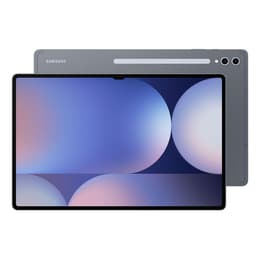
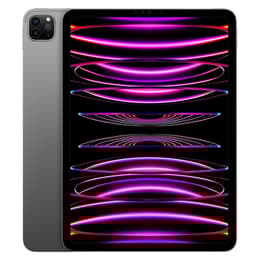
Galaxy Tab S10 Ultra (14.6", 2024) Vs iPad Pro (2022, M2 series)

  • 1-year minimum warranty
  • Free delivery on all orders
  • Free 30-day returns
Galaxy Tab S10 Ultra (14.6", 2024)
Starting at

Refurbished price:€762.00

Versus €1,454.07 new

See options
iPad Pro (2022, M2 series)
Starting at

Refurbished price:€639.00

Versus €1,079.00 new

See options

Differences at a glance

The Samsung Galaxy Tab S10 Ultra (2024) and the Apple iPad Pro M2 (2022) represent premium large-format tablet computing, offering expansive screens and powerful processing capabilities for demanding workflows. While both devices target productivity and media consumption, they diverge significantly through their operating systems, screen technology, and form factors. Choosing between them depends on software ecosystem preferences and how the device will be integrated into daily tasks.

Available Models

Colour

Storage

Scores

Durability

Long-term usability depends on software support cycles, hardware durability, and ongoing maintenance options for these high-end devices.

  • Software Support: The Galaxy Tab S10 Ultra benefits from an extended multi-year update commitment for system security and Android upgrades, while the iPad Pro M2 relies on Apple's established track record of supporting tablet hardware for many years.
  • Build and Repairs: Both models feature rigid metal and glass construction designed to withstand daily transport, though professional repair accessibility varies by region and service provider.
  • Lifespan Expectations: Users can anticipate several years of reliable performance from either model, with battery capacity gradually shifting over extended cycles of heavy daily use.

Year of Release

2024

2022

Compatible with latest Update

Yes

Yes

OS

Android

iPadOS

Performance

Handling demanding workloads, multitasking, and media rendering varies across these two hardware configurations and their respective software architectures.

  • Multitasking and Responsiveness: Both devices handle split-screen applications, heavy web browsing, and high-resolution media editing smoothly without noticeable stutter or lag.
  • Storage Configurations: Multiple internal storage tiers accommodate large files and offline libraries, complemented by expandable storage options on the Galaxy side for localized file management.
  • Battery Behavior: Battery endurance easily sustains a full standard workday of mixed productivity tasks, though intensive gaming or constant high-brightness video streaming reduces overall operating time before requiring a recharge.

Screen quality

Display characteristics shape the primary visual experience, influencing everything from reading documents to watching high-definition video content.

  • Display Technology: The Galaxy Tab S10 Ultra features a vast OLED screen delivering deep contrast levels and vibrant color reproduction, while the iPad Pro M2 utilizes advanced multi-zone mini-LED backlighting on its larger variant to achieve high peak brightness.
  • Refresh Rate and Fluidity: Both tablets incorporate high refresh rate technology, ensuring fluid scrolling through feeds, responsive digital pen input, and seamless animations.
  • Outdoor Usability: High peak brightness capabilities on both screens allow for comfortable viewing in brightly lit environments or outdoor settings.

Resolution

1848 x 2960

2388 x 1668

Screen type

Dynamic AMOLED 2X

Liquid Retina XDR

Pixel density

240ppp

264ppp

Audiovisual

Optics and audio components facilitate video conferencing, casual photography, and media playback during daily use.

  • Camera Systems: Front-facing ultra-wide cameras on both devices support automated framing during video calls, while rear setups handle document scanning and quick casual snapshots.
  • Audio Reproduction: Multi-speaker arrays equipped with spatial tuning produce room-filling sound for conference calls and media streaming without requiring external speakers.
  • Microphone Clarity: Integrated multi-microphone arrays isolate background noise effectively, ensuring clear voice pickup during virtual meetings.

Miscellaneous

Physical dimensions, connectivity standards, and ecosystem accessories define how these tablets integrate into mobile workflows.

  • Portability and Handling: The Galaxy Tab S10 Ultra offers an exceptionally thin profile and a massive workspace, whereas the iPad Pro M2 provides a slightly more compact alternative that remains comfortable to hold for extended reading sessions.
  • Connectivity Options: Both models provide high-speed wireless connectivity standards alongside optional cellular configurations for constant internet access on the go.
  • Ecosystem Integration: Each tablet relies on distinct accessory ecosystems, including precision styluses and keyboard cases that transform the hardware into laptop-replacement setups.

Weight

576 g

466 g

Width

18.5 cm

17.85 cm

Height

29 cm

24.76 cm

Depth

0.56 cm

0.59 cm

Screen size (in)

14.6

11

Network

Wi-Fi

Wi-Fi

Carrier compatibility

Unlocked

Without SIM Port

What the community thinks

User experiences with the Galaxy Tab S10 Ultra frequently highlight the expansive screen workspace and the inclusion of the responsive digital stylus in the box, though some note that the large footprint requires intentional workspace planning. Conversely, users frequently praise the iPad Pro M2 for its processing power and seamless integration with portable computing accessories, while noting that the operating system has distinct file management constraints. Choosing a quality-assured refurbished option through sustainable platforms like Back Market offers an eco-friendly way to access these high-end capabilities while reducing electronic waste.

Users prioritizing a massive OLED workspace, expandable file storage, and an included stylus will find the Galaxy Tab S10 Ultra well-suited to their workflow. Meanwhile, users who prefer a streamlined tablet interface paired with powerful processing architecture may lean toward the iPad Pro M2. Evaluating daily software habits and preferred screen proportions will help clarify which device fits personal productivity needs.


Our recent comparisons